Smart Links for Musicians: A Complete Setup Guide
Smart Links for Musicians: A Complete Setup Guide
Smart links simplify music promotion by consolidating multiple streaming and social media links into one URL. This makes it easier for fans to access your music on their preferred platform while giving you valuable insights into audience behavior. Here's what you need to know:
- What They Do: A single link directs fans to Spotify, Apple Music, YouTube, and more.
- Why They Matter: Avoid losing up to 30% of streams by catering to all platforms.
- Key Features: Track fan activity, run pre-save campaigns, and create artist pages.
- Setup Essentials: Prepare streaming URLs, cover art, ISRC codes, and social links.
This guide covers setting up smart links, running campaigns, and tracking results to maximize your music's reach and engagement.
Getting Started: What You Need Before Setting Up Smart Links
What to Prepare Before You Begin
Having everything ready before setting up your smart link can save time and prevent last-minute errors. Here's a checklist of what you'll need:
- A primary streaming URL: This could be from Spotify, Apple Music, or SoundCloud. Most platforms use this link to automatically generate links to other stores.
- Release metadata: Include your artist name, the track or album title, and the genre.
- Cover art: Make sure it’s a JPG or PNG file, sized between 500x500 and 2,000x2,000 pixels.
- ISRC or UPC codes: If your streaming links aren’t live yet, these codes allow platforms to locate your release.
- Social media links: Gather URLs for your Instagram, TikTok, YouTube, Facebook, and any other relevant platforms. Don’t forget links to your merch store or tour tickets.
- Tracking pixel IDs: If you plan to run ads on platforms like Meta, Google Ads, or TikTok, have these ready to track and retarget visitors.
If you're setting up a pre-save campaign, request a Spotify URI from your distributor at least 1–2 weeks in advance.
Once you’ve collected all these assets, you’ll be ready to create a smart link that works seamlessly.
Key Parts of a Smart Link
A smart link landing page is built around a few essential components. Knowing their purpose helps you design a page that’s both functional and appealing.
At the heart of the page are the streaming and store links. These buttons direct fans to platforms like Spotify, Apple Music, Amazon Music, Deezer, Bandcamp, and others where your music is available. Alongside these, social media icons provide quick access to your Instagram, TikTok, YouTube, and other profiles, helping fans stay connected with you beyond the music.
Visual branding is what ties everything together. Your cover art serves as the focal point, and many platforms will automatically include a 30-second audio preview if you use Spotify, SoundCloud, or Audiomack as your source link. This preview gives fans a quick taste of your music, encouraging them to click through.
Lastly, tracking tools such as pixel IDs allow you to monitor fan engagement. You can see who visited, who clicked, and who ultimately converted.
With these elements in place, you’ll have a solid foundation for an effective smart link.
How to Keep Your Smart Link Looking Professional
A well-designed smart link does more than just look good - it builds trust. As Short.io emphasizes:
"Professionalism is underrated in the music world. But when your fans see a polished, easy-to-navigate page, it signals to fans that you are professional."
One of the simplest ways to elevate your page is by matching its colors and imagery to your release artwork. Linktree's data shows that aligning your smart link design with your release can lead to twice as many clicks on average. It’s a small tweak that can make a big difference.
In addition, consider using a custom domain or subdomain like music.yourname.com instead of a generic platform-generated URL. Pair this with a short, memorable custom slug (e.g., /newalbumtitle) to create a more professional and intentional link.
Finally, always test your smart link on mobile devices. Over 80% of smart link clicks come from social platforms, so ensuring a smooth mobile experience is crucial.
sbb-itb-e819543
Step-by-Step: How to Set Up Smart Links with PromoLinks.me
Creating a Basic Release Smart Link
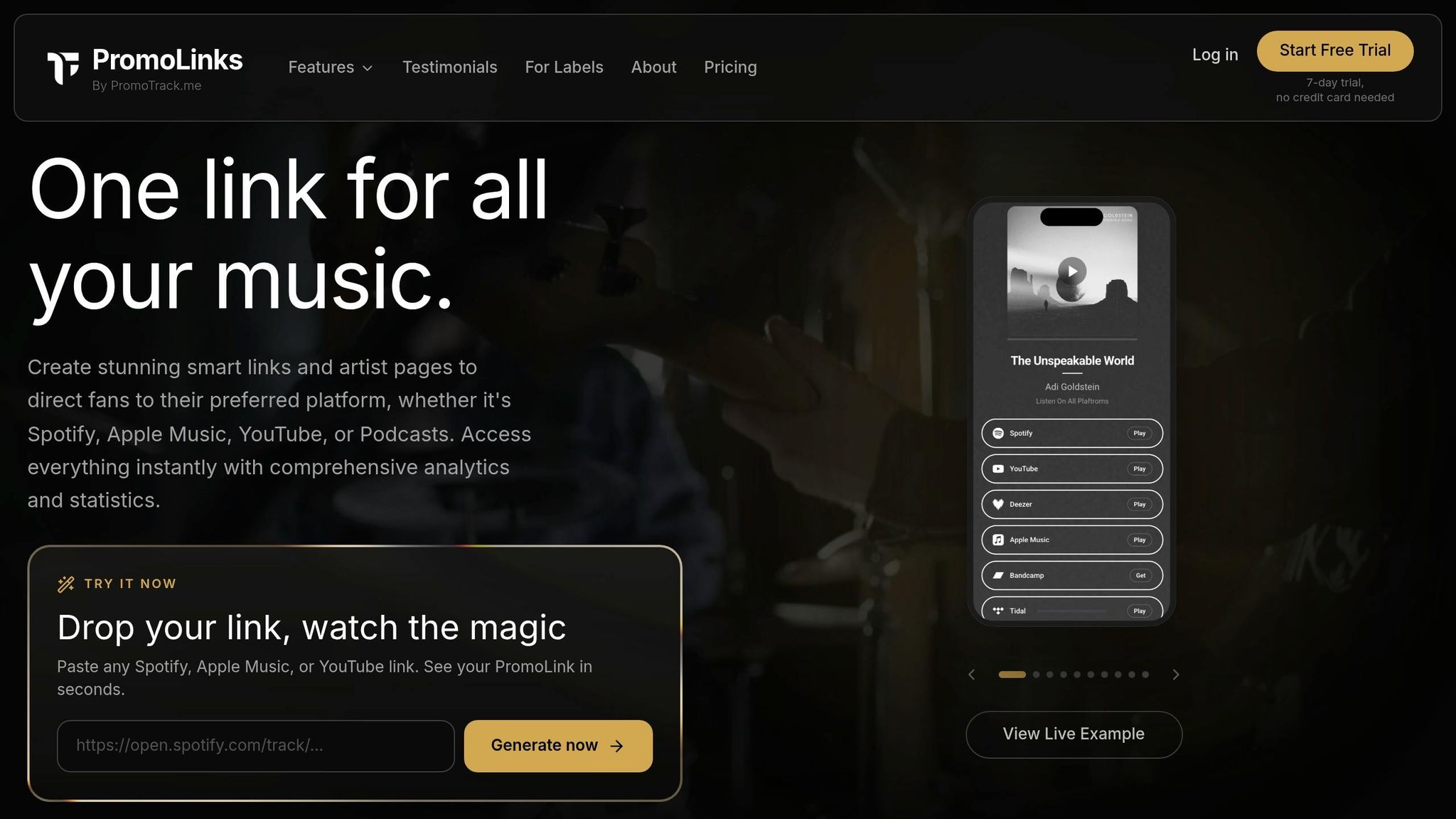
Start by logging in to PromoLinks.me and creating a new smart link. To get started, paste a Spotify or Apple Music URL into the source field. If your track isn’t live yet, you can use its ISRC or UPC code instead. PromoLinks.me takes care of the heavy lifting by scanning over 70 streaming platforms - like Tidal, Amazon Music, and YouTube Music - to find matching listings, saving you the hassle of adding each one manually.
Once the scan is complete, review the metadata and make any necessary updates. You can then personalize your smart link page by selecting a color theme that complements your artwork, enabling the audio preview feature, and arranging streaming buttons in the order you’d like fans to see them. Before hitting publish, test the smart link on your phone to ensure everything looks and works as intended. With your release link ready, you’re all set to create a pre-save campaign to start engaging fans early.
Building a Pre-save Campaign
After setting up your basic release smart link, it’s time to create a pre-save campaign to spark early fan interest. Gather your Spotify URI, UPC, or ISRC code from your distributor at least one to two weeks before your release date. Enter the release date, time, and time zone in PromoLinks.me. This ensures that on release day, your pre-save page will automatically switch to a standard smart link, directing fans to the live track.
To maximize your campaign’s impact, enable email capture and a post-pre-save redirect. Email capture allows you to collect fan contact details during the pre-save process, giving you a direct line of communication. The redirect feature sends fans to a music video, an "instant grat" track, or even your artist page immediately after they save your release. If you’re running paid ads, don’t forget to add your Facebook, Google, or TikTok pixel IDs in the advanced settings. This way, you’ll start tracking conversion data right from the beginning. Once your campaign is live, take things a step further by building artist and label pages to strengthen your online presence.
Setting Up Artist and Label Pages
With your release links and campaigns ready, the next step is to enhance your online presence by creating dedicated artist and label pages. An artist page on PromoLinks.me serves as a central hub - a single URL where fans can find your latest releases, music videos, social profiles, merch store, and tour dates. Instead of constantly updating your bio link whenever you release something new, you can simply update the page itself while keeping the same link.
When designing your page, opt for a branded subdomain (e.g., yourname.promolinks.me) and choose a clear slug like /music or /latest. Write a short, engaging bio - just one or two sentences - that highlights your genre and location, helping new visitors quickly understand your style. Use the Featured Layout option to showcase your newest release prominently with a larger visual display. This layout tends to get twice as many clicks. As your catalog grows, stack older releases below, turning the page into a dynamic discography. To expand your reach even further, consider linking your digital promotions to the physical world using QR codes.
Using QR Codes for Offline Promotion
Take your promotion offline by leveraging QR codes, which are automatically generated for every smart link you create on PromoLinks.me. These codes make it easy to bridge the gap between your physical and digital marketing efforts. Print them on posters, flyers, merch tags, or stickers - anywhere fans might come across your music. When scanned, the QR code directs fans straight to your smart link page. Include a simple call to action like "Stream now" or "Save before it drops" to drive immediate engagement. This strategy ensures your music stays accessible, whether fans find you online or out in the real world.
What are SMART LINKS and How Can Musicians Use Them?
How to Track and Improve Your Smart Link Campaigns
Once your smart link is live, the real work begins. These strategies will help you fine-tune your campaigns and keep fans engaged long after launch.
Using Analytics to Monitor Performance
PromoLinks.me’s real-time analytics dashboard is your go-to tool for tracking how fans interact with your smart links. It provides data on clicks, unique visitors, platform choices, and geographic locations. These insights reveal not only what’s working but also where fans might be dropping off.
One key metric to watch is your CTR (Click-Through Rate). A CTR below 40% suggests your landing page may need adjustments, while a CTR above 60% signals that your design, visuals, and call-to-action are resonating with fans.
Geographic data can also be a game-changer. If you notice high traffic from cities like Atlanta or Chicago, you can use that information to plan tours or launch targeted ads. Similarly, platform data shows where your audience prefers to listen. For example, if 70% of clicks go to Spotify compared to just 5% for Apple Music, you’ll know where to focus your promotional efforts.
For deeper insights, create separate smart links for each channel - one for Instagram, one for TikTok, and another for your email list. This lets you pinpoint which platforms are driving actual engagement, not just clicks.
With this data in hand, you can start optimizing your page through A/B testing.
A/B Testing Smart Link Layouts
A/B testing helps you figure out what works best by comparing different versions of your smart link page.
A good starting point is rearranging the platform order. If Spotify is your top performer, move it to the first position so fans don’t have to scroll to find it. Combine this with the Featured Layout option on PromoLinks.me, which highlights your release with a larger visual display. This simple tweak can significantly boost your click rate.
Another feature to test is an audio preview. Some fans like to hear a snippet before committing to a streaming platform. Enable previews on one version of your page and compare its performance to a version without it. Similarly, swapping static cover art for a short video header might keep visitors engaged longer.
Here’s a quick breakdown of potential A/B tests:
| Feature to Test | Version A | Version B |
|---|---|---|
| Layout Style | Standard list | Featured/grid layout |
| Platform Order | Default order | Performance-based order |
| Visual Media | Static cover art | Video header |
| Audio Preview | Off | On |
To track results, use UTM parameters or unique URLs for each version. Keep in mind that what works for one audience - like TikTok users - might not resonate with another, such as email subscribers.
Adjusting Your Strategy After Release
Once you’ve gathered data from your A/B tests, it’s time to refine your overall approach.
During the first week after release, analyze your performance data. Identify which channels drove the most traffic and where fans clicked the most. For instance, if TikTok accounted for 80% of your visitors but Instagram barely registered, it’s clear where to focus your energy and ad spend.
Your smart link can remain relevant even after the initial launch. Keep it updated with fresh content, like press coverage, a new music video, or details about upcoming shows. This ensures fans discovering your link later still find something engaging and up-to-date. If you collected emails during a pre-save campaign, now’s the perfect time to send a personalized follow-up about the release or offer exclusive content.
If your CTR drops post-launch, consider simplifying your page. Too many streaming options can overwhelm fans, so you might want to hide less popular platforms behind a “more options” toggle. Highlighting the primary platform makes it easier for fans to make a quick decision.
Each release teaches you more about your audience - where they’re located, which platforms they prefer, and which marketing efforts actually connect with them. Use these insights to make your next campaign even more effective right from the start.
Choosing the Right PromoLinks.me Plan
PromoLinks.me Plans Compared: Which Is Right for You?
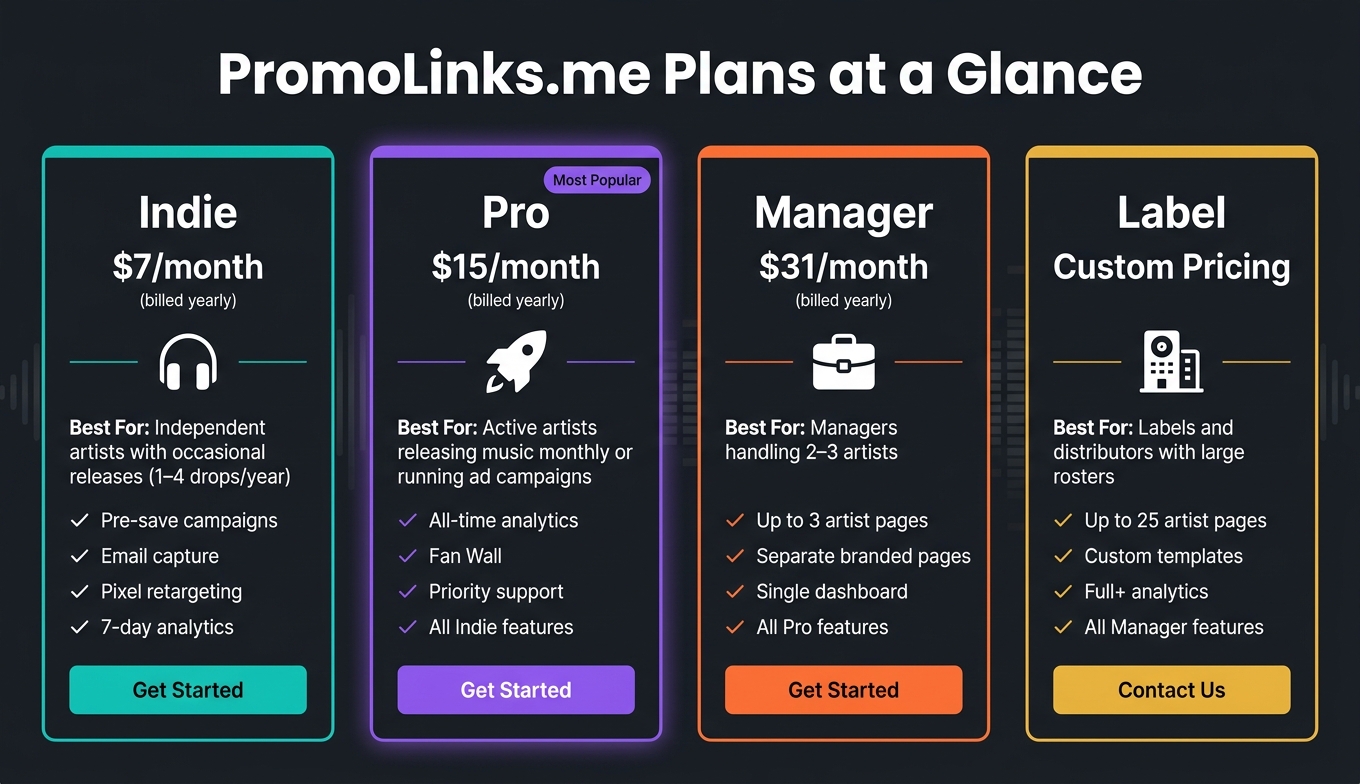
Once your smart link is performing at its best, it's time to choose a plan that keeps pace with your growing music career. PromoLinks.me offers four tiers, each tailored to match different stages of an artist’s journey.
PromoLinks.me Plans at a Glance
| Plan | Price | Best For | Key Differentiator |
|---|---|---|---|
| Indie | $7/month (billed yearly) | Independent artists with occasional releases | Pre-saves, email capture, pixel retargeting, 7-day analytics |
| Pro | $15/month (billed yearly) | Active artists releasing frequently | Full all-time analytics, Fan Wall, priority support |
| Manager | $31/month (billed yearly) | Managers handling multiple artists | Up to 3 artist pages, all Pro features |
| Label | Custom pricing | Labels and distributors | Up to 25 artist pages, custom templates, Full+ analytics |
Let’s break down how to match your release schedule and goals to the right plan.
Which Plan Fits Your Situation
If your release schedule includes one to four drops a year, the Indie plan at $7/month is a great starting point. It covers the basics like pre-save campaigns, email capture, and pixel retargeting, giving you the tools to promote your music effectively.
For artists releasing music monthly or running active ad campaigns, the Pro plan at $15/month is a step up. The shift from 7-day analytics to all-time analytics is a game-changer, offering insights into how older releases continue to drive streams and influence new campaigns.
Managers working with two or three artists will find the Manager plan at $31/month ideal. It allows you to create separate branded pages for each artist while managing everything from one dashboard. For labels with larger rosters, the Label plan provides up to 25 artist pages, custom templates, and advanced analytics. Pricing for this tier is customized, so you’ll need to contact PromoLinks.me directly.
"Investment in the right plan pays off when analytics inform your decisions."
Real Setup Examples for Common Goals
Boosting streams on release day: An indie artist using the Indie plan can create a pre-save campaign that converts into a streaming link upon release. Captured emails and pixel data can then fuel targeted ads, ensuring your release gets the attention it deserves.
Growing an email list over time: With the Pro plan, all-time analytics help identify which releases are driving email sign-ups across your catalog. This long-term perspective enables you to pinpoint what content turns casual listeners into loyal subscribers.
Managing multiple artists: A manager with three artists can streamline their workflow with the Manager plan. Separate branded pages for each artist keep campaigns organized, while a single dashboard makes tracking performance simple - no need to juggle multiple accounts.
Whether you're an indie artist or managing a full roster, PromoLinks.me has a plan designed to help you hit your goals.
Conclusion: Key Takeaways for Musicians
What Smart Links Do for Your Music Career
Smart links have proven to be a game-changer for music promotion, making it easier for artists to connect with their audience across multiple platforms. Here’s the issue they solve: around 30% of your fans may use a different streaming platform than the one you usually share. With a smart link, listeners are automatically directed to their platform of choice, ensuring you don't lose streams.
But that's just the beginning. Smart links go beyond simple routing - they act as a full-fledged promotional toolkit. They help you gather emails during pre-save campaigns, trigger retargeting pixels for ad campaigns, and provide clear insights into which channels - like Instagram, TikTok, or email - are driving the most traffic. This transforms a basic URL into a powerful tool you can rely on throughout your release strategy.
"The most valuable conversion from a smart link: a fan who cares enough to pre-save and an email address for future communication." - Orphiq
Final Tips
To make the most of smart links, ensure your landing page matches the visual style of your release artwork. This can significantly boost clicks. Also, remember that over 80% of smart link clicks from social media come from mobile devices, so test your link on mobile to guarantee a smooth experience.
Another pro tip: use separate tracking URLs for each promotional channel. Create one for Instagram, another for TikTok, and another for your email list. This way, you’ll know exactly where your listeners are coming from, helping you focus your efforts on what works and drop what doesn’t.
And finally, always give your smart link a trial run on a mobile device before sharing it widely.
"The best smart link is not the prettiest one. It is the one that wastes the fewest clicks." - Florencia Flores
FAQs
Should I use one smart link or different links for Instagram, TikTok, and email?
Instead of sharing multiple URLs for each platform, simplify things with a single smart link tailored to your purpose.
For music, create one smart link that lets fans pick their favorite streaming service. Share this link across platforms like Instagram, TikTok, and other posts to drive more streams effortlessly.
For email signups, use a smart link that includes an email capture feature or directs users to a dedicated page. This makes it easier to track which platform is bringing in the most signups.
What’s the best way to choose which streaming buttons appear first?
When organizing your streaming buttons, place your newest release right at the top. Next, prioritize popular platforms like Spotify and Apple Music, as these are often fan favorites. After your launch, use your smart link’s analytics - like click-through counts - to adjust the order based on actual fan behavior. If your tool supports it, enable automatic sorting by performance to save time. If not, make manual updates regularly to reflect fan preferences and engagement trends accurately.
How do I measure whether my smart link is actually improving streams?
To see if your smart link is driving more streams, head over to your smart link dashboard and dive into the analytics. Look at the clicks and conversions broken down by streaming platform to figure out where your fans are most active - whether that's Spotify, Apple Music, or another service. Tools like Linktree’s Analytics or Hypeddit’s Smart Links tab can help you track key metrics like clicks, saves, and platform-specific engagement. This data gives you a better understanding of how well your campaign is working.
Ready to create your smart links?
Join thousands of artists using PromoLinks to promote their music smarter.
Get Started Free