How to Analyze Email Campaign Data for Musicians
Email marketing gives musicians control over their audience engagement, outperforming social media with an average open rate of 21% and a $36 return for every $1 spent. To make the most of it, you need to analyze your email data effectively. Here's how:
- Set clear goals: Focus on one outcome (e.g., ticket sales or pre-saves) and track relevant metrics like CTR or conversion rates.
- Monitor key metrics: Open rates (aim for 30%+), CTR (3%+), and unsubscribe rates (keep below 0.22%) reveal campaign performance.
- Segment your audience: Group fans by behavior (leads, fans, buyers) or location to send personalized, targeted emails.
- A/B test variables: Experiment with subject lines, CTAs, or send times to find what works best.
- Use tools: Platforms like PromoLinks.me help track fan interactions and grow your email list.
Regularly review your data and refine campaigns to boost engagement and sales. Small tweaks, like improving subject lines or segmenting emails, can drive better results over time.
Improving Musicians Mailing List Blasts
Set Clear Campaign Goals
Before diving into metrics, you need to define your campaign's main goal. Without this clarity, your data won't tell you much. As Orphiq aptly notes:
"A dashboard with 50 metrics is a data dump, not a decision tool. Start with 10–15 metrics across five categories."
Every campaign should focus on one primary outcome. Are you aiming to sell tickets for an upcoming tour? Boost pre-saves for a new single? Increase merch sales? Each goal shifts your focus to specific numbers and influences how you interpret them. Once you've nailed down the goal, identify the target metrics that will help you take actionable steps.
How to Choose the Right Goals
The best goals follow the SMART framework: Specific, Measurable, Achievable, Relevant, and Time-bound. Vague objectives like "get more engagement" don't give you much to work with. A better example? "Increase ticket link click-throughs by 15% within the next 30 days." This type of goal provides a clear benchmark for success.
Your goals should also align with your current stage in your career. For instance, a newer artist might aim for 500 pre-saves on a debut single, while a more established act could aim for 10,000. Focus on improving your own past performance rather than comparing yourself to general industry averages. Once your goals meet the SMART criteria, connect them to the right data sources.
Connect Goals to Data Sources
With your goal set, the next step is figuring out where to find the data you need. Different objectives require different sources. Here's a quick guide to match common campaign goals with the relevant data sources and metrics:
| Campaign Goal | Key Data Source | Primary Metric |
|---|---|---|
| Drive merch sales | E-commerce store (e.g., Shopify) / ESP | Sales conversion rate |
| Sell tour tickets | Email platform / ticket vendor | CTR on ticket links |
| Increase pre-saves | Smart-link data / Spotify for Artists | Pre-save click count |
| Fan engagement | Email platform analytics | Open rate / click-to-open rate |
| Grow your list | Landing page / website analytics | New subscriber sign-up rate |
For streaming-related goals, like increasing pre-saves or track saves, smart-link tools are particularly helpful. They reveal which platforms fans are clicking through to - whether it's Spotify, Apple Music, or YouTube. Combine this data with email click reports to get a clearer picture of what’s working.
To stay on track, set aside time for regular reviews: a quick 15-minute check each week and a more detailed 30–45 minute review each month. This approach keeps you focused on long-term trends rather than getting caught up in daily fluctuations. Once your goals are clear, hone in on the metrics that truly matter for your campaign's success.
Track the Right Email Metrics
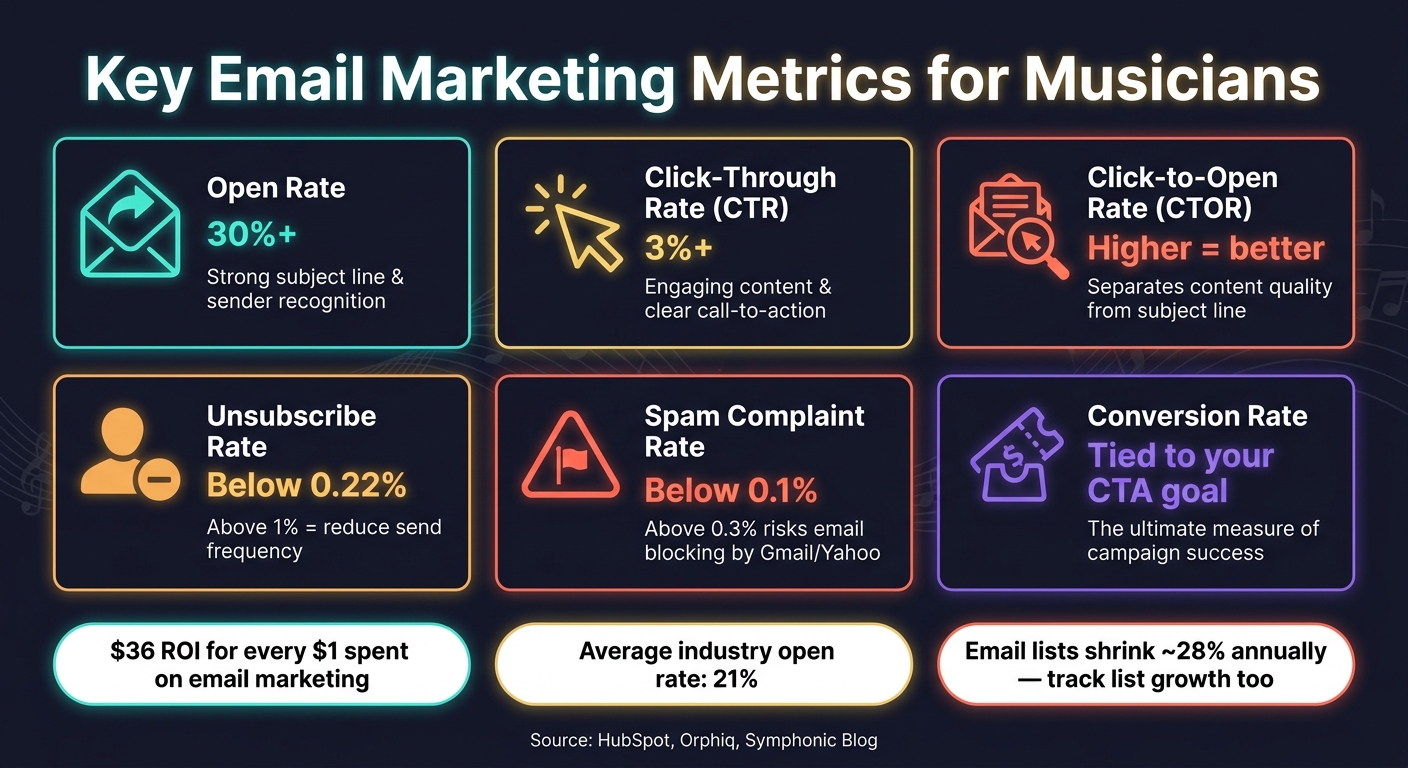
Key Email Marketing Metrics for Musicians: Benchmarks & What They Mean
Once your goals are clearly defined, it’s time to zero in on the numbers that truly reflect your progress. Not every metric on your dashboard is worth your attention - focus on the ones that directly reveal how well your campaign is performing.
Key Metrics to Monitor
Here’s a quick guide to the most important email metrics for musicians, along with what they tell you:
| Metric | What It Measures | Benchmark to Aim For |
|---|---|---|
| Open Rate | How many recipients opened your email | Above 30% is a strong performance for musicians |
| Click-Through Rate (CTR) | Percentage of recipients who clicked on a link | Aim for above 3% for music campaigns |
| Click-to-Open Rate (CTOR) | Percentage of those who opened the email and clicked a link | Helps separate content quality from subject line effectiveness |
| Conversion Rate | Percentage of recipients who took the desired action (like buying tickets) | Directly tied to your call-to-action |
| Unsubscribe Rate | Percentage of recipients who opted out after receiving your email | Industry median is about 0.22% |
| Spam Complaint Rate | Percentage of recipients marking your email as spam | Stay below 0.1% to avoid issues |
Keep in mind that Gmail and Yahoo have strict rules for bulk senders, allowing a maximum spam complaint rate of 0.3% as of 2024. Crossing this threshold could result in your future emails being blocked. Also, email lists naturally shrink over time - roughly 28% annually - as fans change addresses or lose interest. This makes tracking your list growth rate just as important as monitoring engagement metrics.
How to Read Your Metrics
Each metric connects to a specific part of your campaign. For example, if your open rate is low, it might be due to an unappealing subject line or lack of sender recognition. On the other hand, a low CTR often points to unengaging content or a confusing call-to-action.
Marketing expert Erica Santiago from HubSpot explains:
"The definition of a conversion is directly tied to the call-to-action in an email, and my call-to-action should be directly connected to the overall goal of my email marketing."
Before making changes, ensure that improving a particular metric will actually impact your bottom line. For instance, boosting your open rate by 20% may look impressive, but if it doesn’t lead to more ticket sales or pre-saves, it’s likely just a vanity metric - something that seems important but doesn’t drive real results. Always prioritize metrics that align with your campaign objectives.
With these metrics in mind, you’re ready to dive into audience segmentation for deeper insights.
Segment Your Audience for Clearer Insights
Sending the same email to every subscriber is a missed opportunity. By breaking your list into smaller groups based on shared traits or behaviors, you can send content that truly connects. This process, known as segmentation, not only improves engagement but also provides insights that help you refine your messaging.
Ways to Segment Your Fan List
A great place to start is what Dave Kusek, Founder of New Artist Model, calls the three-tier approach:
"The easiest way to segment your list is to divide people up into three groups: leads, fans, and buyers."
Here’s how these groups break down:
- Leads: New sign-ups who haven’t interacted much yet.
- Fans: Those who open your emails regularly and click your links.
- Buyers: People who’ve already made a purchase - whether it’s tickets, merch, or a crowdfunding contribution.
Each group needs a different approach. For leads, you might offer a free track to spark interest. Fans could get early access to new releases, while buyers might appreciate exclusive offers like limited-edition merch or VIP experiences.
You can also segment by geographic location, which is especially helpful if you’re touring. Announcing a Chicago show to fans in Seattle? That’s a miss. Segmented tour emails, on the other hand, can nearly double open rates. Another option is to use the sign-up source. For instance, a fan who joined your list via a live show QR code likely has a different connection to you than someone who signed up through a Spotify pre-save campaign.
Insights from Segmented Data
Once you’ve segmented your list, the data you gather can guide your strategy. Segmented emails consistently outperform mass emails in both engagement and conversions. For example, a promotional email about new merch sent to past buyers converts at 3 to 5 times the rate of the same email sent to your entire list. If you notice a drop in engagement from a specific segment, it’s a signal that they might need a clearer call-to-action or a more personalized offer.
Your superfans, who typically make up just 5–15% of your audience, often contribute 60–80% of your total revenue. By identifying these high-value fans through engagement and purchase data, you can reward them with perks like 24-hour early access to merch drops or invites to exclusive listening sessions. Stacey Worrell, Senior Lifecycle Marketing Manager at Eventbrite, emphasizes this point:
"Use insights from past attendee behavior - like ticket type or engagement level - to identify your most valuable segments."
Using segmented insights allows you to fine-tune your campaigns, helping you hit your engagement and conversion goals with precision. It’s all about delivering the right message to the right group at the right time.
sbb-itb-e819543
Test and Improve Campaign Variables
Once you’ve analyzed how your audience segments perform, the next step is figuring out what drives better engagement. This is where A/B testing becomes essential. Instead of guessing what resonates with your audience, test specific elements and let the data guide your decisions.
How to Run A/B Tests
The golden rule of A/B testing is straightforward: change only one variable at a time. As Randi Zimmerman from Symphonic Blog explains:
"The key is to change one thing at a time so you know exactly what made the difference."
A proven method is the 20/80 holdout strategy: send Version A to 10% of your audience and Version B to another 10%. After observing results for 6–12 hours, send the winning version to the remaining 80%. This approach is particularly effective on release days.
Here are four variables worth testing:
| Variable | Version A | Version B | Key Metric |
|---|---|---|---|
| Subject Line | "Something new is coming..." | "New single 'Echo Lake' out now" | Open Rate |
| CTA Text | "Listen Now" | "Add to Playlist" | Click-Through Rate |
| Hero Creative | Full Album Artwork | Video Thumbnail/GIF | Click-to-Open Rate |
| Send Time | 6–8 AM (release morning) | 10 AM or 2 PM (peak engagement) | Open/Click Rate |
Since Gmail's Gemini-powered inbox (introduced in 2026) now summarizes emails before they’re opened, your subject line and the first two lines of your email body are more important than ever. These function as a single unit, so front-load crucial details like "Presale", "Out Now", or a city name within the first 4–7 words to make the AI-generated summary work in your favor.
How to Read Test Results
When evaluating your tests, focus on both click rates and conversion rates. As Tezons highlights:
"A test that shows version B winning on click rate but losing on conversion rate is telling you that version B attracted clicks that did not convert."
To tie results directly to outcomes, use UTM parameters in your links. This allows you to track whether higher click-through rates actually drive more streams, merchandise sales, or ticket purchases in Google Analytics. For smaller lists (fewer than 1,000 subscribers), a single test may not yield definitive results. In such cases, repeat the same test across two or three campaigns to gather enough data.
Keep a record of your hypotheses, tested variables, sample sizes, and results. Over time, this log becomes an invaluable resource, helping you avoid redundant experiments and giving you a clear understanding of what works for your audience.
With clear insights from your tests, you’ll be able to refine your email campaigns and improve overall performance.
Turn Data Into Campaign Improvements
With test insights in hand, the next step is using that data to fine-tune your campaigns. Data collection only matters if it leads to meaningful adjustments for your next send.
How to Improve Campaign Elements
Start by zeroing in on the metric that’s falling short. For example:
- Low open rates: This often points to issues with your subject line or the timing of your send.
- Low click-through rates (below the ~2.8% average for the music industry): This could mean your hero image, call-to-action (CTA) phrasing, or overall email layout isn’t resonating.
- Strong clicks but weak conversions: This typically signals a problem with your landing page.
To dig deeper, analyze a year’s worth of campaigns. Rank them by open rate and look for patterns in your top-performing emails. Subject lines with words like "Presale", "Exclusive", or specific city names often outperform vague or generic teasers. Additionally, if your unsubscribe rate creeps above 1%, it’s a good indicator that you might need to reduce how often you’re sending emails.
"When a release is the moment, your newsletter should be the shortest path to conversion." - Product + Editorial Playbook
Track Performance Over Time
Looking at a single campaign’s performance can sometimes be misleading. Just because one email underperforms doesn’t mean your overall strategy is flawed - it could simply reflect a slower news cycle or a smaller release. What really matters is the 90-day trend.
Set aside 15 minutes each week to update your core metrics and 30–45 minutes monthly to review trends. Compare your latest campaign’s first-week performance to previous ones. Are open rates improving? Is your click-to-open rate getting better? These comparisons help you determine if your adjustments are effective.
"Data in isolation tells partial stories. Data together reveals patterns." - Orphiq
Another key metric to track is Revenue per Recipient (RPR). Reviewing this monthly across different campaign types - like tour announcements, merch drops, or new releases - helps you identify which emails drive the most revenue. This insight allows you to prioritize the campaigns that deliver the greatest return. These trends confirm whether your data-driven tweaks are paying off.
Using PromoLinks.me for Campaign Analytics
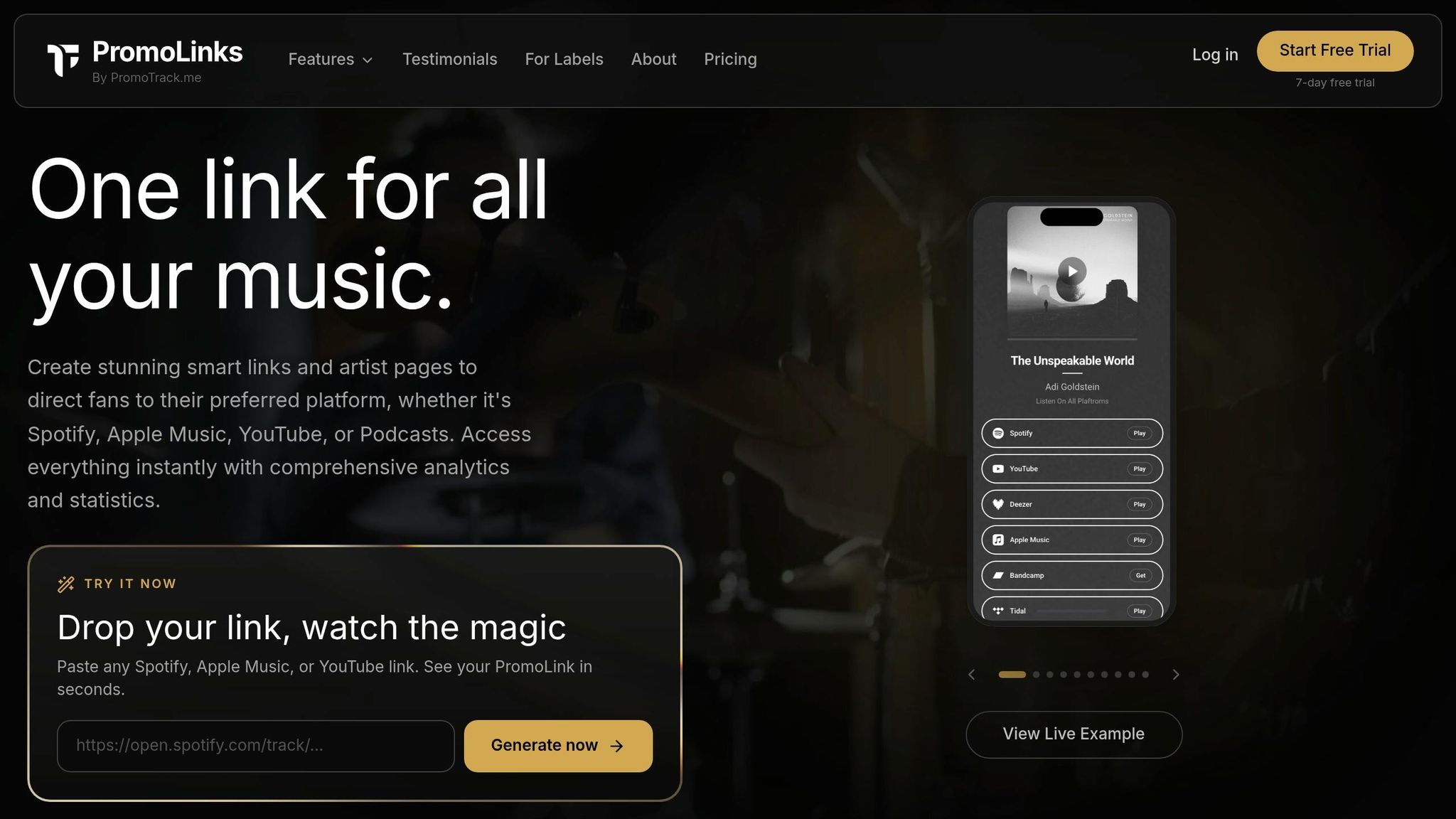
Tools that centralize performance data can simplify your workflow and make these improvements easier. For example, PromoLinks.me combines smart links and pre-save campaigns with real-time analytics, giving you immediate insights into how fans interact with your release links as soon as the campaign goes live.
The platform’s Email Capture feature is especially handy for tying your email strategy into your broader promotional efforts. When fans visit your artist page or release link, PromoLinks.me can collect their email addresses - helping you grow your list from the same traffic your campaigns generate on platforms like Spotify, Apple Music, and YouTube. Opting for the Pro plan ($15/month, billed annually) unlocks full access to your all-time analytics history, making it easier to identify long-term trends that shorter timeframes might miss.
Conclusion: Use Data to Strengthen Your Email Marketing
Email is one of the rare marketing tools where you call the shots. You own your list, set your terms, and - unlike social platforms - there’s no algorithm deciding who gets to see your message. But the real magic happens when you pair this control with a solid, data-driven strategy.
Throughout this guide, we’ve covered how to set clear goals, monitor key metrics, segment your audience, and experiment with A/B testing. These steps aren’t just busywork - they’re the foundation for making informed decisions. As Orphiq wisely states:
"Decisions made without data are guesses. Decisions made with data are strategies."
The numbers back this up. From impressive ROI to strong audience engagement, email marketing thrives when you let data guide your moves. Even small improvements, like a slight boost in click-through rates, can add up across multiple campaigns.
You don’t need to become a data expert to see results. A simple, consistent routine - like spending 15 minutes weekly and 30 minutes monthly reviewing your email metrics - can turn raw numbers into actionable insights. These insights will help you understand what captures your audience’s attention, which campaigns generate revenue, and where to focus your efforts for future success.
Using tools like PromoLinks.me can make this process even smoother, helping you translate data into action. At the end of the day, leveraging data strengthens the connection between you and your audience - and that connection is the heartbeat of a sustainable music career.
FAQs
Which email metrics matter most for my goal?
When it comes to measuring success, the most important metrics will depend on what you’re trying to achieve. Some key ones to keep an eye on include:
- Open rates: This shows how effective your subject lines are at grabbing attention.
- Click-through rates: A measure of how engaged your audience is with the links you include.
- Conversion rates: Tracks actions like ticket purchases, pre-saves, or other desired outcomes.
Don’t ignore unsubscribe rates and bounce rates either - they’re critical for keeping your email list healthy and relevant. Tools like PromoLinks.me can simplify tracking these metrics, helping you fine-tune your approach and build stronger connections with your audience.
How can I track ticket or merch sales from an email?
To monitor ticket or merchandise sales driven by email campaigns, UTM parameters are your go-to tool. These tags are added to your links to pinpoint which email campaign resulted in a conversion. Here's an example:
https://yourwebsite.com/merch?utm_source=newsletter&utm_medium=email&utm_campaign=summer_sale&utm_content=button_link
By using UTM parameters, your analytics platform can track details like the source, medium, and specific campaign. This gives you more detailed insights than just open and click-through rates.
What should I do if my list is too small for A/B tests?
If your email list is on the smaller side, prioritize testing bold, noticeable changes - like trying out completely different subject line styles. This approach makes it easier to spot trends and patterns in your results. Think of these tests as guiding insights rather than absolute conclusions. To strengthen your findings, consider running the same test across 2–3 campaigns. And remember, always test one variable at a time to keep your results clear and avoid any confusion.
Related Blog Posts
Ready to create your smart links?
Join thousands of artists using PromoLinks to promote their music smarter.
Get Started Free