
Music Campaign Planning With Fan Data
If I plan a music campaign without fan data, I’m guessing. If I use fan data, I can set one goal, pick the right audience, track each click, and spend money where fans already respond.
Here’s the short version:
- I start with baseline numbers from my last 3–5 releases or campaigns.
- I choose one main goal like pre-saves, first-week streams, ticket sales, or email signups.
- I split fans by engagement level, location, and streaming platform.
- I use tracked smart links and UTM tags to see where clicks and conversions come from.
- I put more budget into top markets, often around 40%–60% of spend.
- I watch core numbers like CTR, CPC, save rate, and conversion rate after launch.
- I use the results to fix weak spots in messaging, targeting, or link setup before the next campaign.
A few numbers stand out. The article notes that superfans often make up just 5%–15% of listeners, yet they drive most revenue. It also says fans who pre-save are 3.2x more likely to save on release day, and about 68% of pre-savers stream within the first 48 hours. On paid traffic, a 0.5%–2% CTR is common, while under $1.00 CPC for qualified U.S. clicks is a solid target.
What this means is simple: I don’t need more random promotion. I need a tight plan built around data I already have from Spotify for Artists, Apple Music for Artists, my email tool, and my smart-link dashboard.
If I had to sum up the whole article in one line, it would be this: check the baseline, set one goal, track every link, and let fan behavior guide the campaign.
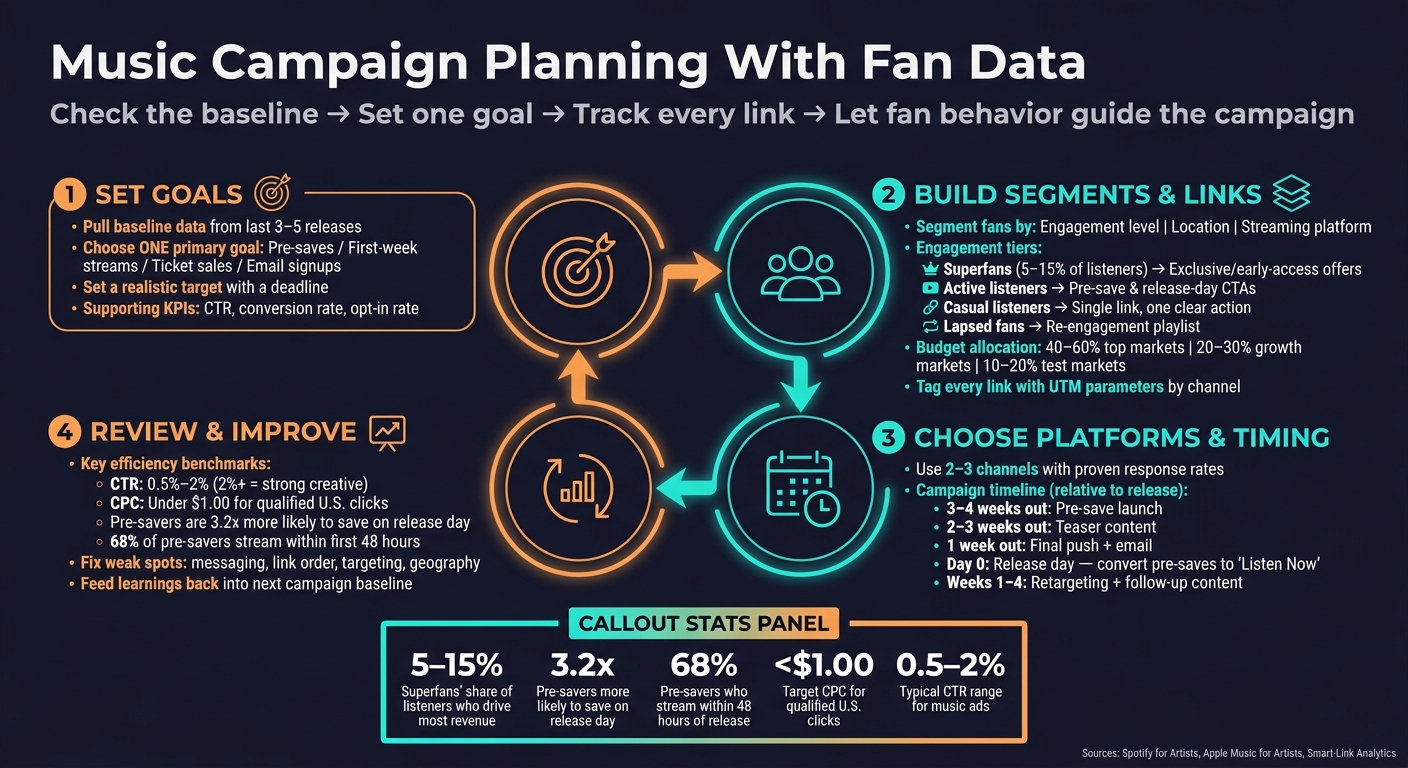
Music Campaign Planning: Data-First Process for Artists
ACTUAL PROOF! What Musicians Should Do To Promote // REAL DATA!!!
1. Set campaign goals using baseline fan data
Baseline fan data is the average you see across your last 3–5 releases or campaigns. Leave out one-off spikes from playlist adds, press hits, or viral reach. Those spikes can make your numbers look bigger than they usually are.
Your baseline does more than give you a benchmark. It shows what your audience and budget can actually deliver. That’s what should shape the goal. From there, you can decide which audience segments, channels, and links should get the most attention.
Pick one primary goal and a few supporting KPIs
Every campaign needs one main goal that defines success, plus 2–4 supporting KPIs that show what’s helping you get there. If you try to chase streams, followers, email signups, and ticket sales all at once, your focus gets scattered.
For a release campaign, the main goal is often pre-saves before launch or first-week streams after release. For a tour push, it’s ticket sales. If the aim is audience growth, look at email signups or follower growth.
Once that main goal is locked in, the supporting KPIs help explain the funnel behind it. Say pre-saves are the goal. In that case, your supporting KPIs might include:
- Landing-page conversion rate
- Click-through rate from ads
- Email opt-in rate from the pre-save page
That main goal should shape every targeting and link choice that comes later.
Use current numbers to set realistic targets
Set a target with a date attached to it, and base it on your baseline data. Aim for a modest lift over baseline, not some huge jump. If your audience size and budget don’t support the number, then the target isn’t realistic.
The same rule works for email. If your recent sends average a 3.2% click-through rate, aim a bit above that unless you have a clear reason to expect a bigger jump.
Budget is a hard limit, not a suggestion. Set a dollar cap and decide what result that spend needs to produce.
Table: Goal type, source data, KPI, and budget
| Goal Type | Source Data | Primary KPI | Supporting KPIs | Budget Range (USD) |
|---|---|---|---|---|
| Pre-release momentum | PromoLinks.me dashboard, prior release analytics | Pre-save conversion rate | CTR, email opt-in rate, landing-page conversion rate | $200–$1,000 in ads |
| First-week streams | Spotify for Artists, smart-link click data | First-week stream count | Save rate, stream growth rate, cost per stream | $200–$500 in ads |
| Email list growth | Email service provider, pre-save page analytics | New email subscribers | Open rate, CTR, opt-in rate by state | $50–$300 in ads |
| Follower growth | Social platform insights, audience engagement data | Follower growth rate | Engagement rate, profile visits, link clicks | $100–$800 in ads |
| Ticket sales | Smart-link analytics, prior event sales data | Ticket conversion rate | Cost per click, best-converting locations, conversion rate | $250–$5,000 in ads |
2. Build audience segments and set up campaign links
Once your goals and KPIs are set, the next move is simple: turn raw fan data into targetable groups, then build links that tell you where every click came from.
Segment fans by engagement, location, and platform
Start with engagement tiers. This helps you line up the right offer and CTA with the fan’s next likely move. Superfans usually make up just 5%–15% of listeners, but they drive most of the revenue. That alone is a good reason to message them separately. Use each segment to shape the offer, link order, and CTA.
- Superfans usually respond best to exclusive and early-access offers, like limited drops, VIP tickets, and early-release links.
- Active listeners are a strong fit for pre-save pushes and standard release-day CTAs.
- Casual listeners need less friction. Give them one link and one clear action.
- Lapsed fans need an easy way back in, not a hard sell. A catch-up playlist or new-single link works better.
Next, layer in location. Your top markets should get more tour promotion, geo-targeted ads, and city-specific messaging. A common split looks like this:
- 40%–60% of ad spend in top markets
- 20%–30% in growth markets
- 10%–20% in test markets
The third layer is platform preference. Look at smart link click data to see where fans actually go: Spotify, Apple Music, or YouTube. Start with segment data, then line up the platform order and CTA with how each group already listens. If one platform is the clear leader, put it first on the page and match the creative to that platform.
Set up smart links and pre-save pages with tracking built in
Once the audience map is ready, connect every channel to a trackable link. Use one smart link to route fans and measure results. The main tool here is UTM parameters. Tag the same base link by channel - ?utm_source=email_list, ?utm_source=instagram_feed, or ?utm_source=qr_poster - so your analytics show which source is driving conversions. One destination, different source tags.
PromoLinks.me can handle pre-save pages, release-day link swaps, QR codes, email capture, pixels, and real-time click tracking from one dashboard. Real-time analytics show which segments and channels respond first.
Fans who pre-save are 3.2x more likely to save a track on release day than fans reached through manual sharing, and about 68% of fans who pre-save stream the track within the first 48 hours. That’s why it makes sense to set up the pre-save page - with tracking in place from day one - before you build the rest of the campaign assets.
Table: Segment, data source, link setup, and use case
| Audience Segment | Data Source | Link Setup / CTA | Use Case |
|---|---|---|---|
| Superfans | Email list, Patreon, pre-save opt-ins | Pre-save with email capture; VIP artist page link | Early access drops, limited merch, VIP ticket offers |
| Active listeners | Spotify for Artists, smart link click data | Pre-save or stream now with top platform prioritized; platform-specific CTA matched to preferred service | First-week streaming push, release-day algorithmic signals |
| Casual listeners | Social referrals, playlist analytics | Minimal smart link with audio preview; single CTA | Awareness, first-play friction reduction |
| Lapsed fans | Email no-opens, drop in streams | Re-engagement link with catch-up playlist or new single | Win-back campaigns, reintroducing current sound |
| Local fans (top markets) | Spotify for Artists geo data, ticketing history | Event page with ticket CTA; QR code on venue flyers | Tour date promotion, city-specific ad targeting |
sbb-itb-e819543
3. Choose platforms, targeting, and timing for the campaign
Now that your links are tagged, use the data to rank your channels and set your timing.
Focus on channels where fans already respond
Look at streaming, email, and smart-link data side by side. Then let the numbers steer the plan.
Use the channel with the strongest click and open rates as your main CTA path. From there, stick with 2–3 channels that have already shown they can get a response:
- one streaming priority
- one main social or video platform
- email or SMS if the list is active
If one channel keeps driving more conversions, move more content and budget there. Simple as that.
Target by market, audience tier, and release phase
Use streaming and smart-link data to find your top markets. For a U.S. campaign, the cities and states driving the most streams and clicks should get the biggest share of paid targeting, plus any organic messaging tied to local shows or time zones.
Audience tier should shape the CTA. Pick the CTA that lines up with the main goal of the campaign. New listeners need low-friction asks like "Watch the new video" or "Follow on Spotify." Warm fans who opened recent emails or saved earlier tracks are more likely to act on "Pre-save the new EP" or "Add this to your playlist." Superfans tend to respond to higher-commitment offers like limited vinyl, early ticket access, or fan club membership. Match one CTA to each tier.
Then use that tiering to plan what goes out around release day.
Build a schedule around release dates and fan response patterns
Start with the release date and work backward. Map the timeline first. Then assign each phase a channel and a CTA. This gives you a clear way to set content, budget, and tracking before launch.
| Campaign Phase | Timing (relative to release) | Primary Action | Key Data to Watch |
|---|---|---|---|
| Pre-save launch | 3–4 weeks out | Drive pre-saves via smart links | Save velocity, conversion rate |
| Teaser content | 2–3 weeks out | Short clips on top social platforms | Engagement, reach |
| Final push | 1 week out | Daily countdowns, email send | CTR, email open rate |
| Release day | Day 0 | Convert pre-save links to "Listen Now" | Stream velocity, playlist adds |
| Post-release | Weeks 1–4 | Retargeting ads, follow-up content | Listener retention, location data |
Use past open and click peaks to lock in send times. Then watch real-time analytics for hourly and day-of-week click spikes. That way, you're not guessing when fans are most likely to act.
4. Review results after launch and improve the next campaign
Once the campaign is live, look at what actually worked. After launch, compare the results against the goals, audience segments, and tracked links you set up before release.
Check performance by goal, segment, and channel
Start with the KPIs you chose before launch: streams, saves, pre-saves, signups, CTR, conversion rate, and CPC. For each campaign, track one primary conversion event.
After you have the top-line numbers, break them down by segment: new listeners, casual fans, superfans, and local markets. Then look at performance by location - city and state - and by platform, including Spotify, Apple Music, YouTube, TikTok, and Instagram. It also helps to split organic traffic from paid traffic.
Organic traffic often shows higher save and follow rates, even with lower volume. That usually means your core audience is paying attention. Paid traffic gives you scale. When you compare both, you get a clearer picture of where your ad spend is paying off.
Use CTR, CPC, and cost per save as your main efficiency checks. Broad-target music ads often land in the 0.5%–2% CTR range, and 2%+ usually points to strong creative and targeting. For qualified U.S. clicks, under $1.00 CPC is a good mark.
Those patterns can tell you where the issue sits: the message, the link setup, or the targeting.
Find what to fix in messaging, links, or targeting
If Apple Music clicks are lagging, move that button higher or make a separate link version for that audience. Use a separate smart-link variant so the click data stays clean. With a tool like PromoLinks.me, you can update button order, swap headlines, and add email capture right on your pre-save or artist page. Real-time analytics show which destinations get the most clicks and where fans drop off.
If email conversion is low even though traffic looks good, make the form simpler. One or two fields is often enough. Then test a clearer incentive, like an unreleased track or exclusive content.
For cities or states that aren't pulling their weight, tighten your ad geography and shift budget toward your best markets instead of spreading it thin. If new listeners are clicking but not saving, retarget that warm audience - people who clicked or streamed once - with storytelling content and social proof. That's often the nudge that gets them to save or follow.
Conclusion: A repeatable data-first campaign process
Use what you learn to sharpen the next campaign. Every campaign in this guide follows the same loop: start with baseline data → set one clear goal → build segments → set up tracking-ready links → choose platforms and timing based on fan behavior → review results after launch.
The artists who improve fastest are the ones who track on a steady basis, compare results against their baseline, and make one or two focused changes each cycle. Set up tracking before launch, own fan relationships through email and SMS, and let the numbers guide the next campaign.
FAQs
How much fan data do I need to start?
You can start collecting fan data the moment your promotion goes live, even if your audience is still small. You don't need a huge following to learn something useful.
Each fan who clicks your smart link or interacts with your content gives you another data point. That helps you see where people are, which streaming platforms they prefer, and what devices they use. With PromoLinks.me, you can use that real-time data to fine-tune your approach based on what people are actually doing.
What if I have a small budget?
You don’t need a big budget to run a polished campaign.
You can still put together a professional setup by using tools with free tiers or low-cost, flat-rate plans. PromoLinks.me, for example, has an Indie plan that starts at $7–$9 per month and includes the basics: pre-save campaigns, email capture, and QR codes.
If funds are tight, put your energy where it can stretch the farthest. Focus on organic growth by building your email list, and lean on free, algorithm-driven options like Spotify’s Discovery Mode.
Which metrics matter most first?
Start with metrics that show early traction and future growth. Before release, pay close attention to pre-save conversion rates and use UTM parameters to track which channels bring in the most traffic.
After release, shift your focus to save rates, listener retention, and email list growth. These numbers give you a clearer view of long-term performance, platform momentum, and how well you're building a direct connection with fans.
Related Blog Posts
Ready to create your smart links?
Join thousands of artists using PromoLinks to promote their music smarter.
Get Started Free