Custom Audiences for Event Promotion Ads
Custom Audiences for Event Promotion Ads
Promoting events can quickly become expensive without targeting the right audience. Custom audiences solve this problem by focusing your ads on people who’ve already shown interest in your music or events. These audiences are built using data like website visits, email lists, or social media interactions, ensuring your budget is spent on fans most likely to take action.
Key Takeaways:
- Custom audiences target warm leads (e.g., past buyers, social engagers) instead of cold, random groups.
- Retargeting audiences convert 2–5 times better than cold audiences, with lower costs.
- Tools like Meta Pixel and PromoLinks.me help track and collect data to build these audiences.
- Organize your fan data (emails, past buyers, etc.) for better match rates and audience segmentation.
- Separate warm and cold audiences in campaigns to optimize ad performance and budget allocation.
Complete Guide to Custom Audiences for Facebook Ads! Everything you need to know!
sbb-itb-e819543
Pre-Campaign Setup: Getting Your Data and Tools Ready
Before diving into audience building, you need a solid foundation. Skipping this prep work can lead to incomplete data, making it harder to measure performance accurately.
Set Up Tracking Pixels and Analytics
Start by installing Meta Pixel on your website, ticketing platform, and event pages. Combine this with Meta's Conversions API (CAPI) to recover data from iPhone users, potentially increasing your matchable audience by 20–40%. When using both tools, enable event_id matching to avoid double-counting conversions.
If you're advertising on TikTok or Reddit, make sure to install their tracking pixels as well. For better tracking of ticket sales, add UTM parameters to all your music promotion links and monitor them in Google Analytics 4.
"In 2026's 'privacy-first' era, event marketers must adapt by leaning into first-party data and in-app engagement." - Ticket Fairy Promoter Blog
Organize Your Fan Data Sources
Gather all your fan data - emails, ticket buyers, presale registrants, and phone numbers collected at the door - and standardize it before uploading. Make sure email addresses are in lowercase and phone numbers include the country code (e.g., +1 for US numbers). Adding details like name, city, and ZIP code can boost your match rate by 20–30%.
Segment your lists based on intent. Prioritize past buyers first, followed by presale or waitlist registrants, and then general email subscribers. While Meta requires at least 100 profiles for ad delivery, performance tends to improve significantly with audiences of 1,000 or more. Always ensure your data collection complies with CCPA and includes user consent.
Define Your Geographic Targeting
For physical events, tailor your targeting radius to match realistic travel distances. A 15–25 mile radius works well for urban markets, while rural or destination events often require a 50-mile range. On Meta, select "People living in this location" to avoid showing ads to transient audiences like tourists.
When uploading customer lists, include city, state, and ZIP code to increase match rates by an additional 15–25%. To keep your campaigns organized, name your audiences and campaigns with key details like city and event date (e.g., "Artist Name – Chicago – Aug 15, 2026").
With your tools, data, and targeting ready, you're set to start building your core custom audiences.
Building Your Core Custom Audiences
When it comes to promoting events, three core custom audiences can be game-changers: engagement-based, website visitors, and customer lists. These groups form the foundation of cost-efficient, high-conversion ad campaigns by targeting fans based on their level of interest and intent.
Video Views and Social Engagement Audiences
This group focuses entirely on social engagement metrics like video views, likes, comments, profile visits, and saves. A major plus? These audiences aren't affected by iOS privacy restrictions, which can hinder pixel-based tracking.
For video viewers, target fans who watch at least 75% of your videos. These individuals tend to convert at rates between 6–12%, making them one of the most effective warm audiences. For viewers with lower engagement thresholds (e.g., those watching 3–25% of your videos), use softer, brand-focused content to nurture their interest.
On the social engagement side, create distinct audiences for Instagram profile visitors (within the last 30 days) and Facebook Event Responders - people who clicked "Interested" or "Going" on your event. Facebook Event Responders often convert at rates of 8–15%. To make these audiences even more relevant, consider using a geographic filter, such as targeting users within a 25-mile radius of your venue.
Website and Event Page Visitors
Pixel-based audiences allow you to target fans who visited your event page or ticket link but didn’t complete a purchase. These users are high-intent prospects who might just need a nudge to convert. Use short retention windows to keep these audiences fresh - 7 days for recent visitors and 30 days for broader mid-campaign retargeting.
If you’re using PromoLinks.me for your event page, its analytics can show which fans clicked through to your ticketing link. This provides a stronger signal of purchase intent than a general page visit. To stay organized as you scale, use clear naming conventions like WCA_TicketPage_7d or WCA_EventPage_30d.
Once you’ve built these audiences, you can take things further by refining your customer lists for even more precise targeting.
Customer Lists and Past Event Attendees
Your customer lists are a powerful tool for reaching your most loyal fans. Break these lists into segments to tailor your messaging. For example, VIP buyers, general admission attendees, waitlist registrants, and email subscribers each respond best to different offers. Here’s a quick breakdown:
| Segment | Intent Level | Best Messaging Angle |
|---|---|---|
| Past VIP / High-Spend Buyers | Very High | Early access, exclusive upgrades |
| General Admission Past Buyers | High | Loyalty discount, lineup highlights |
| Presale or Waitlist Registrants | Medium-High | Urgency, limited availability |
| General Email Subscribers | Medium | Event announcement, social proof |
Additionally, use your 180-day purchaser list as a seed to create 1% Lookalike Audiences. Meta’s AI can identify new users who closely resemble your top fans. Lookalikes built from high-quality seeds, like VIP buyers, can reduce cost per acquisition by 20–40% compared to cold interest targeting. For best results, aim for a seed audience of at least 500–1,000 of your most engaged fans.
"Retargeting is not about scale first - it's about precision first, then scale." - Jacomo Deschatelets, Founder & CEO, Instrumnt
Structuring Your Event Ad Campaigns
Event Ad Campaign Timeline: Audience Strategy by Phase
Using your custom audiences effectively is key to structuring ad campaigns that drive ticket sales. Here's how to make sure your setup works for both warm and cold audiences.
Separate Warm and Cold Audiences
Keep warm and cold audiences in separate ad sets. Why? Meta's algorithm often prioritizes the cheaper audience to reach - usually the cold one - over the audience more likely to convert. That can hurt your campaign's performance.
- Cold audiences (e.g., interests, lookalikes, local demographics): Use creative that builds awareness. Focus on short, engaging hooks, artist introductions, and showcasing event highlights.
- Warm audiences (e.g., prior engagers, video viewers): These need more detailed content. Include social proof, lineup details, and clear calls to action.
As MusicPulse explains:
"The critical mistake is collapsing all three stages [Prospecting, Retargeting, Re-engagement] into a single campaign. Each stage requires different creative, different messaging, and different budget allocation."
Also, make sure to exclude recent ticket buyers from your active ad sets. This avoids wasting your budget on people who’ve already converted.
Allocate Your Retargeting Budget
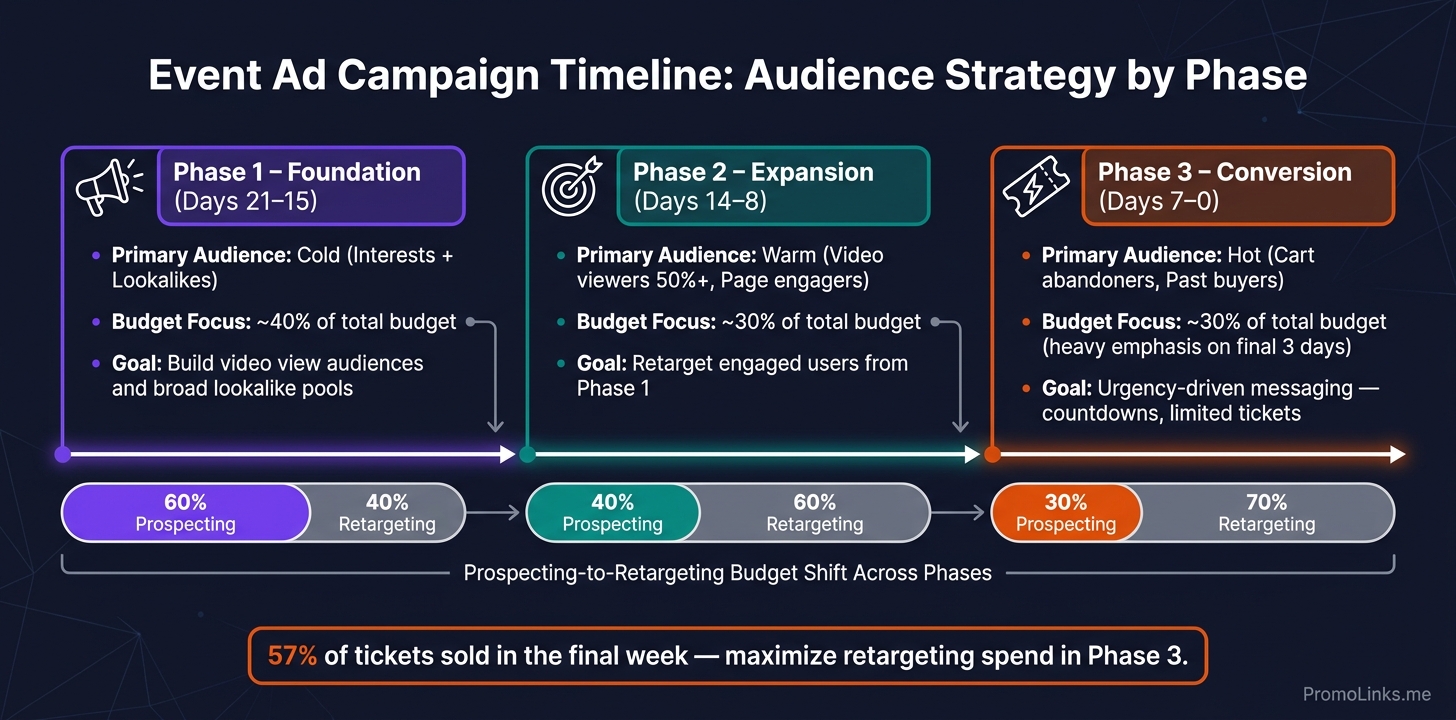
Start with a 60/40 budget split: 60% for prospecting and 40% for retargeting during the first week. As the event gets closer, shift your focus:
- Weeks 2 and 3: Flip the split - 60% retargeting and 40% prospecting.
- Final week: Invest 50–70% in retargeting to capture last-minute buyers.
Retargeting is especially effective in the entertainment space, where these audiences convert at 2–5x the rate of cold audiences. Plus, with 57% of tickets typically sold in the final week, this strategy ensures you're targeting the most likely buyers when it matters most.
Watch your ad frequency carefully. If it climbs above 2.5 in a short period, it’s time to rotate your creatives to avoid ad fatigue.
Match Audiences to Each Stage of the Event Timeline
Divide your campaign into three phases, each targeting a specific audience with tailored messaging:
| Campaign Phase | Timeline | Primary Audience | Budget Focus |
|---|---|---|---|
| Foundation | Days 21–15 | Cold (Interests, Lookalikes) | ~40% of total budget |
| Expansion | Days 14–8 | Warm (Video viewers, Page engagers) | ~30% of total budget |
| Conversion | Days 7–0 | Hot (Cart abandoners, Past buyers) | ~30% of total budget, with emphasis on the final 3 days |
- Foundation phase: Focus on video view campaigns and broad lookalike ads to build an audience of engagers for later stages.
- Expansion phase: Retarget users who’ve watched at least 50% of your videos or engaged with your event page.
- Conversion phase: Zero in on high-intent users, like cart abandoners and repeat ticket page visitors. Use urgency-driven messaging, such as countdowns or "limited tickets remaining" reminders .
If your event launches with less than a week to go, skip the audience-building phase and direct 90% of your budget toward retargeting warm audiences. There’s no time to start from scratch.
Maintaining and Improving Your Custom Audiences
After the event, it's crucial to refine and maintain your custom audiences. The fan data you've gathered - like email sign-ups, pixel events, and video views - becomes the backbone of your future campaigns. Regularly updating and analyzing this data ensures that your event success translates into ongoing marketing wins.
Track Performance by Audience Segment
Dive into your audience segments - cart abandoners, video viewers, past buyers, and lookalikes - and evaluate their performance. Look at metrics like cost per ticket, click-through rate (CTR), and conversion rate. For reference, a strong CTR typically falls between 1.0% and 1.5%, while anything below 0.5% signals a problem that needs fixing. Indie concert campaigns often hit a cost per click of $0.50–$1.50 and a cost per ticket sold of $5–$15.
To keep things organized, use a consistent naming convention like [Type]_[Event]_[Window] (e.g., WCA_Purchase_30d) so you can easily compare audience segments across campaigns. Also, check the Event Match Quality in Meta's Events Manager to ensure your pixel and Conversions API are working properly. As one expert at Prism.fm aptly put it:
"If your marketing system can't tie ad spend to ticket revenue per channel, you're not marketing a festival. You're guessing."
Use this data to identify opportunities and make timely updates to your audience strategy.
Update Your Fan Data Regularly
Keep your audience lists fresh by updating them every 7–14 days. This includes adding new fans and removing opt-outs. Regularly refreshing your exclusion lists is also important to avoid retargeting recent buyers.
When uploading lists, use multiple identifiers like email addresses, phone numbers, and names. This improves your Meta match rate, which typically ranges between 40% and 80%. Updating your lists and lookalike seed audiences every 7–14 days ensures Meta's algorithm works with the most current data, helping you target the right people based on recent buyer behavior.
Use PromoLinks.me Analytics to Improve Future Campaigns
With updated data and insights in hand, take advantage of PromoLinks.me analytics to fine-tune your campaigns. Analyze which links drive the most clicks and where fans drop off. High-performing event pages typically see 40–60% click-through rates to streaming destinations. If your numbers fall short, it might be time to test new creative or adjust your targeting.
Once your PromoLinks event page reaches over 1,000 visitors, use that pixel data to create a 1% lookalike audience for prospecting. This strategy has been shown to lower cost-per-stream by 34% compared to broader 3% lookalikes. Additionally, segment visitors who click through to ticketing from those who only view the page. This allows you to craft retargeting campaigns that align with each group's intent.
Conclusion: Running Better Event Ads with Custom Audiences
Custom audiences take the guesswork out of ad targeting. By focusing on real fan data - like past attendees, video watchers, website visitors, and email subscribers - you’re tapping into signals of genuine interest. This approach isn’t just smart; it’s effective. Campaigns using custom audiences see a 47% lower cost per acquisition (CPA) compared to targeting based solely on interests.
A checklist approach is key to success. By carefully setting up tracking, organizing data, building audience segments, and structuring campaigns for warm and cold audiences, you create a strategy that’s both actionable and measurable. This step-by-step process ensures every action, from data collection to audience refinement, directly improves ad performance. As we’ve seen, retargeting consistently outperforms cold targeting when audience segments are well-maintained and up-to-date.
Ulises from the NotNoise Team summed it up perfectly:
"The real value of Facebook ads for music isn't the streams you buy. It's the data you collect and the algorithmic triggers you create."
This perspective highlights the importance of integrated data collection tools. Platforms like PromoLinks.me play a crucial role by centralizing first-party data collection through event pages, pixel retargeting, and fan email capture. These tools feed directly into Meta’s Advantage+ automation, allowing you to target genuine ticket buyers instead of casual browsers. Over time, pixel data from your event page becomes a powerful foundation for creating lookalike audiences, helping to lower your acquisition costs even further.
Your campaign’s insights - such as click patterns, conversion rates, and audience match quality - are invaluable for refining future efforts. By regularly updating your lists, analyzing segment performance, and feeding better data into your system, your event ads will only get better with each campaign.
FAQs
Which custom audiences should I build first for a new event?
Start by tapping into your most valuable data sources. Create engagement-based audiences from people who have interacted with your social media, followed your accounts, or responded to event pages in the past. Leverage website pixel data to retarget recent visitors - especially those who checked out ticketing pages. Don’t forget to upload your email list to connect with loyal fans directly. By prioritizing these high-intent groups, you can drive conversions more effectively before expanding to broader targeting strategies.
What lookback windows should I use for retargeting?
The ideal lookback window is all about finding the sweet spot between audience intent and reach. Shorter windows, like 7–14 days, focus on users who are highly interested but result in smaller audience sizes. On the other hand, longer windows, such as 30–180 days, allow you to reach a broader group, which is great for building awareness and driving engagement.
A few common approaches include targeting people who watched your videos or interacted with your page within the last 90 days. For website traffic, a lookback window of 30–180 days is often effective. The key is to test different timeframes to see which best supports your event goals.
How can I avoid wasting ad spend on people who already bought tickets?
To make sure you're not wasting ad spend on people who already bought tickets, take advantage of the exclusion feature in Meta Ads Manager. Start by creating a Custom Audience of past ticket buyers. You can do this by either uploading a customer list or using pixel data from your confirmation page. Once that's set up, exclude this audience from your ticket-sales ad sets. This way, your budget is directed toward attracting new attendees, making your campaigns more efficient and cost-conscious.
Related Blog Posts
Ready to create your smart links?
Join thousands of artists using PromoLinks to promote their music smarter.
Get Started Free