Emotional Fan Connection Through Music Posts
I start with one true song story, one clear next step, and time to reply. My pre-release marketing plan begins 2–4 weeks before release: share a detail that helps fans understand the music, link to the right page, and set aside 20 minutes after posting for replies.
Here’s how I keep the work focused:
- Story: Use my artist voice, protect private details, and get permission before sharing someone else’s story.
- Posts: Match each format to the platform and release stage, then reuse the story from another angle.
- Release setup: Check listening links, tracking, email consent, and team approvals.
- Results: Review replies, saves, shares, and clicks monthly - not just views.
My rule: <u>a click is not a listen</u>. I look for what fans say and do next to guide the next post.
3 Tips to Boost Your Social Media Fan Engagement | Jay Coyle | Music Business | CD Baby | Marketing
sbb-itb-e819543
Plan Posts for Each Platform and Release Phase
Music Release Posting Timeline
### Music Promotion Across Platforms: Instagram, TikTok, YouTube, Facebook, and X
Once you’ve settled on the story, choose where to tell it. Give each platform one job. Pick formats that fit your recording and editing time. Keep the core story the same, but adjust the hook, pacing, visuals, and call to action so fans can feel the song - not just hear about it.
Instagram Reels and TikTok music clips help new listeners find you and make an emotional connection. Start Reels with a visual or performance hook. For TikTok clips, lead with a strong musical moment.
| Platform and format | Storytelling use | Detail level | Effort | Main role |
|---|---|---|---|---|
| Instagram Stories | Poll, candid update, countdown, or link prompt | Low | Low | Daily touchpoints and release reminders |
| Instagram carousels | Lyrics, songwriting notes, or recording photos that explain a song’s meaning | Medium–high | Low–medium | Context fans can save and a deeper connection |
| TikTok direct-to-camera | One personal detail or fan question | Medium | Low | Artist perspective and relatability |
| YouTube performances | Full-song or acoustic performance | Medium | Medium–high | Deeper listening |
| YouTube longer stories | Writing process or studio diary | High | High | Detailed storytelling |
| Facebook community and event updates | Show details, shared milestones, discussion, or event information | Medium | Low | Community and attendance |
| X conversations and release updates | Recording observations, questions, or news | Low–medium | Low | Timely discussion |
Schedule Posts Before, During, and After Release
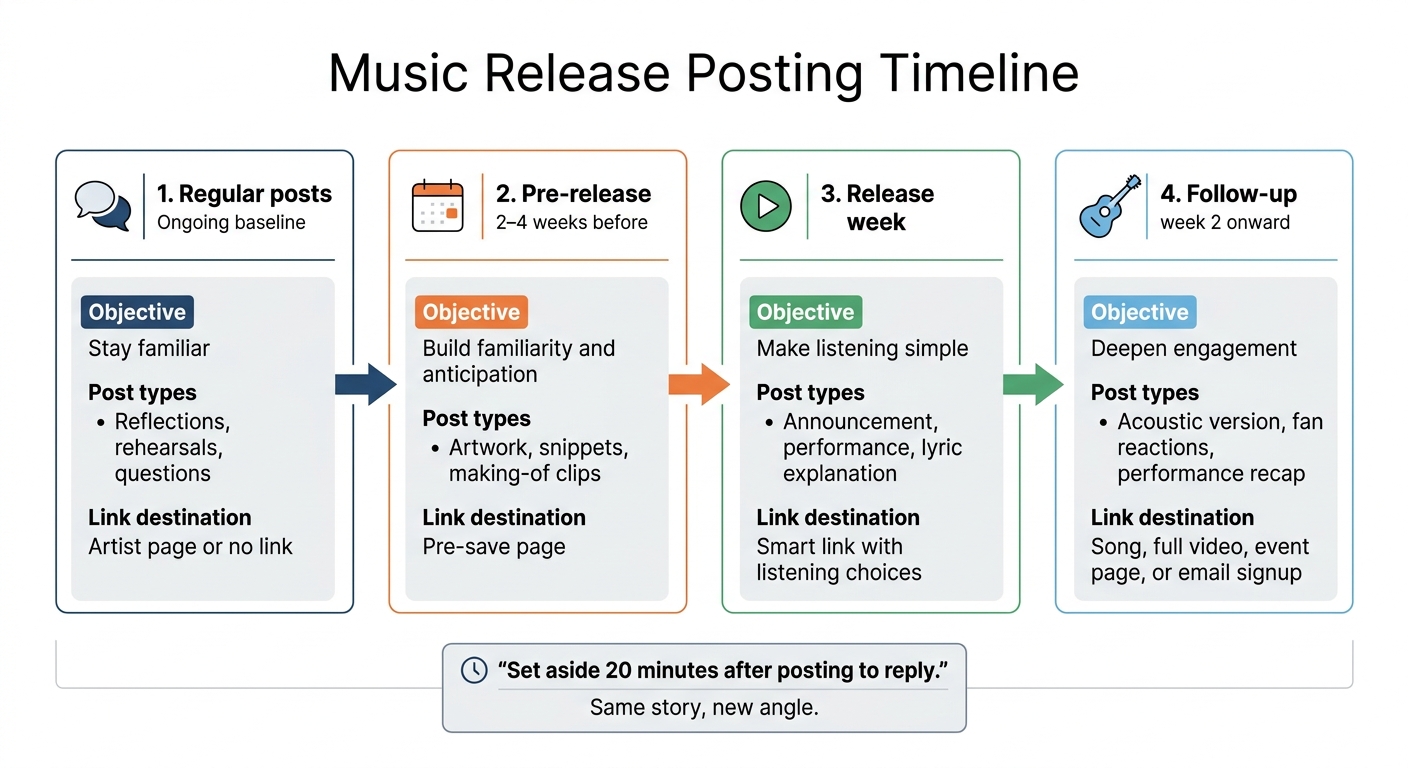
Plan around release stages rather than a daily posting quota. Start 2–4 weeks before release to build familiarity and anticipation. After release, give fans a new angle instead of another reminder.
Each stage has a different job:
| Phase | Objective | Post types | Link destination |
|---|---|---|---|
| Regular posts | Stay familiar | Reflections, rehearsals, questions | Artist page or no link |
| Pre-release: 2–4 weeks before | Build familiarity and anticipation | Artwork, snippets, making-of clips | Pre-save page |
| Release week | Make listening simple | Announcement, performance, lyric explanation | Smart link with listening choices |
| Follow-up: week 2 onward | Deepen engagement | Acoustic version, fan reactions, performance recap | Song, full video, event page, or email signup |
Sample weekly rhythm: Monday: artist story. Tuesday: music-making clip. Wednesday: 15–30-second excerpt. Thursday: performance. Friday: release update. Saturday: fan replies or a permission-based repost. Sunday: reflection or rest.
Use audience activity data to choose two or three publishing windows. Then compare posts with similar formats and calls to action. List times in ET, CT, MT, or PT, and note daylight-saving changes. Check watch time, saves, replies, and clicks against each post’s goal. General “best time” advice is just a starting point.
Reuse Stories and Reply to Fans
After publishing, give the story another form and reply while interest is highest. One confirmed song story can work across several formats. Same story, new angle:
A 20–30-second video captures the turning point; a caption adds context; a carousel shows lyric development; a Story compares demo and finished versions; a live session pairs performance with questions; a longer video explains production choices.
Change the opening and supporting material rather than reposting the same file and caption.
Set aside 20 minutes after posting to reply. If time allows, add a separate weekly community session. Keep replies within set windows and be clear about repost permissions. Before sharing fan content, get permission, confirm credit, and check whether that permission covers other platforms or paid promotion. Follow the campaign’s privacy rules whenever you reply or repost.
Prepare Release Links and Team Messaging
Emotional posts need a clear path from story to action. Once the story and format are set, give each post one destination, one tracking link, and one owner.
Choose PromoLinks.me Destinations for Each Post
Choose a destination and action for each post. Use artwork and page copy that match the post so fans recognize the story. Audio previews can support song stories, while QR codes can guide fans from posters and venue screens to the right page.
| Post’s purpose | Destination | Action |
|---|---|---|
| Pre-release story or countdown | Pre-save campaign | Pre-save the single |
| Release-day announcement | Smart link with available listening destinations | Listen now |
| Upcoming performance | Event page with date, venue, and ticket details | Get tickets |
| Catalog discovery | Artist page with featured tracks | Explore my music |
| Email invitation | Email signup page with subscriber benefits | Join the email list |
Record the tracking link and consent rules alongside each post once you’ve chosen its destination.
Set Up Tracking and Email Consent
Use campaign-specific links or tracking parameters to tell posts, platforms, and release phases apart. Log each URL beside its scheduled post. Check analytics for traffic sources, and count completed pre-saves and signups only when reporting confirms them. Keep pending, completed, and failed pre-saves separate. A click is not a listen, and a pre-save is not a stream. Privacy settings may limit reporting, and results may arrive late.
At signup, name the artist or company and explain which emails subscribers will receive. Include the email frequency when practical, link to privacy information, and make unsubscribing easy. A pre-save does not grant permission for unrelated marketing; use a separate opt-in when required. Save the signup source, timestamp, consent wording, and form version. Explain cookies, pixels, and analytics in plain language, and follow current U.S. privacy rules and platform policies.
Write a Campaign Brief and Assign Approvals
Keep one shared brief and calendar as the source of truth. Before scheduling, check:
- Release title, version, credits, date, launch time, and time zone; emotional theme and approved description; voice and privacy boundaries; approved story points, assets, and platform-specific copy.
- Destination URLs, tracking codes, fallback links, distributor delivery status, and a plan for delayed availability; deadlines, owners, reviewers, and backup contacts.
| Role | Main responsibility | Approval or coordination |
|---|---|---|
| Solo artist | Defines story, voice, boundaries, and personal wording | Approves personal claims and sensitive details |
| Manager | Maintains calendar, links, assets, and deadlines | Aligns posts with the story and intended action |
| Label or marketing team | Aligns campaign copy, paid versions, and reporting | Reviews budgets, disclosures, and label-sensitive claims |
| Distributor | Confirms delivery, metadata, timing, and platform availability | Flags release or store-link delays |
Roles vary, and a solo artist may handle every task. Move each post from draft to factual and rights review, then artist approval. Record “approved,” “revise,” or “hold” in one shared document. Set approval deadlines and name a contact for urgent corrections.
Keep titles, dates, claims, and destinations consistent across accounts, but leave room for natural wording. An artist’s personal post shouldn’t have to sound like a label announcement.
Review Fan Responses and Improve Posts
After each release, review what fans did - not just how many people saw the post.
Track Fan Interaction and Music Discovery
Track four categories: exposure, engagement, discovery actions, and repeat participation. Exposure measures reach. Engagement tracks active responses. Discovery actions show what fans did next. Repeat participation tracks returning attention through recurring commenters and fan-created content. These signals suggest interest, not proof of attachment, and they don’t account for every fan. Compare these patterns month by month.
Decide what counts as a meaningful response before you start counting.
A fan explaining how a lyric relates to their life, returning to comment on multiple posts, or sharing the song with a personal recommendation carries different information than a one-word comment, automated reaction, or contest entry.
Read responses and ask specific questions about which line stayed with fans. Summarize themes without names, handles, screenshots, or details that could identify someone. Get separate permission before publishing private feedback.
Check streaming-service reports for listeners, streams, saves, and playlist adds, then compare those trends with social responses. Saves and playlist adds may suggest plans to listen again, but they don’t prove emotional attachment.
Compare Posts and Campaign Results Each Month
Review results on the first Monday of each month using a consistent 30-day window. For each post, record audience size, paid spend, review dates, platform, format, release phase, and destination URL. This helps account for differences in exposure, timing, and intended action.
Keep paid and organic results separate. Compare posts with the same goal and similar release timing, and don’t claim a post caused a listening lift without reliable attribution.
Story angle / format / platform / phase / destination Exposure Meaningful responses Link or discovery actions Effort Origin story / Reel / Instagram / pre-release / pre-save page Reach, views Substantive replies, returning commenters Clicks, pre-saves Filming, editing, approvals Lyric explanation / short video / TikTok / release week / smart link Views, watch time Personal shares, thoughtful DMs Clicks, streaming-platform saves Artist time, editing, paid spend Personal interpretation / text and image / X / post-release / artist page Impressions Quoted lyrics, repeat participants Destination clicks Writing and approval time
Use the same denominator each time you calculate a given rate: reply rate = replies ÷ reach × 100%; email conversion rate = signups ÷ landing-page visitors × 100%. Weigh results against production hours and ad spend, not just volume.
Choose two or three changes after each release:
Keep a strong story angle, test a shorter opening, or drop one low-value activity.
Carry the strongest angles, openings, and formats into the next campaign’s story worksheet, schedule, and brief.
Conclusion: Your Next Release Checklist
Before every release, use this checklist to keep your story, links, and replies in sync. Put your campaign plan into action with a coordinated release that builds an emotional connection.
- Story, voice, and privacy: Check that every story is true, credits are correct, and sensitive details have been approved.
- Formats, schedule, and replies: Match each post to its platform. Check captions and accessibility, set a posting pace your team can maintain, and assign comment coverage throughout the release cycle.
- Links and tracking: Give each post one action and a matching destination, using PromoLinks.me where appropriate. Test links on mobile and desktop, verify tracking tags, and check email consent and unsubscribe options.
- Team approval: Put the story, assets, links, privacy limits, and release date and time in one campaign brief. Name one final approver, and give each task an owner and a deadline.
- Results: Keep post testing separate from fan response, and schedule a feedback review. Use that review to improve the next conversation - not just the next post count.
FAQs
How can I connect with fans without oversharing?
Let your music lead the connection. Use your artist voice to share the stories behind your lyrics or how you produce your tracks, rather than details about your personal life.
PromoLinks.me gives you one smart link that sends fans to a professional, branded release page with audio previews and clear calls to action. Keep your marketing focused, and build direct connections with fans through an email list. Offer gated content to encourage sign-ups.
What should I post if my song has no personal backstory?
Bring the song’s mood into a moment fans can picture: a late-night drive, a packed dance floor, or a memory that still hits home. Ask where the track fits into their lives. Share studio footage, instrumentals, or lyric snippets that put a familiar feeling into words.
Close with a direct call to action: Listen now through the PromoLinks.me smart link.
How can I encourage replies when my audience is small?
Put personal, consistent interactions ahead of posting in bulk. Set aside 20% of your content for community interaction. Try casual Q&As every 1–2 weeks or polls where fans’ choices shape what you do next.
Aim to respond to every comment, DM, and Story mention within 24–48 hours to build trust. When you share milestones or fan reactions, thank your early supporters. That personal touch helps people feel welcome and more comfortable joining the conversation.
Related Blog Posts
Ready to create your smart links?
Join thousands of artists using PromoLinks to promote their music smarter.
Get Started Free