7 Facebook Ad Tips for Music Releases
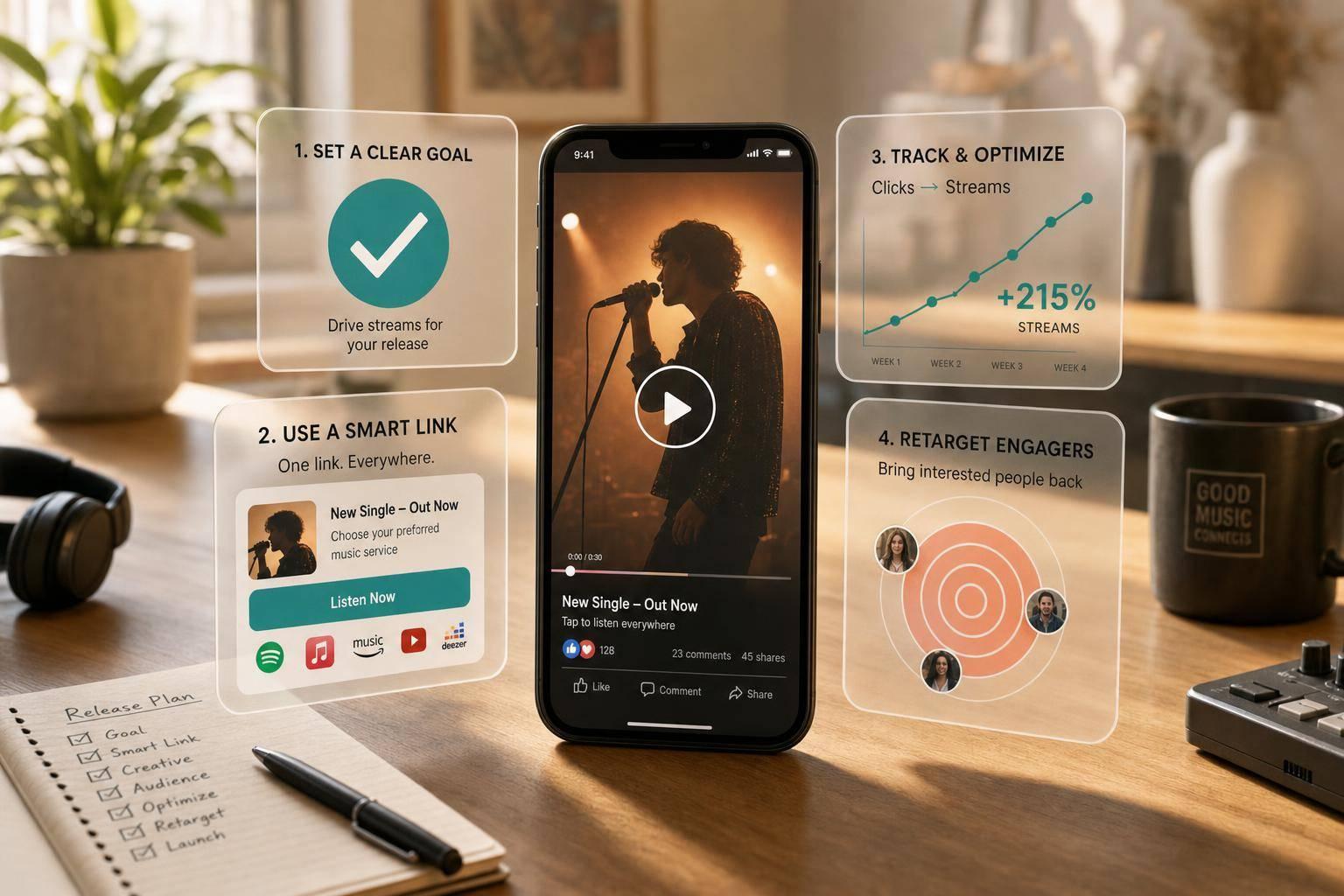
If I want more streams from Facebook and Instagram ads, I need a simple funnel: the right campaign goal, the right audience, short video, one smart link, clean tracking, tight timing, and follow-up ads.
Here’s the short version: I should match the ad setup to the release type, send all clicks to one mobile-first landing page, and track ad click → page view → streaming-platform click. That matters because a single, EP, and album do not need the same ad plan.
What I’d focus on first:
- Singles: push one hook, one CTA, one link
- EPs: lead with one song, then let the page sell the full release
- Albums: run a longer funnel with more follow-up
- Goals: use Traffic, Video Views, Conversions, or Leads based on the release
- Targeting: test genre, similar artists, and mood audiences
- Video: use short vertical clips, with the first 3 seconds doing most of the work
- Landing page: use one smart link with big streaming buttons above the fold
- Tracking: watch CTR, outbound click rate, and cost per outbound click
- Timing: split spend across pre-release, release week, and post-launch
- Retargeting: warm audiences can convert at 2x–5x the rate of cold traffic
The article’s main point is simple: better results usually come from fixing the path to the stream, not from spending more money.
How to Promote Your Music on Spotify with Facebook Ads (2026)
Quick Comparison
| Release Type | Best Starting Goal | Main Ad Angle | Timing |
|---|---|---|---|
| Single | Traffic or Video Views, then Conversions | One song, one hook | Short burst |
| EP | Traffic, then Conversions | Lead track first | Medium rollout |
| Album | Conversions or Leads | Multi-track push | Longer rollout |
If I keep the path short and track each step, I give Meta a better shot at finding people who are more likely to click and listen.
How Release Format Changes Your Ad Strategy
Release format should shape your ad plan. The goal is simple: move each listener from the ad to the stream by the shortest route possible. That’s why campaign goal comes first. The format of the release changes what Meta should optimize for.
Promoting a single is the most direct setup. You need one hook, one CTA, and one landing page. Pull the strongest 10–20 seconds from the track, then send people to a clean page with the cover art and streaming links. No extra clicks. No clutter.
An EP usually works better with a lead-track angle. Instead of trying to sell the whole project at once, use one standout song to earn the click. Then let the landing page do the rest by introducing the full release. That same approach also shapes your timing and retargeting later in the campaign.
An album needs a broader funnel. You’re not just pushing one moment. You’re giving people room to look around. Feature a few key tracks, include full streaming links, and add any store or physical purchase options. Run the campaign longer too. Album listeners often click because of one song, then end up streaming another.
Start with the format that matches the release, then test before you scale. With that set, the next move is picking the right campaign goal.
1. Pick the Right Campaign Goal for Your Release Type
The campaign objective you choose tells Meta what action to chase. If you pick the wrong one, Meta will spend your budget chasing the wrong result.
Here’s the simple version: match the objective to the release and the action you want most.
For a Single, start with Traffic or Video Views. That gives you a low-friction way to test the hook and see which listeners react. Then, once your smart link pixel has enough data, switch to Conversions.
For an EP, use Traffic first to build discovery. After that, move to Conversions for pre-saves or track clicks.
For an Album, it usually makes more sense to begin with Conversions or Leads. That works well for pre-saves, email capture, and streaming clicks.
One thing to avoid: don't use Engagement as your main objective if streams are the goal. Meta will optimize for likes and comments, but it won't optimize for streams.
| Release Type | Recommended Objective | Primary Goal |
|---|---|---|
| Single | Traffic → Conversions | First listens, streaming clicks |
| EP | Traffic + Conversions | Pre-saves, track clicks |
| Album | Conversions or Leads | Pre-saves, email capture, streaming clicks |
The event matters just as much as the objective. Don’t optimize for a generic link click if what you care about is a platform visit. Instead, optimize for a specific outbound event, like a Spotify or Apple Music click.
Once the objective is set, the next step is choosing who sees it.
2. Target Genre Fans and Listeners of Similar Artists
Go after fans of artists who sound like you. Those are usually the people most likely to stream a new release.
A simple setup in Meta Ads Manager is to choose 5–8 similar artists and group them into one interest audience. Then add your genre and a few streaming-platform interests so Meta gets a clearer picture of the listener you want. In many cases, audiences between 1 million and 2.5 million worked best.
For U.S. releases, set the location to United States and line up the age range with your actual streaming data. Stick with mobile-first placements like Instagram Reels and Stories along with Facebook Feed. That makes sense because a lot of listeners see an ad on their phone and then jump straight into a streaming app. Those people can later become part of your warm audience.
This setup also gives you a retargeting pool for later campaigns.
If artist targeting is limited, go a bit broader with genre or mood interests. If a certain artist doesn't show up in Detailed Targeting, swap in close alternatives or mood tags like Workout music or Chill music. A good way to test this is to run two or three ad sets built around:
- genre
- artist
- mood
Then use CTR and CPC to decide which audience deserves more budget.
3. Use Short Vertical Video for Reels, Stories, and Feed
Once your audience is set, the next thing that stops the scroll is the format. Use 9:16 video for Reels and Stories. For Feed, 4:5 or 1:1 can work well. Vertical video takes up more of the screen, which helps keep people watching a little longer.
Your video length should fit both the release format and the ad’s job. Match length to release type like this: singles, 6–15 seconds; EPs, 10–20 seconds; albums, 15–30 seconds.
The first 3 seconds matter most. Start with something that grabs attention right away, like:
- a face shot
- a beat drop
- a text overlay such as "New single out now."
Then end with a clear CTA: "Tap to stream now."
Each placement should do a different job. Reels are great for discovery, and people usually watch them with sound on, so let the music lead. Stories are a good fit for direct-to-camera updates and countdowns. Feed is often scrolled with sound off, so bold text overlays and captions need to carry the message.
After you make placement-specific edits, check the frame one more time. Keep key text and logos inside the middle 60–70% of the screen. Reels and Stories UI can cover the top and bottom edges.
Once the ad gets the click, send listeners to one landing page built for streaming.
4. Send Ad Traffic to a Smart Link Landing Page
Once someone clicks your ad, the next step matters just as much as the ad itself. For singles, EPs, and albums, it helps to send every format to one smart link. That gives fans one mobile-friendly page where they can pick the streaming service they already use. It also makes click tracking much cleaner.
There’s another reason this setup works well: measurement. If you send traffic straight to a DSP, you can’t place your own pixel on that DSP page. That means Meta has less visibility into what happened after the click. With a smart link landing page, you can install the Meta Pixel yourself. And when you add the Conversions API on top of pixel data, campaigns have seen attributed conversions increase by an average of 13–19%.
PromoLinks.me lets you build smart link pages with analytics, QR codes, and fan email capture. You can also see which DSP buttons get the most taps. That’s useful because it shows where your U.S. audience is actually listening, which can shape future campaign choices.
Keep the page simple:
- Cover art
- One short headline
- Large streaming buttons above the fold
That information then feeds into your click-to-stream tracking in the next step.
sbb-itb-e819543
5. Track Click-to-Stream Results with Pixels and Link Analytics
Clicks matter only when they turn into streams. That means you need to track the full path: ad click → landing page view → stream click. Once someone lands on your page, the next job is simple: find out what they did next.
Use the Meta Pixel on your smart link page to track page views and outbound clicks. Then use link analytics to see which streaming buttons get tapped and where people stop.
Pay close attention to:
- landing-page view rate
- outbound click rate
- cost per outbound click
Compare your ad CTR with outbound clicks. That comparison tells you where the weak spot is. If CTR looks good but outbound clicks are low, the landing page may be the issue. If both are low, the ad creative may need work. These numbers will shift based on the release type, and that changes what you should watch.
For a single, focus on stream clicks and pre-saves. For an EP, compare which preview or visual gets the most outbound clicks. For an album, look at which audience segments keep clicking over time.
PromoLinks.me supports Meta Pixel tracking on smart link pages and shows click data by platform, geography, and source. That helps you build retargeting audiences and sharpen your next CTA. Pair it with the Conversions API, and attribution gets better. Meta recommends aiming for a 75% event coverage ratio between the two.
Use these signals to figure out when to push harder before and after release day.
6. Time Your Campaign Around Pre-Release, Release Day, and Post-Launch
Use the pixel and link data from Tip 5 to figure out when to put more money behind your campaign. Timing matters. It helps turn clicks into streams, and it gives you a better retargeting pool to work with later.
A simple way to handle this is to break the campaign into three phases: pre-release, release week, and post-launch.
Pre-release is all about warming people up before you ask them to stream. Run teaser video ads 2–4 weeks before release and point them to a pre-save link. Then build a retargeting audience from people who watched the videos and people who clicked the pre-save link. That way, when release day hits, you're not starting from zero.
Release day and the first 10–14 days are your main push. This is usually the window that deserves the heaviest spend. Move budget over to your smart link and lean in. For indie artists, a solid starting point is $20–$30 per day for at least the first 7–10 days after release. It also helps to schedule ads around the hours your audience is most likely to be listening.
Post-launch is where retargeting takes over. Shift budget toward warm listeners from pre-release and launch week. For a single, 1–3 weeks of retargeting is often enough. EPs can often support 3–6 weeks of follow-up. Albums usually have more room to run, so they may support several months of lighter retargeting. You can also swap in new ad angles here, like different tracks, acoustic versions, or behind-the-scenes clips.
The rollout length should match the release type. Singles usually need a short burst. EPs need a bit more runway. Albums can carry a longer cycle.
Use this split as a starting point:
| Phase | Single | EP | Album |
|---|---|---|---|
| Pre-release | 1–2 weeks, ~20–30% of budget | 2–4 weeks, ~30–40% of budget | 4–8 weeks, ~40–50% of budget |
| Release day/week | 3–7 days, ~40–50% of budget | 1–2 weeks, ~30–40% of budget | 1–2 weeks, ~30–40% of budget |
| Post-launch | 1–3 weeks, ~20–30% of budget | 3–6 weeks, ~20–30% of budget | Several months, ~20–30% of budget |
That warm audience becomes the starting point for your follow-up ads. Next, the goal is to turn those warm listeners into repeat clicks and streams.
7. Retarget Warm Audiences with Follow-Up Ads
Once the first wave of launch traffic starts to level off, move more of your spend toward people who already interacted with your music. This is where launch data starts to pay off. Use your pixel data and link analytics to build warm audiences from:
- Video viewers
- Smart link visitors
- Site engagers
- Email subscribers
These people already know you, even if only a little. That’s why follow-up ads often convert at 2–5x the rate of cold audiences.
In Meta Ads Manager, set these up with Custom Audiences. If you’re using a smart link pixel, you can turn page visits and outbound clicks into retargeting audiences too. That gives you a simple way to reach people who showed intent but didn’t take the next step.
Your retargeting ads should not sound like your cold ads. The tone needs to shift. Write copy that assumes some prior interest and nudges the listener to stream, save, or check out another song. For singles, keep it short and direct, with the stream or playlist save as the main goal. For EPs and albums, carousel ads work well because they let you show different tracks and give listeners more ways into the project.
Ad fatigue shows up fast here. Cap frequency, swap in new creatives every 1–2 weeks, and exclude people who already converted. It also helps to split warm audiences by behavior. Someone who watched a video is not the same as someone who clicked through to your smart link, so don’t talk to them the same way. One audience, one message.
As the release gets older, shift more budget from cold traffic to warm traffic. A good split often looks like this:
- Single: start retargeting at about 20–40% of budget, then increase it as your warm audience grows
- EP: a 40–60% retargeting split usually fits
- Album: go heavier on retargeting, around 60–80% of budget, since existing fans and recent engagers are more likely to spend time with a full record
Those audiences tend to work best when every click goes to a page you control.
Smart Links and Landing Pages: Why They Matter for Music Ads
When someone clicks your ad, the next page has one job: turn interest into a stream.
That’s why it makes sense to send every ad to one smart link page. Listeners can pick their platform, and you can change the CTA from pre-save to listen now without touching the URL.
There’s another upside too. A smart link page gives you one place to track the whole campaign. You can see which platform, device, and source each click came from. That means cleaner data for later decisions, whether you’re shifting budget splits, tightening up ad creative, or figuring out which U.S. cities to push next.
PromoLinks.me is built for this setup. It offers smart links, pre-save pages, analytics, QR codes, and fan email capture. You can launch a pre-save page weeks before release, then switch that same URL from pre-save to listen now without changing the ad.
The page can also collect emails and help build retargeting audiences from visitors who didn’t stream. That kind of flexibility makes launch-week ad swaps a lot faster.
A Simple Campaign Timeline for U.S. Release Weeks
Use Tip 6 like a calendar. In the U.S., most releases go live on Friday. That gives you a simple rhythm: 5–7 days before release to warm people up, release week to push hard, and 2–4 weeks after launch to bring interested listeners back.
If your single drops on August 9, 2026, your campaign can look like this:
| Phase | Date Range | Primary Goal | CTA |
|---|---|---|---|
| Pre-Release Teaser | Aug. 2–8, 2026 | Build warm audiences and collect pre-saves | "Pre-save now" |
| Release Week | Aug. 9–15, 2026 | Drive clicks to your smart link | "Tap to listen now" |
| Post-Launch Retargeting | Aug. 16–Sept. 12, 2026 | Convert warm viewers into streams and playlist adds | "Add to your playlist" |
During the teaser phase (Aug. 2–8), run a Video Views campaign with a 15–30 second vertical clip. The goal here is simple: get people familiar with the song before it lands. If you're using PromoLinks.me for pre-saves, send traffic to that smart link page during this window and collect fan emails before the track is live.
On release day (Aug. 9), shift your main budget to Traffic or Conversions and send people to a mobile-optimized smart link. Put more of your spend into the first 24–48 hours so the campaign gets early momentum. And if you're running ads across the U.S., it helps to split ad sets by Eastern, Central, Mountain, and Pacific time zones. That way, your ads hit each market during local active hours instead of going live at the wrong time.
During the post-launch window (Aug. 16–Sept. 12), retarget people who already showed interest: viewers, clickers, and engagers. Swap in new creative to keep things from feeling stale. A lyric clip works. So does a fan reaction or a press quote. You can pair that with copy like "In case you missed it..." After 2–4 weeks, narrow your audience down to the people most likely to act, such as repeat clickers, 75%+ viewers, and email signups.
The next section shows how this timeline changes for singles, EPs, and albums.
Singles vs. EPs vs. Albums: Quick Ad Strategy Comparison
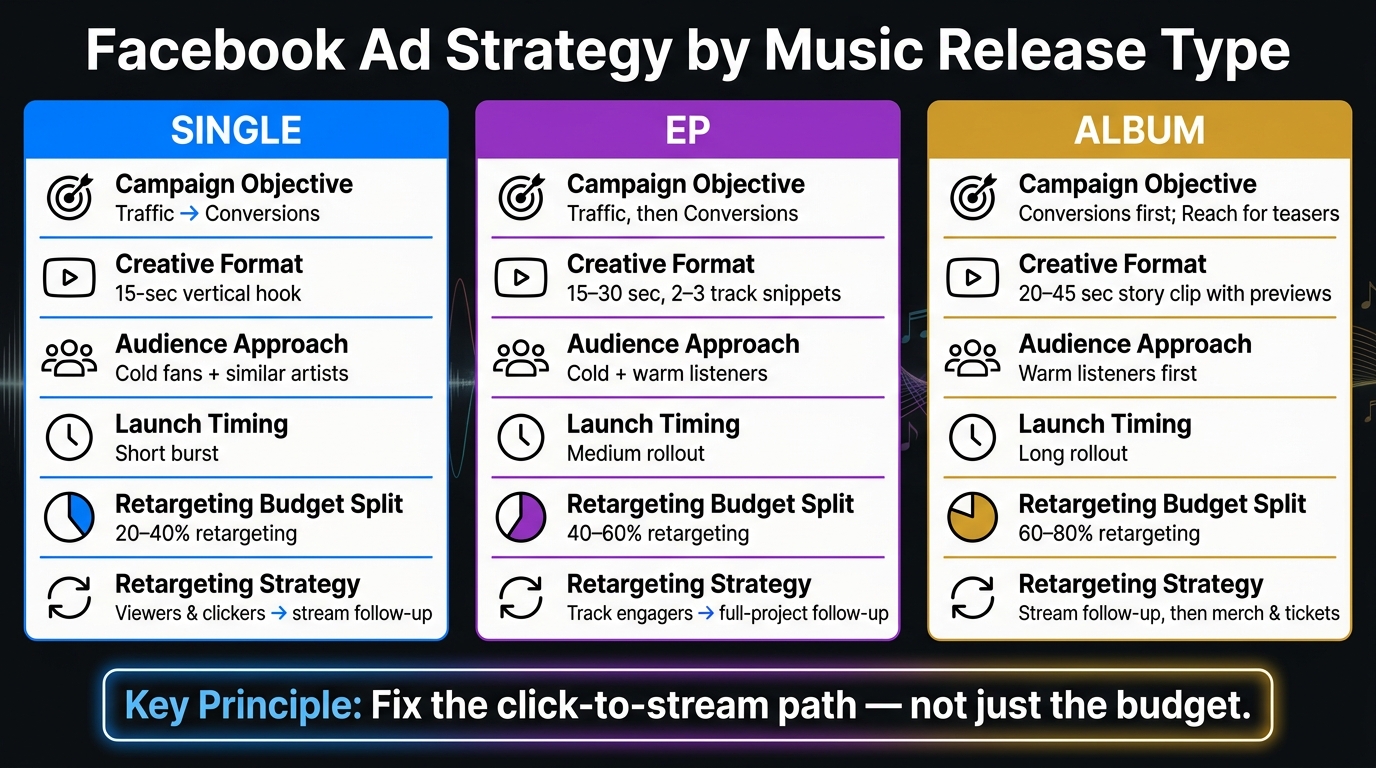
Facebook Ad Strategy by Music Release Type: Single vs EP vs Album
Use this quick comparison to line up your ad plan with the type of release you’re putting out. The same seven tips still apply, but the way you use them shifts based on whether you’re pushing a single, an EP, or a full album.
| Strategy Element | Single | EP | Album |
|---|---|---|---|
| Campaign Objective | Traffic → Conversions | Traffic for testing, then Conversions | Conversions first; Reach for teaser ads |
| Creative Format | 15-second vertical hook | 15–30 second clip with 2–3 track snippets | 20–45 second story clip with previews |
| Audience Approach | Cold fans + similar artists | Cold + warm listeners | Warm listeners first |
| Landing Page Depth | Lean smart link | Smart link with lead track | Artist hub with extras |
| Launch Timing | Short burst | Medium rollout | Long rollout |
| Retargeting Strategy | Viewers and clickers → out-now follow-up | Track engagers → full-project follow-up | Stream follow-up, then merch and tickets |
A single usually works best with a tight, fast push. You want one strong hook, one clean click path, and a short window that turns attention into streams.
An EP gives you a bit more room. You can test with traffic early, see which track gets the best response, then put more budget behind conversion ads for the full release.
An album is a bigger lift. In most cases, it makes sense to start with warm listeners, use teaser ads to build interest, and send people to a deeper page that gives them more to explore.
The main idea is simple: use the release format that fits your music, then keep the rest of the campaign focused on click-to-stream results.
Conclusion
Better Facebook ads start with better funnel choices, not a bigger budget. The point isn't just to get clicks. It's to get clicks that turn into streams.
These seven tips work best as one system. Your campaign goal, audience, creative, landing page, timing, and retargeting all affect each other. Skip one piece, and the whole campaign gets weaker.
From there, the fastest wins usually come from fixing one thing at a time. Focus on the weakest part in each release cycle, whether that's the hook, the landing page, or retargeting.
PromoLinks.me keeps one link in front of fans and shows which clicks turn into streams. That's how a small campaign gets better release after release.
Fix the weakest part of the funnel on your next release, then scale what converts.
FAQs
How much should I spend on ads for a music release?
Success in music advertising isn’t tied to some magic budget number. It comes down to getting in front of the right people.
You can spend $50 targeting a huge group of music fans and still get nowhere. That money can disappear fast if the audience is too broad. A better move is to focus on a warm audience, like people who visited your pre-save page or watched your teaser clips.
That’s where PromoLinks.me Pro comes in. It helps you build retargeting audiences, track performance, and test different creatives so your ad spend goes further.
What should I do if my ad gets clicks but not stream taps?
If your ad gets clicks but not stream taps, the problem is probably your landing page, not visibility.
Check your analytics dashboard. If the page conversion rate is below 10%, your design, offer, or call to action likely needs work.
A couple of fixes can help fast:
- Add an audio preview to your PromoLinks smart link
- Make your main call-to-action button easy to spot above the fold on mobile
Think of it this way: getting the click is only half the job. Once someone lands on the page, the next step should feel obvious and easy.
When should I switch from cold targeting to retargeting?
Make the switch as soon as you’ve built an audience that has already engaged with your content.
When you connect your Meta or TikTok pixels through PromoLinks.me, people who click your smart links or visit your pre-save page can go into a retargeting audience. That gives you a warmer group to target, which can make your "Listen Now" or "Out Now" ads more cost-effective on release day.
Related Blog Posts
Ready to create your smart links?
Join thousands of artists using PromoLinks to promote their music smarter.
Get Started Free