
How Pre-Save Campaigns Work for New Releases
A pre-save campaign does one job: it turns interest before launch into a library save on release day.
If I had to sum it up fast, it works like this:
- I finish the release setup first
- I connect Spotify and Apple Music links in my campaign tool
- I send fans to one pre-save page
- Fans click, sign in, and approve the save
- On release day, the music is added to their library on its own
- I track clicks, completed pre-saves, conversion rate, platform split, and email sign-ups
That matters because not every click becomes a completed pre-save. If 1,000 people visit the page and 250 finish the flow, that’s a 25% conversion rate. That number tells me much more than traffic alone.
Before I share any link, I need to check a few things:
- Release date
- Distributor status
- Artist name, title, cover art, and tracklist
- Spotify URL or URI
- Apple Music URL
- Post-release redirect
- UTM tags
- Pixel setup
- Email capture
Here’s the flow in plain English: fans click one link before launch, approve the save, and the campaign link later switches to the live listening page after the release goes out. Some tools do that switch automatically at 6:00 AM UTC on release day.
| Stage | What I set up or track | What happens |
|---|---|---|
| Before launch | Release info, DSP links, landing page, UTMs, pixels | Fans can pre-save |
| Fan action | Platform choice and sign-in approval | Save permission is stored |
| Release day | Redirect and library add | Music appears in fan libraries |
| Before and after launch | Clicks, pre-saves, conversion, DSP split, emails | I measure campaign results |
In short: I set up the release, connect the platforms, collect fan approval before launch, and let the platform handle the library add on release day.
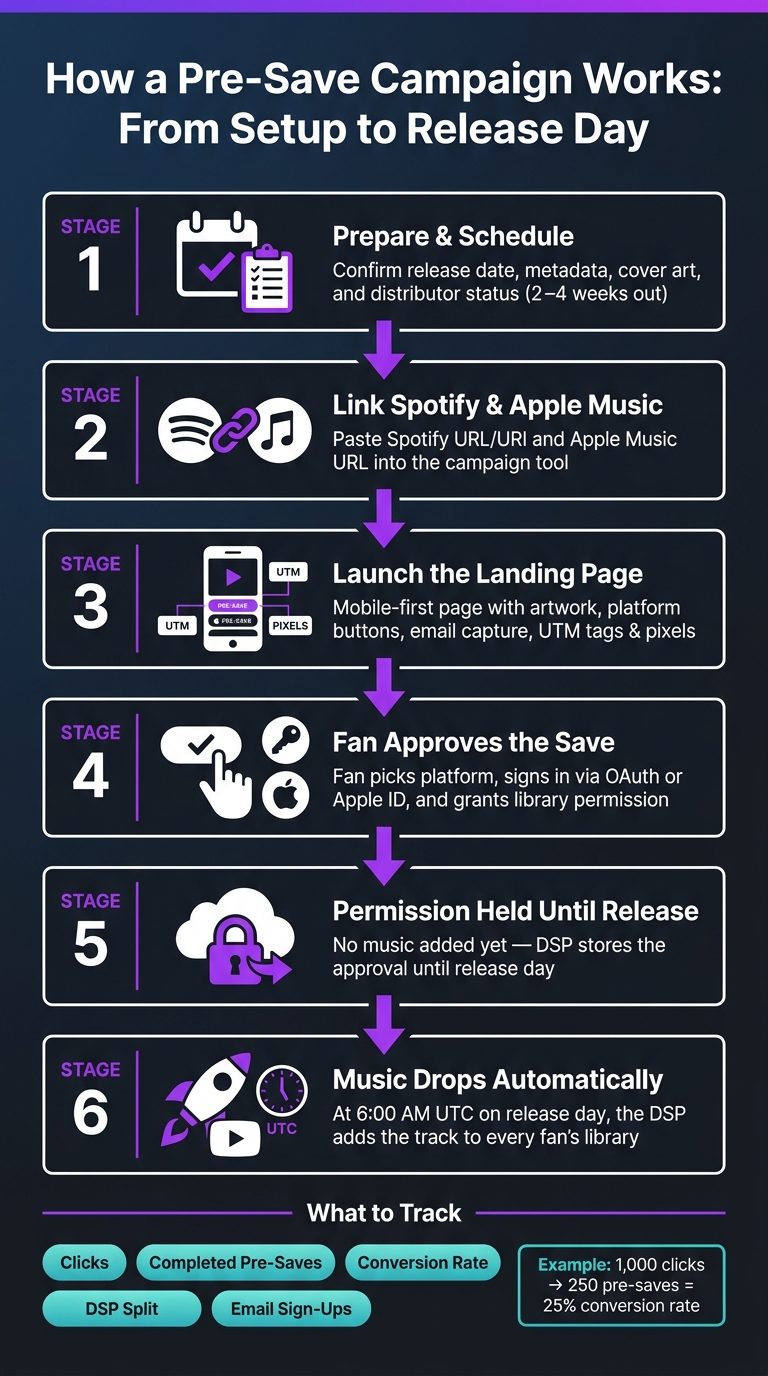
How a Pre-Save Campaign Works: From Setup to Release Day
Create a Spotify Pre save campaign (In less then 8 minutes)
sbb-itb-e819543
Get the release and campaign ready
Finish the release before you build the page or share the link. A pre-save only works when the release is scheduled and the metadata lines up.
Confirm the release date, distributor status, and release details
Log into your distributor and check that the release shows a status like Scheduled or In Progress. Set the release date in MM/DD/YYYY format. Then review the basics everywhere: artist name, title, release type, cover art, and tracklist.
If any of that is off between the distributor and the landing page, fans can get confused. And once people spot mixed details, trust in the campaign can slip fast.
Try to submit everything to your distributor at least 2–4 weeks before release day. That gives you enough time to set up the pre-save and start your single release promotion without rushing.
Gather the release links, IDs, and live destination
After your distributor processes the release, collect the Spotify release URL or URI and the Apple Music URL needed to connect the campaign. These links show the tool which release to save. You can build the campaign first if needed, but the Spotify link needs to be added before release day for the save to work the way it should.
You also need to choose the post-release destination, which is the page fans should land on once the music is out. Use the release’s live listening page. Setting this ahead of time lets the campaign move from the pre-save flow to the listening page on release day without any manual edits.
Set up tracking before traffic starts
Before you send people anywhere, add UTM parameters to every URL you plan to share. For example: utm_source=instagram&utm_medium=social&utm_campaign=single_presave. That way, you can see which channels are driving clicks.
If you're running paid ads, connect your Meta Pixel or TikTok Pixel to the pre-save page before the campaign goes live.
Enable email capture before promo starts too. Fans who pre-save are strong contacts for release-day announcements, and getting their info gives you a direct way to follow up. Track performance from day one. PromoLinks.me supports smart links, pre-save campaigns, real-time analytics, and fan email capture.
With the release locked, connect the DSPs and build the pre-save page.
Connect the DSPs and build the pre-save page
Once the release is locked, it's time to build the page fans will actually use.
Enter the release link or identifier into the campaign tool
Paste each DSP release URL or ID into the campaign builder. The tool checks the release, pulls in the artwork and metadata, and gets it ready for pre-save.
You can set up the campaign ahead of time and add the Spotify link before release day. Just don’t skip that step. If the Spotify link isn’t in place before launch, the automated save won’t run, even if fans already approved it.
Choose how the landing page should look and work
Keep the page simple and mobile-first. Show the artwork, title, artist name, and platform buttons clearly. The goal is to get fans to the platform button with as little friction as possible.
PromoLinks.me also gives you the option to add an email capture field during the pre-save flow. That can help you collect fan contacts, but placement matters. Put the email field after the save action so the main flow stays fast.
Set the post-release redirect to the live music page
Set the post-release redirect in the campaign settings so the same link sends fans to the live release page after launch. That way, you don’t need to swap links or send people somewhere new.
The same campaign link should move from the pre-save page to the live release page on its own. That switch takes place automatically at 6:00 AM UTC on release day.
| Campaign State | Fan Lands On | Primary Action |
|---|---|---|
| Before release date | Pre-save landing page | Authorize library add |
| After release date | Live smart link or DSP page | Stream the release |
With the page live, the next part is the fan's click-to-save flow.
Follow the fan flow from click to authorization
Fan opens the link and picks a streaming platform
The process starts with a click. A fan taps the link from social, email, text, a bio link, or a QR code, then lands on the pre-save page.
From there, they pick their platform. Clear buttons like "Pre-save on Spotify" and "Pre-add on Apple Music", paired with familiar logos, make that choice fast and obvious. The page then sends the fan into the right DSP authorization flow.
Fan signs in and authorizes the pre-save or pre-add
Next, the fan signs in and approves the request. Without that approval, nothing gets saved.
Each DSP handles sign-in a little differently. Spotify authorization is usually a one-click OAuth flow. Apple Music uses a web sign-in with an Apple ID, and fans who open the link inside apps like Instagram or TikTok may need to switch to Safari to finish.
Once the fan approves, they see a confirmation screen and the flow stops there. That approval is then stored until release day.
The authorization is stored until release day
At this stage, nothing has been added yet. The release still isn't live, so the platform keeps the approval on file instead of placing the music in the fan's library.
On release day, the system uses that stored authorization and automatically adds the release to each fan's library. Once the release goes live, the stored approval turns into a library add on its own.
What happens on release day and what teams track before launch
The release goes live and is added to the fan's library
When the release goes live, the DSP automatically adds it to each fan's library. That usually leads to a release-day spike in saves and streams.
Once launch-day behavior starts to come into focus, the next step is to look back at how the campaign performed before release day.
Track clicks, completed pre-saves, conversion rate, platform split, and emails
Track visits and completions as separate metrics. That distinction matters. A lot of people may land on the page, but only some will finish the authorization step.
| Metric | What It Measures | Why It Matters |
|---|---|---|
| Clicks | Total visits to the pre-save page | Shows how far promotional posts are reaching |
| Completed Pre-saves | Fans who finished authorization | Predicts day-one stream volume |
| Conversion Rate | Pre-saves ÷ clicks | Shows whether the page and creative are convincing |
| DSP Split | Spotify vs. Apple Music breakdown | Helps spot platform preference and guide future focus |
| Email Capture | Fans who opted into the mailing list | Builds a reusable audience independent of algorithms |
Tools like PromoLinks.me support real-time analytics, QR codes, smart links, and fan email capture, so teams can watch performance as traffic builds before launch.
Conclusion: The pre-save flow in brief
In short: prepare the release and confirm delivery, connect the DSPs and build the landing page, send fans to that page through music promotion across platforms using social, email, or QR codes, collect their opt-in authorization, and let the platform complete the library add automatically on release day.
FAQs
Do pre-saves guarantee release-day streams?
No. A pre-save makes sure your track lands in a fan’s library the moment it goes live, so they don’t need to hunt it down and save it themselves.
But it doesn’t guarantee they’ll hit play.
That said, about 68% of fans who pre-save a track stream it within the first 48 hours. That early activity can help signal strong engagement right out of the gate.
Why do some fans click but not finish the pre-save?
Fans don’t always finish a pre-save because there’s too much friction in the way. A page that loads slowly, a weak call to action, or a glitch inside in-app browsers like Instagram or TikTok can be enough to make someone drop off.
Timing matters too. Many fans need 3 to 5 exposures before they take action. So if the campaign goes live too early, people may forget about it. If it starts too late, they may not have enough time or enough reminders to follow through.
When should I launch my pre-save campaign?
The ideal time to launch your pre-save campaign is 2 to 3 weeks before your release date.
That window gives you enough time to build momentum without letting interest fade. It also lines up with how people act: listeners often need to see a link 3 to 5 times before they click.
A simple way to handle it:
- Use the 3 to 4 weeks before release to build anticipation with teaser content.
- Then, around the 2-week mark, launch your pre-save campaign to turn that interest into action and support day-one streams.
Think of it like warming up the crowd before the main event. The teaser phase gets people curious. The pre-save link gives them something clear to do once that interest is there.
Related Blog Posts
Ready to create your smart links?
Join thousands of artists using PromoLinks to promote their music smarter.
Get Started Free