Post-Release Smart Link Guide for Labels
After release day, I want one link to do all the work. If I keep one fixed URL live for 8 weeks, check every store on Day 1, update every channel in the first 24–48 hours, and use the same UTM format every time, I make reporting cleaner and cut link errors across the campaign.
Here’s the short version:
- I use one stable smart link for the full post-release window.
- I check live routing for Spotify, Apple Music, YouTube Music, Amazon Music, and any store that matters to the release.
- I update bios, pinned posts, YouTube descriptions, newsletters, ads, and QR destinations to the same URL.
- I keep the URL the same, but I can change button order, CTA copy, hero image, merch blocks, or video focus behind it.
- I review CTR, platform split, top referrers, and geo/device data every week through Week 8.
- I use one label-wide UTM format: source, medium, campaign, content.
A few numbers stand out. The article frames the core window as Day 1 through Week 8, suggests checking all live channels within 48 hours, and shows that a label plan can support up to 200 artist pages. That tells me the job after launch is not just traffic routing. It’s clean link control, clear ownership, and weekly reporting that I can reuse on the next release.
If I had to sum it up in one line: one link, one naming system, one review rhythm.
| Focus area | What I do |
|---|---|
| Link setup | Keep one post-release URL live |
| Routing | Verify each DSP and artist profile |
| Channel updates | Point every public touchpoint to the same link |
| UTMs | Use one naming format across the label |
| Reporting | Review clicks and stream-side data weekly |
| Team workflow | Assign one owner and one approver per channel |
This guide is about turning post-release link work into a repeatable label process, not a string of last-minute fixes.
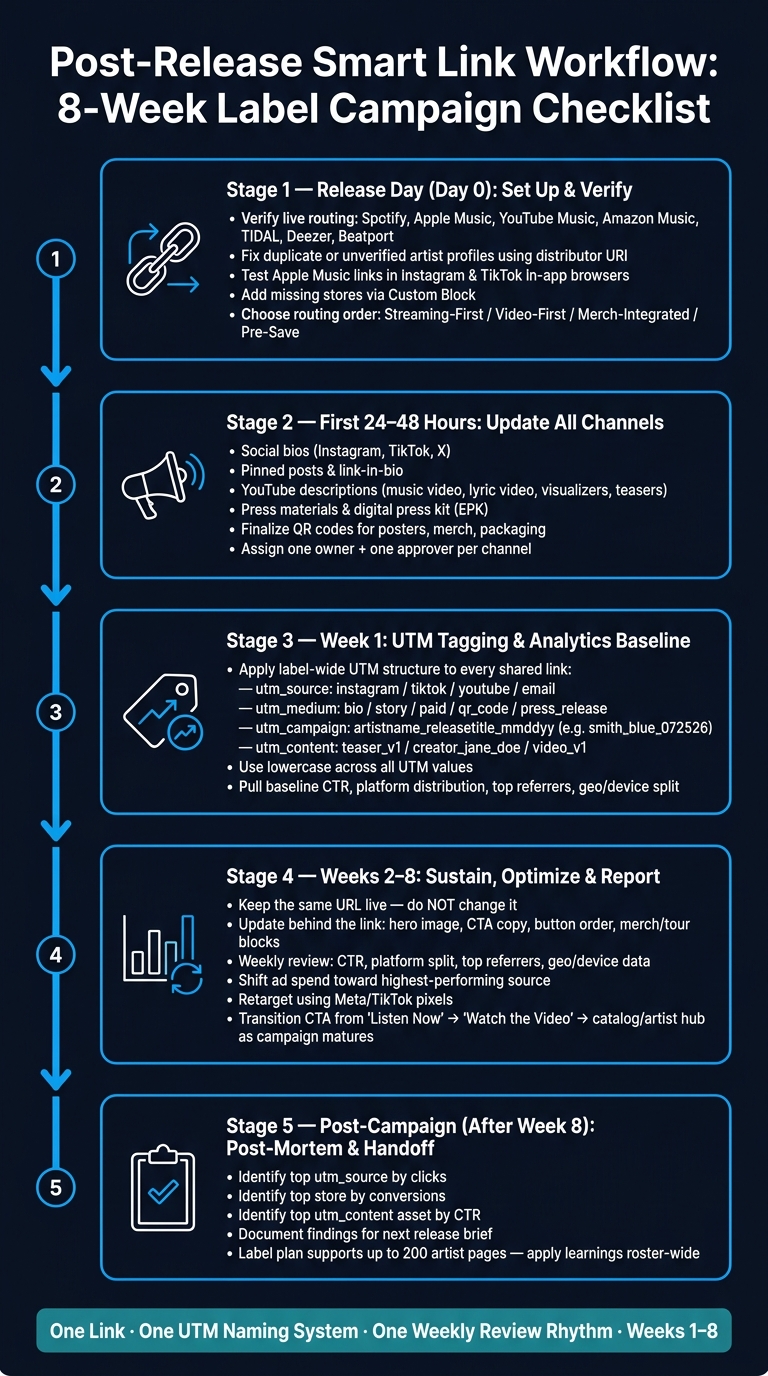
Post-Release Smart Link Workflow: 8-Week Label Campaign Checklist
Set Up Store Routing and Artist Page Links After Release
Verify Live Links for Every Priority Platform
Once the release is live, check every destination. Start with Spotify, Apple Music, YouTube Music, and Amazon Music. Then review TIDAL, Deezer, and genre-specific stores like Beatport if those matter for your audience.
Auto-linking usually picks up most destinations. But it can still miss duplicate releases or send fans to the wrong artist profile. So go link by link and make sure each one opens the right version of the release: explicit or clean, the correct release, and the verified artist profile.
If a release lands on a duplicate or unverified profile, send your distributor the verified artist URI or URL. For Spotify, that usually means using a URI like spotify:artist:ID so the release lands on the verified profile.
Also, test Apple Music links inside Instagram and TikTok in-app browsers. Apple’s API can trigger an "Open in Safari" prompt, which adds friction right in the middle of the fan journey.
If any destination is missing, add it with a Custom Block and place it alongside your other streaming links.
Once the links are right, sort them based on what the campaign needs most.
Choose a Routing Order That Fits the Campaign Goal
Not every release should route fans the same way. A standard single from a developing artist will usually put Spotify and Apple Music near the top to support early algorithmic signals. If the campaign leans hard on visuals, YouTube may deserve the first spot. And if you’re running a limited vinyl drop for an established act with a loyal fanbase, the merch store might need to be front and center.
| Strategy | Advantages | Disadvantages | Best Use Case |
|---|---|---|---|
| Streaming-First | Supports algorithmic lift; builds monthly listeners | Lower immediate revenue per play | New releases; breaking new artists |
| Video-First | Strong engagement; visual-first discovery | May distract from library saves on streaming apps | Music videos; tracks with viral TikTok trends |
| Merch-Integrated | Higher fan revenue; direct-to-consumer data | Higher friction; lower conversion for casual fans | Established artists with loyal fanbases |
| Pre-Save to Smart Link | Captures intent early; drives day-one streams | Requires 2–4 weeks of lead time | Priority singles and album launches |
As the campaign moves from launch mode to sustain mode, revisit the routing. What works on day one may not be the best setup two weeks later.
After routing is in place, extend the path to the artist and label pages.
Connect Each Release to Artist Pages and Label Pages
Once fans land on the release, give them an easy next click into the rest of the catalog.
Use the release page to guide engaged listeners to artist and label pages. PromoLinks.me artist and label pages can keep that path in one place. Link each release to the artist page for catalog, merch, and dates. Use the label page to bring the roster together.
That setup makes discovery easier for fans and keeps your team’s link management tidy in one place.
Update Every Channel on a Clear Post-Release Schedule
Once routing is locked in, the next job is simple: keep every public channel pointed at the same release URL. Every public touchpoint should lead to that one link, with one owner per channel and one review date.
Channel Updates to Make in the First 24 Hours and First Week
The first 24 hours are about removing dead ends. If a channel is likely to get traffic right away, update it before fans start clicking around.
That includes social bios on Instagram, TikTok, and X, pinned posts on your main feeds, link-in-bio spots, YouTube descriptions on the official music video, lyric video, visualizers, and teaser videos, plus the main listen link in press materials and your digital press kit.
Once those launch-day edits are live, use the first week to repeat that same link across every follow-up channel. Add story reshares, newsletter follow-ups, community posts, and paid placements, all driving back to the same smart link.
This is also the right window to refresh artist website banners and paid campaign landing pages with stream now copy. The key idea is simple: keep the URL fixed and update the copy and visuals around it.
Keep the Same Link Active Through Weeks 2–8
Keep that same URL live through Week 8. Playlists, reposts, creator videos, and press mentions can keep sending traffic long after launch week. If the URL changes, those references stop working.
What can change is what sits behind the link. You can swap the hero image, change the call to action from listen now to watch the video, or reorder the streaming buttons based on what your analytics show is converting, all without changing the URL.
This matters even more for QR codes on posters, merch, or album packaging. PromoLinks.me supports trackable QR codes tied to smart links, so a poster printed before release day can still send fans to the right place weeks later. You can also see how many scans it generated by device and location. Finalize offline QR codes before release, and only update them if the landing page changes.
As the release curve starts to flatten, shift the landing page focus from single-release calls to action toward artist hub or catalog content. The URL stays the same. The page behind it changes with the campaign.
Assign Owners and Due Dates for Each Channel
Assign one owner and one approver per channel.
| Channel | Update Timing | Owner | Review |
|---|---|---|---|
| Social bios | Release Day (Day 0) | Social Media Manager | Daily in Week 1 |
| Pinned posts | Release Day (Day 0) | Social Media Manager | Daily in Week 1 |
| Email newsletter | Day 0 + Day 5–7 follow-up | CRM / Digital Marketing | Before each send |
| YouTube descriptions | Day 0 | Video / Content Team | Weekly |
| Press kit / EPK | Day 0 | PR / Publicist | Once after launch |
| QR codes / offline | Pre-release (finalized) | Creative / Production | Only if landing page changes |
| Paid ads | Week 1–4 | Performance Marketing | Weekly |
Check every live channel in the first 48 hours, then review weekly through Week 8. After Week 8, use this channel cadence to compare performance by source and tighten the workflow for the next campaign.
sbb-itb-e819543
Standardize UTM Tracking, Analytics, and Reporting
Once every channel points to the same live URL, the next step is simple: tag traffic the same way every time.
If UTMs are messy, reporting gets messy too. You lose the ability to see which channel drove clicks or streams, and side-by-side campaign comparisons fall apart. A standard setup fixes that and makes release reporting easier to compare from one launch to the next.
Build a Label-Wide UTM Structure That Stays Consistent
Every link your team shares should follow the same four-part UTM structure:
utm_source- source:instagram,tiktok,facebook,newsletter,youtube,emailutm_medium- placement:bio,story,paid,qr_code,press_releaseutm_campaign- release ID:artistname_releasetitle_mmddyy- Example:
smith_blue_072526
- Example:
utm_content- asset or creator:teaser_v1,creator_jane_doe,video_v1
Use lowercase across the board. It sounds minor, but it keeps reporting clean and stops small naming mismatches from splitting your data.
PromoLinks.me's Source Copy feature automatically appends utm_source for common channels like Instagram, TikTok, YouTube, and Email. That cuts down on manual mistakes and helps keep reports aligned.
Read Smart Link Analytics Alongside Campaign Data
Smart link analytics show clicks. DSP data shows streams. You need both.
Looking at one without the other is like checking a box score without watching the game. Clicks tell you where attention came from. Streams tell you what happened after that attention turned into action.
The table below shows the main metrics your team should review each week, what each one tells you, and how to act on it.
| Metric | What It Means | Label Action |
|---|---|---|
| Click-Through Rate (CTR) | Percentage of page visitors who clicked a streaming service button. | Test a different template or preview. |
| Platform Distribution | Breakdown of which stores fans choose. | Use it to prioritize routing order on the next release. |
| Top Referrers | Traffic by source. | Shift spend toward the highest-performing channel. |
| Geo/Device Split | Geographic location and device type of clicking fans. | Use it to guide tour routing and localized ad targeting. |
PromoLinks.me's real-time analytics dashboard helps teams review CTR, referrers, and audience splits fast. For labels managing multiple artists, the Label plan includes Full+ analytics, team management features, and up to 200 artist pages.
Weekly Reviews and End-of-Campaign Post-Mortems
Use weekly numbers to make small course corrections, not just end-of-campaign calls.
Pull Top Referrers, CTR, and platform distribution each week through Week 8. If one source is beating the others by a wide margin, move spend toward it before the next cycle. That way, you're not waiting until the campaign is over to act on data you already had.
Then, at the end of the campaign, run a full post-mortem. Look at which utm_source drove the most clicks, which store captured the most conversions, and which piece of creative in utm_content posted the highest CTR. That gives your team a clear starting point for the next release brief.
Over time, those post-mortems add up. You start to see, across the label, what gets fans to stream and what just looks good on paper.
Build a Repeatable Workflow for Multi-Release Label Campaigns
Once weekly reporting is in place, the next step is simple: turn what you learn into a workflow your team can run again and again. Each release should feed the next one. That means using every post-mortem to tighten the same process: clear owners, fixed checks, and one reporting format.
Use a Role-Based Checklist for Setup, Review, and Approval
When nobody owns a task, small things slip. UTMs get missed. Link pages stop matching the campaign. And then the team ends up chasing avoidable problems.
Use the same stage map for every release so everyone knows when to step in and what to check.
| Campaign Stage | Owner | Key Task | Metric to Watch |
|---|---|---|---|
| Pre-Release | A&R / Digital Marketing | Set up pre-save and Future Save, verify routing | Pledge count / conversion rate |
| Release Day | Social Media Manager | Update link-in-bio with UTMs | Day-one streams / CTR |
| Week 1 | Campaign Manager | Review platform split, top referrers, and geo data | Referral sources |
| Weeks 2–8 | Digital Marketing | Use Meta/TikTok pixels for retargeting | Retargeting audience size |
| Post-Mortem | Label Head / Management | Review end-of-campaign analytics and brief the next launch | Total conversions / ROI |
PromoLinks.me's Label dashboard lets you assign team members to artist profiles from one view.
Adjust Live Links Based on Performance and Catalog Goals
Weekly data shouldn't just sit in a report. It should change the live page while the campaign is still moving.
Once the workflow is set, use weekly performance data to update the page in market. These edits happen after routing, channel updates, and UTM setup are already done.
The changes that tend to matter most are:
- Button order: put the most-clicked or highest-priority platform first
- Page layout: shift the structure based on what people are using
- Secondary content blocks: add merch, tour dates, or other support links when they fit the push
Here’s what that looks like in practice:
| Optimization Element | Before Review | After Optimization | Outcome |
|---|---|---|---|
| Button Order | Alphabetical | Sorted by most clicked | Higher CTR to the priority platform |
| Secondary Links | None | Added tour and merch blocks | More merch clicks |
| CTA Copy | Generic "Listen Now" | Matched to active campaign | Better conversion on current push |
For EPs and albums, verify the tracklist preview deck and each snippet. If TikTok starts driving a material share of clicks, change the routing order to match that traffic. In plain English: send people where they're already showing intent.
Conclusion: One Link, One Workflow, One Reporting Standard
Document the workflow once, then use it on every release. Verify live routing fast. Connect each release to the right artist and label pages. Update every channel on a clear schedule. Tag all traffic with one UTM structure. Pull analytics every week, not just at the end.
That way, your team spends less time fixing broken links and more time acting on data that moves streams.
FAQs
Why keep one smart link live for 8 weeks?
Keeping a smart link live for 8 weeks helps keep attention on the release and gives the algorithms more time to react. Streaming platforms can keep reviewing a track for weeks, so steady traffic may help with placements such as Discover Weekly and Radio.
That extra time also lets you run targeted ads, post updated content, and watch real-time analytics to see which channels are turning listeners into fans during the release cycle.
What should I check in the first 48 hours after release?
In the first 48 hours, keep a close eye on your save-to-stream ratio. Around 68% of fans who pre-save a track usually stream it during that window, so those first two days can tell you a lot.
Use the PromoLinks.me real-time analytics dashboard to watch:
- Unique visitors
- Click-through rates
A good target is at least a 5% save rate. If pre-saves look strong but streams are trailing behind, tweak your follow-up marketing right away. It also helps to double-check that your metadata is correct and that all smart links are working as they should.
How should a label standardize UTM tags across campaigns?
Use a dedicated UTM builder instead of editing links by hand. It helps keep tagging consistent across campaigns. Stick to clear naming rules, keep all UTM values lowercase, and swap spaces for hyphens or underscores so your reports don’t get split into messy variations.
With PromoLinks.me, the Copy Link feature can append source-specific parameters for you. That makes it easier to track links shared across social, email, and paid channels in a consistent way.
Related Blog Posts
Ready to create your smart links?
Join thousands of artists using PromoLinks to promote their music smarter.
Get Started Free