How Apple Music Editorial Pitches Work
I’d start by asking my label or distributor to submit through an authorized Apple Music partner account - at least 10 days before release. Apple Music for Artists access alone won’t let you pitch, and your partner may have an earlier deadline.
Here’s my music marketing checklist before release:
- Release details: Correct metadata, a focus track, release timing, and target territories. I also recommend setting up a pre-save campaign to build momentum.
- Campaign facts: Confirmed promotion dates, press links, and audience or Shazam data you can verify.
- Final checks: Match the delivered release, confirm time zones, avoid duplicate territory submissions, and save the confirmation.
Editors may consider fit, timing, and audience activity, but Apple publishes no scoring formula. My rule: <u>treat a pitch as a submission, not a promise</u>. Neither review nor placement is guaranteed.
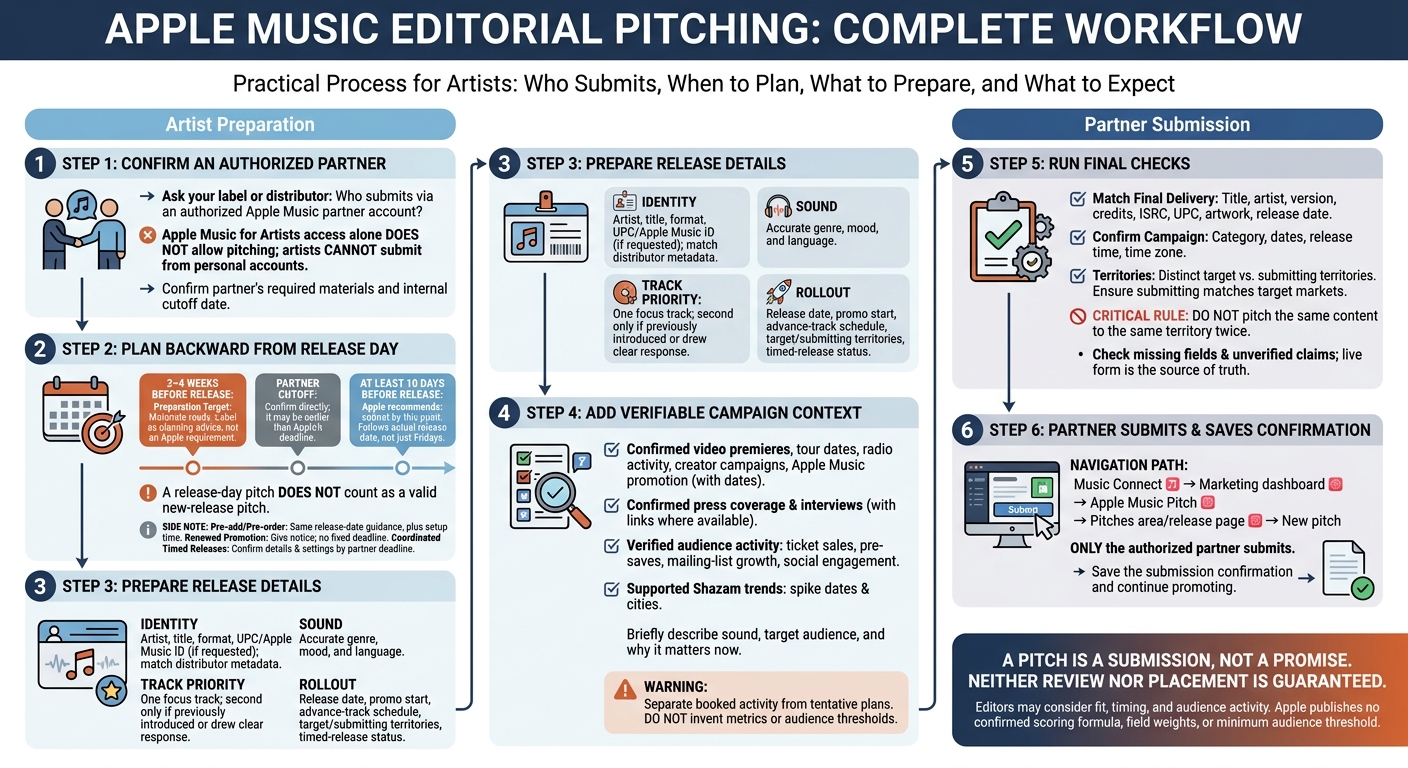
Apple Music Editorial Pitch: From Preparation to Submission
How to get your music on Apple Music & Spotify editorial playlists || We Need To Talk
sbb-itb-e819543
When to Pitch a Release
Once access is confirmed, the next step is getting the timing right.
Apple recommends submitting a new-release pitch at least 10 days before the release date. That window follows the actual release date - even if it isn’t a Friday. Check Apple’s current pitch guidance before each campaign. This is a critical part of your music promotion across platforms.
Your partner’s deadline is separate from Apple’s. The partner may need extra time to review metadata, deliver audio, and submit the pitch. Ask for its current cutoff; there’s no single processing deadline that applies to every partner.
| Release type | Preparation window | Risk of submitting late |
|---|---|---|
| New release | Submit at least 10 days before release, and meet your partner’s earlier cutoff. | Less time for editorial review. |
| Pre-add or pre-order campaigns | Follow the same release-date guidance, with extra time for setup. | Less review time before the campaign begins. |
| Renewed promotion | Give as much notice as possible; Apple lists no fixed deadline that applies to every campaign. | Less time to assess renewed interest. |
| Coordinated timed release | Confirm the date, time, territories, and Timed Release settings by your partner’s deadline. | Less time to review the pitch before launch. |
A release-day pitch does not count as a valid new-release pitch.
Before submitting, confirm the release date, time, territories, and campaign category. Keep the submission confirmation. With timing set, the next step is getting the pitch details right.
What to Include in the Pitch
Prepare two short lists before opening the form: release details and promotional context. They help editors scan your pitch fast. Use the live form as the source of truth, since required fields can change.
Editors need to know what the release is and why it matters now.
Release details
- Identity: Include the artist name, release title, format (single, EP, or album), and UPC or Apple Music ID when requested. Match your distributor metadata exactly.
- Sound: Choose accurate genre, mood, and language tags. Pick the closest fit rather than stretching the description.
- Track priority: Name the focus track editors should hear first. Add a second priority track only if it has already introduced the project or drawn a clear audience response.
- Rollout: Provide the exact release date, promo start date, advance-track schedule, target territories, submitting territory if requested, and timed-release status.
Promotional context
Show why the release deserves attention now, using facts editors can check.
- Confirmed plans: Include video premieres, tour dates, radio activity, creator-led campaigns, and Apple Music promotion. Give dates and clearly separate booked activity from tentative plans.
- Relevant press: Share confirmed coverage and interviews, with links where available.
- Audience activity: Include verified ticket sales, pre-saves, mailing-list growth, or social engagement.
- Shazam activity: Note recent identification spikes, when they happened, and which cities showed interest. Only describe a trend if you have data to support it.
End the pitch with a brief, plain-language description of the sound, target audience, and why the release matters now. Keep it factual so editors can get the picture at a glance. Once those details are ready, move on to submission.
How to Submit the Pitch
Once the pitch details are ready, only an authorized partner can submit through Apple Music Pitch. Artists can’t submit from personal accounts.
The partner opens Apple Music Pitch in Music Connect’s Marketing dashboard, then starts a new pitch from the Pitches area or the relevant release page. Keep target territories separate from the submission territory when entering the details.
Before submitting, check dates, territories, missing fields, and unverified claims. If Timed Release applies, confirm the scheduled time and time zone. Save the confirmation to track the submission.
How Editors May Review a Release
After submission, editors scan the pitch for fit, timing, and proof of active demand. Metadata - genre, mood, language, and territory - helps them judge fit. Apple has not published a confirmed scoring formula or weighting system.
Release timing and the focus track help editors see what to prioritize and when. For albums, name one priority track to anchor the campaign.
Explain why the release matters now with a specific, verifiable story. Then list only confirmed promotional activity and its start dates. Recent listener growth or Shazam activity can support the pitch, but Apple has published no minimum threshold.
A pitch does not guarantee review or placement. Editorial playlists are hand-curated, and Apple does not publish how it weights each field. Keep promoting your single while you wait for editorial feedback. Before submitting, compare these signals with the live form and verify every field.
What to Check Before Pitching
Run through this checklist before your partner submits the pitch.
- Confirm access and requirements. Ask your label or distributor who will submit through an authorized Apple Music partner account, what materials they need, and when their internal cutoff is.
- Plan backward from release day. Have materials ready 3–4 weeks ahead so delivery and internal review wrap up before your partner’s cutoff.
- Match the final delivery data. Check the release title, artist name, version, credits, ISRC, UPC, artwork, and release date against the distributor’s final delivery. Make sure the pitch type fits the campaign.
- Check the campaign schedule and territories. Make sure media and promotion dates line up with the release time and time zone. Check that the submitting territory matches your target markets and that nobody has already pitched the release there. Apple says content should not be pitched to the same territory twice.
PromoLinks.me can help track shareable music links and audience activity, but only an authorized Apple Music partner can submit the pitch.
FAQs
How can I confirm my distributor submitted my pitch?
Once distribution is complete, check New Release Insights in your Apple Music for Artists dashboard. If your release appears, your distributor has delivered the data, and your music is ready for review.
Processing usually takes 2 to 4 days, but it can take up to 7 days. If your release still hasn’t appeared after 7 days, contact your distributor right away to keep your pitch on schedule.
Can I update my pitch if release plans change?
If your release plans change, update your information as soon as possible through your distributor and the Apple Music for Artists portal. Editors review release dates, metadata, and the context around your release, including its ties to communities and customs. Keep those details accurate.
For promotion beyond Apple Music, make sure your PromoLinks.me smart links and artist pages match your distributor information. Mismatched details can cause distribution delays or platform rejections.
Can I pitch without press coverage or audience data?
Yes. You can pitch to Apple Music without press coverage or a large amount of audience data. Editors focus on the story behind your release - including your identity as an artist and its cultural relevance - not just streaming numbers or media traction. Press coverage and cultural reach matter, but neither is required.
To give your pitch the best chance, have your track mastered in Spatial Audio and submit it through Apple Music for Artists 3–4 weeks before release.
Related Blog Posts
Ready to create your smart links?
Join thousands of artists using PromoLinks to promote their music smarter.
Get Started Free