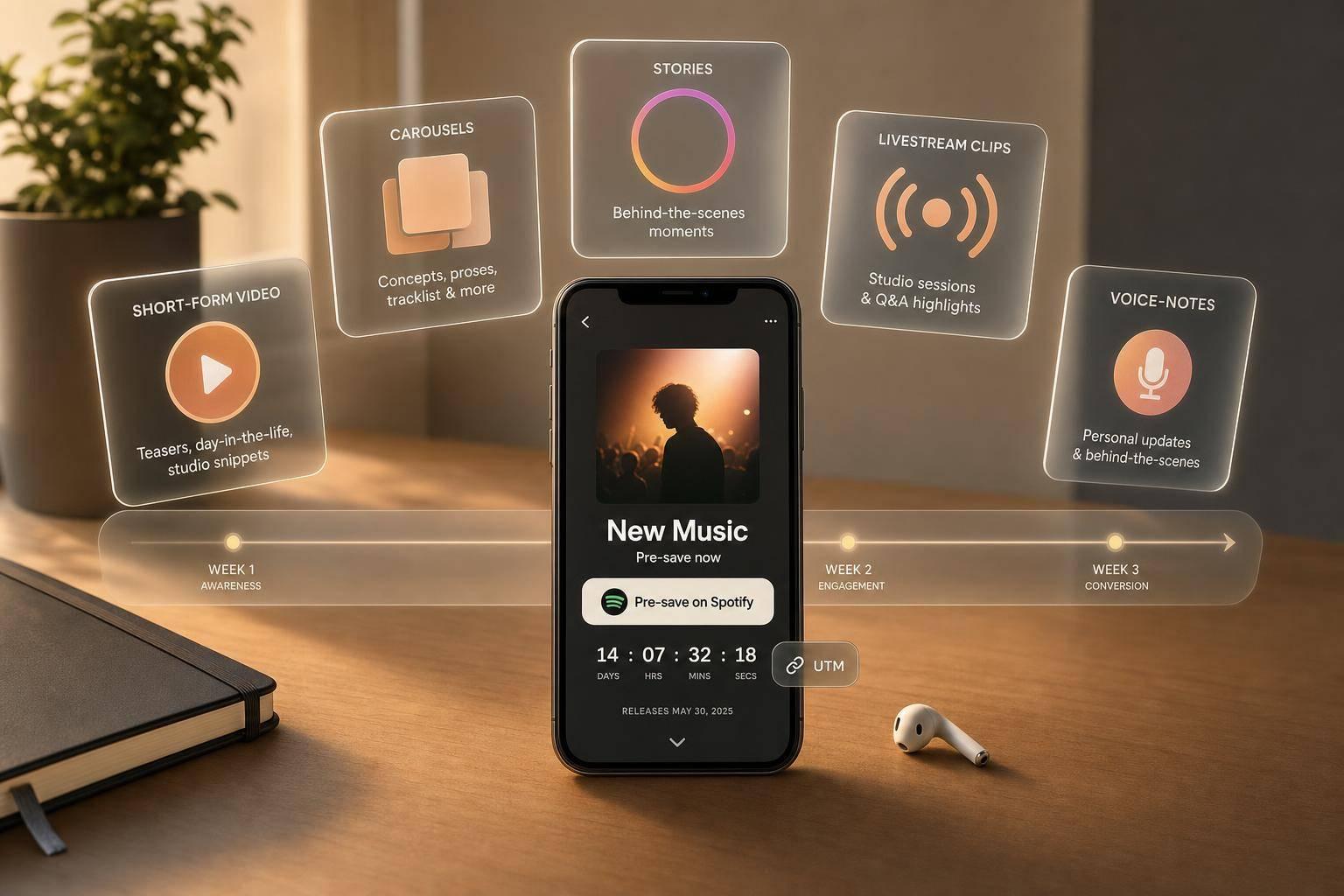
Best BTS Formats for Pre-Save Campaigns
If I want more pre-saves, I don’t post the same BTS content every day. I use short-form video for reach, carousels for context, Stories for last-minute taps, livestream clips for fan closeness, and voice-note posts for direct asks.
Here’s the short version:
- Short-form video works best early in the countdown when I need attention.
- Photo carousels work best when I need to explain the story behind the release.
- Stories work best in the final days because the link is easy to tap and the 24-hour limit adds time pressure.
- Livestream clips help when I want fans to feel close to the release process.
- Voice-note posts are best for short, personal messages that push clicks.
A simple 2- to 3-week plan works best:
- 14–21 days out: announce the release
- 7–14 days out: give more context and add direct pre-save asks
- Final 7 days: post more often and push for action
I’d also track each format with UTM links, then compare clicks, CTR, pre-save rate, and email signups. That tells me which posts get attention and which posts get action.
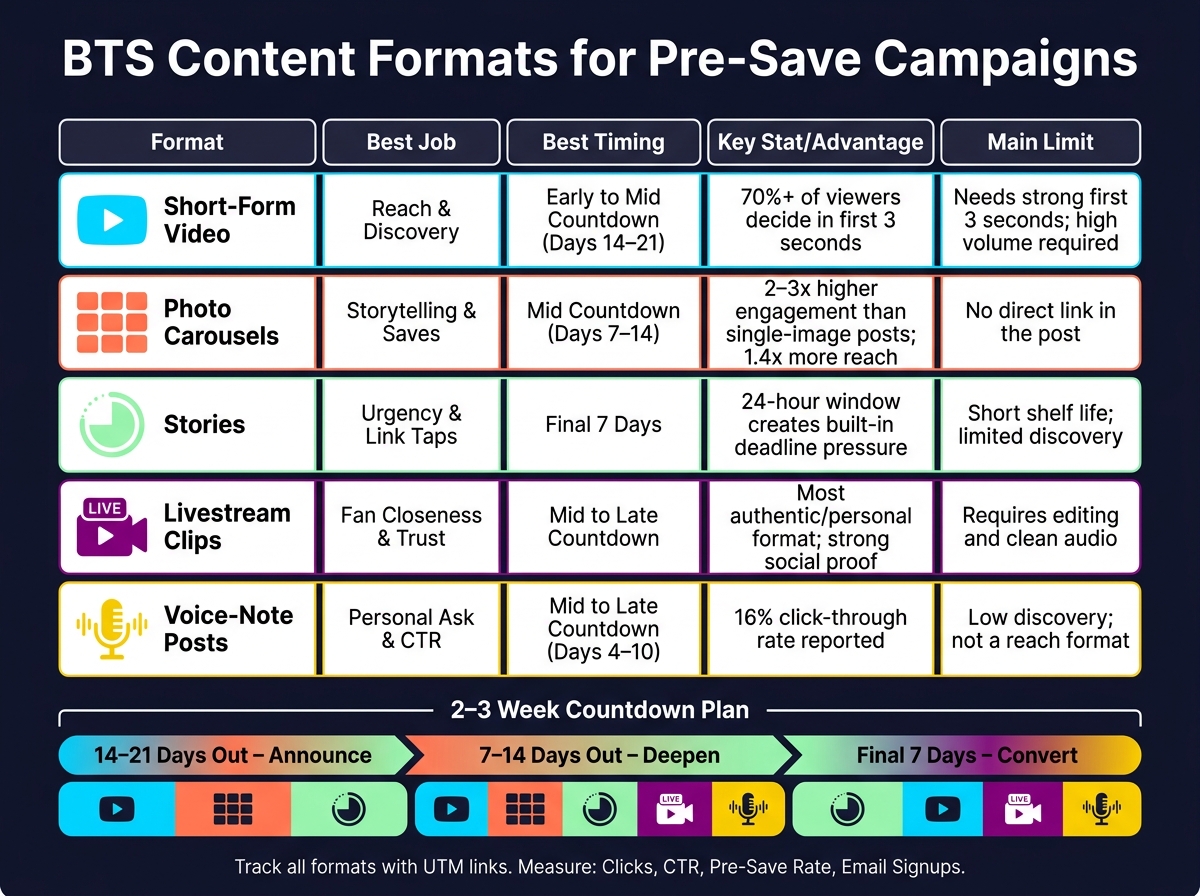
BTS Content Formats for Pre-Save Campaigns: Quick Comparison Guide
Quick Comparison
| Format | Best job | Best timing | Main limit |
|---|---|---|---|
| Short-form video | Reach and discovery | Early to mid countdown | Needs a strong first 3 seconds |
| Photo carousels | Storytelling and saves | Mid countdown | No direct link in the post |
| Stories | Urgency and link taps | Final week | Short shelf life |
| Livestream clips | Fan closeness and trust | Mid to late countdown | Needs editing and clean audio |
| Voice-note posts | Personal ask and CTR | Mid to late countdown | Lower discovery |
If I had to keep it simple, I’d use video to get seen, carousels to explain, and Stories to convert.
sbb-itb-e819543
1. Short-Form Video
Short-form video - TikTok, Instagram Reels, and YouTube Shorts - is the awareness engine of a pre-save countdown. These feeds can resurface older posts to new viewers, which means a Day 14 clip can still find people who missed the first wave. But that extra reach only helps if the video hits fast. The first 3 seconds do most of the heavy lifting.
Stick with 20–45 second clips built around a simple structure: hook, one story beat, CTA. Across the countdown, turn those posts into a mini-series. For example:
- Day 14: writing session
- Day 7: cover art reveal
- Day 3: lyric tease
Each post should work on its own, while still nudging people toward release day.
Length matters, sure. But the opening hook matters more. Data shows that over 70% of viewers decide whether to keep watching or scroll within the first 3 seconds. So lead with the strongest moment right away - the chorus hit, a striking visual, or a candid reaction - and save the CTA for after that. Skip slow intros and long logo stings. In fact, removing branding from the first 3 seconds can improve retention by 15–30%. A faster hook gives you a better shot at getting viewers to tap through to the pre-save page.
One more thing: layer the hook. Use the visual itself, on-screen text, and a spoken CTA together. Posts with stacked signals tend to beat clips that rely on just one.
For the CTA, use three layers:
- on-screen text in the first few seconds
- a spoken line near the end
- the first line of the caption for the direct ask
Since TikTok and Instagram Reels usually send clicks through the bio, point viewers to one smart link there. A PromoLinks.me pre-save page can cover Spotify, Apple Music, and YouTube with one URL, and platform tags like ?utm_source=tiktok or ?utm_source=reels let you see which platform sends the most clicks. Inside each platform, watch completion rate and profile taps, then compare that with the click data in your smart link dashboard.
When a short clip can't carry enough context, photo carousels give the countdown more room.
2. Photo Carousels
When a video hook isn't enough to tell the full story, photo carousels do the heavy lifting. Video stops the scroll. Carousels explain why the release matters. On Instagram, carousels can drive 2–3x higher engagement than single-image posts, and they've also been cited as getting about 1.4x more reach than static posts. Since fans have to swipe through, they spend more time with the post. That's why carousels work best for the middle of the countdown, when you want to build interest and give people more context on music promotion across platforms.
A simple structure works well. Use the first slide as the hook, the middle slides to tell the story, and the last slide for the pre-save ask. For instance, slide 1 might say "New single drops in 7 days" over the cover art. The next slides can show studio photos, a handwritten lyric sheet, or a candid recording moment. Then the final slide should make the next step obvious with a CTA like "Tap the link in bio to pre-save on Spotify and Apple Music." In the caption, make the first line a direct ask, then use the rest to add context.
For most countdown posts, 4–6 slides is a good range. That's usually enough room to tell a story without losing people before they get to the CTA. Longer carousels, around 7–10 slides, fit mid-countdown deep dives like a concept breakdown or a studio session recap. Shorter 2–3 slide carousels are better in the final stretch, when the goal is urgency and repetition.
Since carousel slides aren't clickable, you need to point fans somewhere else. Send them to the link in bio, repeat that ask on the last slide with a button-style graphic, and pin a comment that says the same thing. A PromoLinks.me smart link in your bio can send fans to Spotify, Apple Music, and YouTube from one URL. You can also tag it with UTM parameters like utm_source=instagram&utm_medium=social&utm_campaign=presave&utm_content=carousel_v1 so carousel traffic shows up separately in your analytics dashboard.
Track performance with Instagram Insights and your PromoLinks.me dashboard. Look at profile visits, website clicks, and saves for each post, then compare that with live click data from your smart link. If a carousel gets lots of profile visits but not many website clicks, the story is working, but the CTA likely needs work. In that case, tighten the final slide. You can also compare link traffic on carousel days versus non-carousel days to see if this format is pushing more pre-saves.
When you need faster, more frequent reminders, move the CTA into Stories.
3. Stories
Stories are the urgency format in a pre-save campaign. Carousels and short-form video can do more teaching or discovery. Stories do a different job: they keep the pressure on with fast, easy reminders. That’s why they tend to work best in the last 2 to 3 weeks before release.
There’s a simple reason for that. Stories vanish after 24 hours, so every post with a pre-save link comes with built-in deadline pressure. As release day gets closer, that short shelf life starts working in your favor. If you want short, repeated nudges, Stories are usually the strongest option.
A simple countdown ladder works well. In week three, keep things light: a short studio clip, a candid selfie video, or a fast teaser. In week two, get more direct about the release date and why fans should pre-save. Then in the final 48 hours, post more often and lean into urgency with daily countdown stickers or repeated reminders. Tease first, add value in week two, then push urgency in the final 48 hours.
For the CTA, place the link sticker near the first frame so it’s easy to tap and less likely to get blocked by UI elements. Add clear on-screen text like "Pre-save now" or "Tap to pre-save before Friday" so people know exactly what to do. A Story flow that often works looks like this:
- Start with a short BTS clip
- Follow with the release date
- End with the CTA frame and link sticker
If you want one more layer, add a countdown sticker or a quick poll in the second frame to warm people up before they tap. You can also use a PromoLinks.me smart link as your Story link. That way, fans on Spotify, Apple Music, and YouTube all get sent to the right pre-save page in one tap, while you get real-time click data.
Stories work best as quick prompts, not long context. Keep each frame focused on one idea. In most cases, 3 to 5 frames is enough. The format compresses attention, cuts friction, and handles repeated reminders better than heavier, story-led formats. If you need a more personal, in-the-moment push, move to livestream clips.
For tracking, tag your Story link with UTM parameters like utm_source=instagram&utm_medium=stories&utm_campaign=presave so Story traffic appears on its own in your analytics. Then watch:
- Link taps
- Sticker tap rate
- Story exits
- Pre-save page completion rate
Those numbers show where people drop off and which frame is doing the selling. Save your top linked Story as a Highlight so the pre-save link stays live after the 24-hour window closes.
4. Livestream Clips
If Stories create urgency, livestream clips add the kind of personal proof that gets fans to move. This is the most personal pre-save format. Because these clips come from live sessions, they feel immediate, unscripted, and easy to trust. That makes them stronger for trust-building than for pure reach. Compared with short-form video, livestream clips give up some reach in exchange for trust. Use this format when that personal connection matters more than discovery.
They fit best in the middle and final stretch of the countdown, when trust and urgency start to matter more. In most cases, they work better after the first announcement, once people already know the song exists and just need a reason to care. A clip from a final studio session, a reaction to the finished master, or a candid fan Q&A moment can all work well here.
Keep each clip between 15 and 30 seconds. Start with the strongest moment in the first second or two, because livestream footage often opens slow. Cut silence, dead air, and anything that doesn’t support one clear idea. That idea might be why the song matters, a studio moment worth sharing, or a direct ask from the artist to the fan.
A few small moves can make the clip work harder:
- Add on-screen text right at the start
- Repeat the ask out loud near the end
- Pin the smart link in a comment
- Lead with the fan benefit, like getting the song into their library on release day
The clip should build to one simple action: pre-save now. This is one of several ways to grow your fanbase using pre-save strategies.
For tracking, use a separate UTM-tagged link for each clip version, such as utm_source=instagram&utm_medium=reels&utm_campaign=presave_livestream, so you can see which angle and placement drive clicks. If you're using PromoLinks.me, the real-time analytics dashboard can help you track traffic by source.
Next, voice-note style posts can push that same sense of closeness even further, without video.
5. Voice-Note Style Posts
Livestream clips can feel like a public event. Voice-note posts feel much more one-to-one.
This format is simple: a short audio message over a static image or a basic waveform. Because it feels personal, it tends to work best when you want a direct, low-friction ask. Stationhead reported a 16% click-through rate (CTR) for voice-note campaigns.
Voice-note posts fit best in the middle and final stretch of a 2- to 3-week countdown. Around days 4–10, you can use them to share the story behind the track - what inspired it, who it's for, or what you were feeling when you wrote it. In the last few days, it's better to keep the message shorter and more urgent. A simple reminder that the release is only a few days away, and that a pre-save helps with playlist momentum, usually does the job.
Keep each note between 10 and 20 seconds. That's enough room for one clear point - an origin story, a thank-you, or a countdown reminder - without losing people halfway through. If you have more to say, split it into a short series instead of packing everything into one clip.
Put the CTA near the end of the audio, then repeat it in the caption with the link. For example, tell fans to tap the bio link to pre-save on Spotify and Apple Music. Add on-screen text for silent viewers, such as Pre-save now - out August 7. If you're using PromoLinks.me, one smart link can send fans to all platforms at once (see our music promotion guides for more strategies), which keeps the spoken CTA clean.
Use a separate UTM-tagged URL for each platform. Then track clicks in your dashboard and compare voice-note days with non-post days to spot spikes.
Pros and Cons by Format
No single format wins in every situation. You always give something up to get something else: reach for depth, urgency for shelf life, intimacy for scale. And each format tends to win on a different goal, whether that's reach, urgency, depth, or trust. Use the matrix below to pick the right format for reach, urgency, or trust.
Short-form video is your top reach driver. It gives you the broadest reach, but there's a catch: it needs volume to keep paying off.
Photo carousels make a different trade. They usually get less viral reach, but they stick around longer. That means fewer new listeners in many cases, but more saves and better retention.
Stories flip that model. They're built for urgency. The 24-hour window pushes fans to act now, and link stickers give them a straight path to the pre-save page.
Livestream clips land somewhere between reach and trust. They can feel more human and more convincing, but they take more time to make. You have to go live, save the footage, and cut it into clips people will watch.
Voice-note posts are the most personal format of the five, and also the least scalable. They work best when the goal is a direct, emotional ask, not broad discovery.
Here’s the fastest way to compare them side by side.
| Format | Key Pros | Key Cons | Best Use in Countdown |
|---|---|---|---|
| Short-Form Video | High algorithmic reach; great for new listeners | Needs high volume; views decay fast | Weeks 2–3: Teasers, trend-driven clips, audio snippets |
| Photo Carousels | Strong saves; good shelf life; clear storytelling | Lower viral reach; first slide must stop the scroll | Key anchor dates: pre-save launch, about 1 week out |
| Stories | High urgency; direct link stickers; easy to post daily | Limited discovery; disappears in 24 hours | Final week: Daily countdown updates, final push |
| Livestream Clips | Authentic feel; social proof; scales as short-form | Requires editing; audio/video quality can vary | Throughout the countdown: Deep-dive moments, fan reaction clips |
| Voice-Note Posts | Very personal; strong for emotional storytelling | Limited reach; not a discovery format | Opening and final days: Origin story, gratitude, reminders |
Use this format map to match each post type to the right countdown week.
How to Match Formats to a 2- to 3-Week Countdown
A pre-save campaign works best with a 3-phase posting schedule. The idea is simple: split the countdown into three parts, and give each part a clear job. That way, your posts don't all sound the same, and your audience gets the right message at the right time.
14–21 days out: announce
Start by letting people know the project is coming. This is the announcement phase, so keep things light. Use photo carousels and short-form video to reveal the project, and use Stories for a lighter announcement plus a soft pre-save ask.
At this stage, stick to soft asks only. You're opening the door, not pushing people through it.
7–14 days out: deepen
Now it's time to give people more to care about. Shift into deeper storytelling with short-form video, carousels, Stories, livestream clips, and voice-note posts. This is where the campaign starts doing more than announcing.
Every post in this phase should include a clear pre-save CTA. No vague hints. Make the ask easy to spot.
Final 7 days: convert
In the last week, the job changes again. Now you're pushing for action. Use Stories and short-form video for daily urgency, then add livestream clips and voice-note posts for direct day-one pushes.
This is the time to post more often and make sure every post drives a pre-save.
Use layers, not single posts. One format shouldn't carry the whole campaign by itself. A carousel might introduce the release, a Story might remind people later that day, and a short-form video might do the heavier lifting the next morning. Same message, different angles.
The good news? This structure works at any budget. What changes is posting volume and how polished the production looks.
The table below condenses the schedule into a quick planning map.
| Phase | Timeline | Primary Formats | Core Goal |
|---|---|---|---|
| Awareness | 14–21 days out | Photo carousels, Short-form video, Stories | Announce and spark interest |
| Engagement | 7–14 days out | Short-form video, Carousels, Stories, Livestream clips, Voice-note posts | Deepen interest and drive clicks |
| Urgency | Final 7 days | Daily Stories, Short-form video, Livestream clips, Voice-note posts | Convert interest into pre-saves |
How to Place Pre-Save CTAs in Each Format
Timing matters. But where you place the CTA matters even more.
The goal is simple: put the ask in the caption, the spoken line, and the on-screen text so people can't miss it. Early promo posts can use a lighter touch. In the final week, move the CTA up front and make it more direct. Then watch which format gets the most taps.
Short-form video like Reels, TikToks, and Shorts works best with this stacked setup. Put the CTA in the first 3–5 seconds: "Hit the pre-save link in my bio to be the first to hear this track when it drops on 08/05/2026." Add bold on-screen text in the bottom third of the frame: "PRE-SAVE NOW – LINK IN BIO." Then start the caption with the ask before anything else: "Pre-save 'Midnight Drive' now – link in bio. Every pre-save helps this track hit your Release Radar on day one."
Photo carousels need one slide that does nothing but ask for the click. In most cases, that's the last slide. Keep it simple: a solid background, big type, and one line like "PRE-SAVE NOW – Link in bio." The caption should lead with the CTA too, then connect it back to the story in the carousel: "You've seen the whole journey - now pre-save so you're there when it finally drops."
For Stories, the order of frames does a lot of the work. Start with a teaser. Use the next frame to add context. Then use the last frame for a clean "Pre-save now" headline with a link sticker that points to your pre-save page. Rename the sticker to match the destination, such as "Pre-save on Spotify & Apple Music," so fans know where the tap leads.
Livestreams need a different setup because people drop in at different times. Pin a comment at the start of the stream - "Pre-save 'Midnight Drive' here: [smart link]. Every pre-save helps the song reach more fans on release day." - and bring up the ask again near the end in a casual way: "If you're vibing with this, the new single is up for pre-save - hit the link in my bio or the pinned comment so you don't miss it on release day."
For voice-note style posts, keep the CTA natural and direct. End with: "It would mean a lot if you pre-save my new single using the link in my bio, so you get it in your library the moment it drops." Add one line of on-screen text too, so people watching on mute still know what to do.
Use one destination across every format. A smart link tool like PromoLinks.me lets you make one pre-save landing page with buttons for Spotify, Apple Music, and YouTube, then place that single URL in your bio. So when you say "link in bio" in a Reel, a Story, a livestream, or a voice-note post, fans land in the same spot. Once that setup is live, the next move is to track which format gets the clicks.
How to Track Clicks and Measure What Works
Once you post short-form video, carousels, Stories, livestream clips, and voice-note posts, track the formats that get people to move. Views and likes show who noticed your post. Clicks, conversions, and email captures show who took action.
The simplest way to split traffic by format is with UTM parameters. Tag each link with utm_source, utm_medium, and utm_campaign. That lets you sort by platform, format, and release phase in your analytics. It also helps you measure each countdown phase on its own. The key is to use the same naming pattern from day one.
This setup works best when every link matches a clear name in your dashboard. Give each tracked link its own name, even if all of them lead to the same pre-save page. For example: ig_story_bts_day7_presave. That makes format-to-format comparisons easy to scan. PromoLinks.me lets you create multiple tracked URLs that point to the same pre-save campaign, each with its own UTM string, and then see all results in one real-time analytics dashboard.
Focus on a small set of metrics for each format:
- Clicks: raw traffic
- CTR: clicks divided by impressions
- Pre-save conversion rate: the share of visitors who finish the pre-save
- Fan email captures: people who join your list
A format with lower reach but a stronger conversion rate can beat a post with lots of views and weak intent. That’s the difference between attention and action. Email captures matter for the same reason. Those fans are now on a channel you control, so you can reach them for future releases without waiting on an algorithm.
Check results every 2–3 days. Look at the last 2–3 days of clicks and pre-saves, then put more weight behind the format pulling the best results in the days left in your countdown. That gives you a simple feedback loop: post, measure, shift, repeat.
Conclusion
No BTS format works best in every case. Each one has its own job across early awareness, mid-countdown context, and last-minute urgency. They tend to work better together than on their own.
The main point is simple: build a 2- to 3-week content matrix that lines up each countdown stage with the right format, then check it against music analytics that matter. That turns the campaign into a planned sequence instead of a random burst of posts.
Make the CTA impossible to miss in every post. Tell fans exactly what to do, and place that ask where they’re most likely to see it.
PromoLinks.me lets you create trackable pre-save links and keep the same link live on release day. Track the clicks, keep the formats that convert, and cut the ones that don’t.
FAQs
Which BTS format gets the most pre-saves?
There’s no stated ranking for BTS formats.
That said, email newsletters stand out with the highest pre-save conversion rate.
No matter which format you use, a few tweaks can help you get more out of it:
- Create urgency
- Reduce friction
- Use a clear, fan-focused call to action
- Add a 15- to 30-second audio preview on your PromoLinks pre-save page
Small changes like these can make the path from interest to pre-save feel a lot smoother for fans.
How often should I post during a pre-save countdown?
Increase your posting pace as the release date gets closer.
During the early tease phase, aim for 1 to 2 posts a day. Then switch to daily posting in the final week.
On release day, step it up to 5 to 10 posts to get as many eyes on it as possible. Most followers won’t see every update anyway, so it makes sense to repeat the message in a few different ways.
Change up the format and angle each time, and make sure your pre-save link appears in every post.
What metrics matter most for pre-save campaigns?
Conversion rate matters most. A good target is 15%–30% of landing page visitors completing a pre-save. If you’re below 10%, that’s a sign to revisit the page itself, the copy, or the offer.
It also helps to watch a few other numbers:
- Pre-save-to-stream ratio
- Top referrers
- Geographic insights
For PromoLinks.me Pro users, Meta and TikTok pixel events can help you build high-intent retargeting audiences for release day.
Related Blog Posts
Ready to create your smart links?
Join thousands of artists using PromoLinks to promote their music smarter.
Get Started Free