
Top 5 Smart Link Providers for Release Campaigns
More than 100,000 tracks land on DSPs each day, so one release link can make a big difference. If I had to sum this up fast: PromoLinks.me fits many indie artists and managers, Linkfire fits label teams, Feature.fm suits marketing-led campaigns, Amplify.link works for simple release pages, and PUSH.fm is the low-cost pick.
Here’s what I’d look at before choosing:
- Pre-save support before release day
- Auto-switching to live links after release
- DSP coverage for Spotify, Apple Music, YouTube, Amazon Music, Deezer, and Tidal
- Analytics like clicks, DSP choice, and city/country data
- Fan data tools like email collection and retargeting pixels
- Price and whether it fits a solo artist, manager, or label team
A few numbers stand out:
- About 70% of pre-savers stream in the first week
- A pre-save campaign launched about 3 weeks early can convert 10%–20% of engaged email followers
- Some tools start at $0/month, while label-focused options use custom pricing
The FASTEST Music Marketing Smart Link Service | FeatureFM
sbb-itb-e819543
Quick Comparison
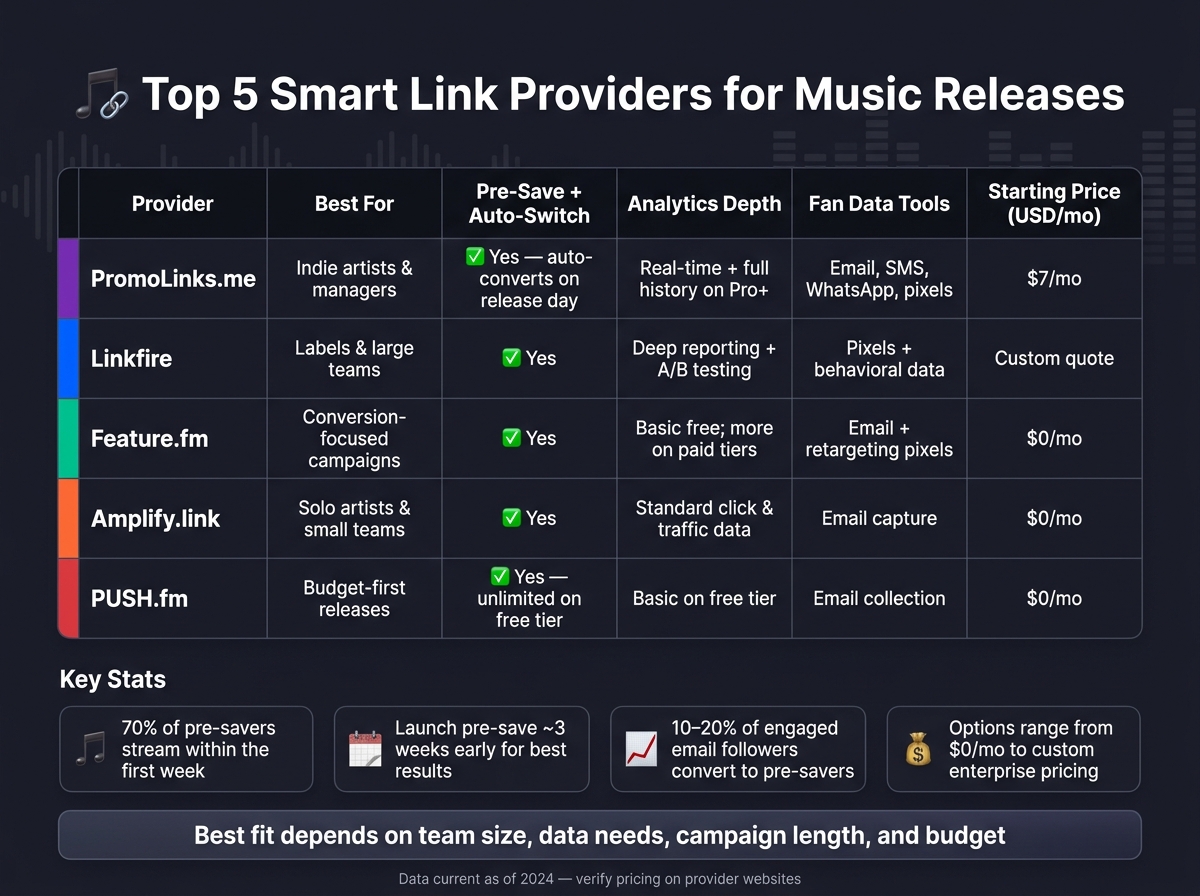
Top 5 Smart Link Providers for Music Releases: Side-by-Side Comparison
| Provider | Best For | Pre-Save + Post-Release | Analytics | Fan Data | Starting Price |
|---|---|---|---|---|---|
| PromoLinks.me | Indie artists, managers | Yes; one link before and after release | Real-time analytics; more history on higher plans | Email, SMS, WhatsApp, pixels on Pro+ | $7/month |
| Linkfire | Labels, large teams | Yes | Deep reporting, A/B testing | Pixels and behavioral data | Custom quote |
| Feature.fm | Conversion-focused campaigns | Yes | Basic on lower tiers; more on paid plans | Email, pixels | $0/month |
| Amplify.link | Solo artists, small teams | Yes | Basic click data | Email capture | $0/month |
| PUSH.fm | Budget-first releases | Yes | Basic on free tier | Email collection | $0/month |
Bottom line: if you want one link for pre-save, release day, and post-release tracking, these five tools cover the main use cases. The best choice comes down to team size, data needs, campaign length, and budget. For a deeper dive into strategy, check out our pre-save campaign guide.
What Smart Links Do for Singles, EPs, and Albums
A smart link gives you one URL that sends fans to the right DSP and keeps your release campaign tidy. For singles, EPs, and albums, that one link can cover pre-save, release-day routing, and post-release tracking.
The job changes a bit by release type. Singles usually need fast pre-save action. EPs and albums need one link that still works after launch, not just in the lead-up. So the same smart link can do work before release, on release day, and after the music is out.
Here’s how that plays out across the campaign.
Before release day, the page works as a pre-save campaign. Fans can authorize the release so the track lands in their library as soon as it goes live. That’s a big deal. Roughly 70% of users who pre-save a release stream it within the first week. And when a pre-save campaign goes live about three weeks before release, it will often convert 10–20% of engaged followers from email lists into pre-savers.
On release day, that same page switches jobs. Instead of asking for a pre-save, it routes fans to the live streaming links. Simple on the surface, but it cuts friction. One link, one destination hub, no scrambling to swap URLs across Instagram, TikTok, email, and everything else.
After release, smart links turn into a data source. They show which DSPs fans click, where those fans are located - including country and city - and which channels, like Instagram, TikTok, and email, are sending traffic . That gives you more than just click counts.
- Geographic data can help shape tour routing.
- Referral data shows which DSPs, locations, and channels are worth more attention on the next drop.
Once those basics are in place, the next move is figuring out which features matter most in a release-campaign tool.
What to Look for in a Release-Campaign Smart Link Tool
Smart link tools aren't all built the same. Some are made for a simple single release. Others are set up for teams juggling a full roster.
When you're picking a release-campaign tool, focus on four things: pre-save support, DSP coverage, analytics, and workflow fit. These four filters make it much easier to compare providers side by side.
Pre-save and post-release support comes first. Check whether the tool covers both stages of a campaign: pre-save support before release and a live streaming page after launch.
DSP coverage comes next. A good tool should route fans to the major DSPs without friction, including Spotify, Apple Music, YouTube, Amazon Music, Deezer, and Tidal.
Analytics and fan data matter too. You want reporting that shows clicks, platform preference, and geographic data. This data is a core part of music promotion across platforms. Real-time reporting is ideal because it gives you a clear read on what's happening as the campaign moves.
Workflow fit is the last filter. This is where the day-to-day side kicks in. Solo artists usually want a simple single-page setup. Managers and labels often need roster management, team access, and cross-release analytics.
Use these four filters to compare the five providers below.
1. PromoLinks.me
PromoLinks.me covers the full release cycle, from pre-save to live routing. For singles, EPs, and albums, the main draw is simple: one page handles the pre-save, launch-day routing, and post-release follow-up. That means no URL swap in the middle of a campaign. If you're running release marketing, that setup can save time and keep fan data in one place.
Pre-Save and Post-Release Support
PromoLinks automatically turns a page from pre-save mode into smart link mode on release day, so you don't need to change the URL by hand. Pre-savers are also added to your audience list, which makes it easier to send release-day follow-ups by email, SMS, or WhatsApp.
DSP Routing and Release-Page Coverage
The platform routes fans to Spotify, Apple Music, and YouTube. It also supports artist pages, event pages, and playlist spotlights. Every plan includes audio previews and QR code generation, which is handy when you want one link to work across social posts, ads, and print materials.
Analytics and Fan Data Capture
After routing is set up, the next thing most teams want to know is: what data do you get back? PromoLinks includes real-time analytics for views, clicks, platform preferences, and geo data down to the city level.
There is one plan-level limit to watch. The Indie plan only keeps 7 days of analytics history, while Pro and higher plans open up full historical reporting. Fan data capture is built in for email, SMS, and WhatsApp, and pre-savers are added to your audience list automatically.
Workflow Fit and USD Pricing
Pricing scales based on team size:
| Plan | Price (Annual billing) | Best fit | Artist Pages |
|---|---|---|---|
| Indie | $7/month | Solo artists and basic releases | 1 |
| Pro | $15/month | Artists running paid ads; adds retargeting pixels and custom domains | 1 |
| Manager | $31/month | Managers handling multiple artists | 3 |
| Label | Custom | Labels needing enterprise reporting | Up to 25 |
Indie and Pro each support one artist page, while Manager and Label are built for multiple acts. Pro and above also add retargeting pixels for Meta, TikTok, X, Spotify, and Google Analytics. There's also a free trial, and it doesn't require a credit card.
2. Linkfire
Linkfire is an enterprise smart link platform used by major labels and large teams. It makes the most sense when you're handling a roster, running several campaigns at the same time, and need one place to track performance across releases. At that point, the big draw isn't just ease of use. It's control.
Pre-Save and Post-Release Support
Linkfire supports Spotify pre-saves and Apple Music pre-adds through one shareable URL. Once the music goes live, that same link sends fans straight to the released track or album.
DSP Routing and Release-Page Coverage
Linkfire also supports artist-profile and playlist links, which gives labels one system for singles, EPs, albums, and catalog pushes. Its automated routing sends fans to the right DSP, which cuts down on friction and keeps campaigns cleaner.
Analytics and Fan Data Capture
This is where Linkfire starts to stand out for bigger teams. It offers enterprise reporting, A/B testing, and retargeting pixels for Meta, TikTok, and Google Analytics. That means teams can look across releases, compare results, and compare smart link services to make smarter calls on the next launch.
Workflow Fit and USD Pricing
For labels and larger teams, the choice often comes down to workflow and price. Linkfire uses tiered plans for pro teams and labels, and enterprise features are usually offered through custom quote. In plain English: it's built for label workflows, roster management, and planning across many releases at once.
| Feature | Linkfire Capability | Best For |
|---|---|---|
| Pre-Save Support | Spotify pre-save and Apple Music pre-add | Labels |
| DSP Routing | Automated platform detection | Enterprise teams |
| Analytics | Enterprise reporting and A/B testing | Data-heavy campaigns |
| Campaign Scope | Release, artist, playlist, and catalog links | Labels |
| Retargeting | Meta, TikTok, and Google Analytics pixels | High-budget advertisers |
| Pricing | Tiered plans and custom enterprise quotes | Enterprise teams |
3. Feature.fm
Feature.fm puts pre-save, pre-add, and post-release routing into a single link. That makes it a good fit for campaigns that want a clean handoff from the pre-save period to release day without sending fans to different URLs.
Pre-Save and Post-Release Support
Start the pre-save phase 2–4 weeks before release to build early saves ahead of launch day.
DSP Routing and Release-Page Coverage
Feature.fm combines pre-save, pre-add, and store links in one shareable URL. Once the release is live, the same link sends fans to their preferred streaming platforms.
Analytics and Fan Data Capture
Feature.fm offers basic click and platform reporting, so you can see how fans interact with the link before and after release.
Workflow Fit and USD Pricing
Feature.fm works well for campaigns that need one page for pre-save, pre-add, and store links. It starts with a free tier, then moves into paid plans for artists who want more links and added reporting. For current pricing in USD, check the Feature.fm website.
If you need deeper team management or broader reporting, the next provider may be a better match.
4. Amplify.link
Amplify.link is made for independent artists who want a clean release page and a setup that doesn’t take all day. It works well for single releases where speed and presentation matter most.
Pre-Save and Post-Release Support
Amplify.link supports pre-save campaigns, which can help build momentum before release day and drive engagement when the song goes live. That makes it a good fit if you want one simple page to carry the campaign from pre-launch through release.
DSP Routing and Release-Page Coverage
Amplify.link gives you one release page for both pre-save and post-release routing. After the release is live, that same page keeps traffic in one spot instead of sending fans to different URLs.
Analytics and Fan Data Capture
Amplify.link covers basic click activity and capture fan data during a launch. If you need deeper reporting or coordination across many artists, this platform isn’t built for that kind of setup.
Workflow Fit and USD Pricing
Amplify.link fits solo artists and small teams that care more about a polished release page than roster-level workflow. Pricing includes a free tier, Pro at about $10/month, and Premium at about $20/month. Check current U.S. pricing on Amplify.link before you pick a plan.
If your campaign needs deeper analytics or support for multiple artists, the next provider is a better match.
5. PUSH.fm
PUSH.fm is a simple pick for independent artists and small labels that want to launch a release campaign without much setup. It’s built for fast, low-friction campaigns, so it works well for a first single or any rollout where money is tight.
Pre-Save and Post-Release Support
PUSH.fm supports pre-saves for Spotify, Apple Music, and Deezer. The same link stays live after the release, which keeps things easy for fans and saves you from swapping links at the last minute.
DSP Routing and Release-Page Coverage
PUSH.fm sends fans to the main DSPs and keeps one release page active before and after launch. That gives you one central place to share across the full campaign.
Analytics and Fan Data Capture
Reporting is pretty basic. You get click data and simple campaign activity, which can be enough for budget-first campaigns that don’t need deep team reporting.
Workflow Fit and USD Pricing
PUSH.fm’s free tier includes unlimited Smart Links and pre-save campaigns. That makes it a good fit for first-time releases, small EP drops, budget album campaigns, and simple launch plans.
There is a tradeoff, though. Reporting is limited, and the platform has fewer workflow tools for larger teams. So if your main goal is to get a low-cost release campaign live fast, PUSH.fm is the most stripped-down option in this list.
How the 5 Providers Compare for Singles, EPs, and Albums
This table helps match each tool to the stage of a release, the size of the team, and the budget. What works for a one-song drop may fall short for a long album rollout. A lot comes down to campaign length and how much data you want once the music is out.
| Provider | Best Fit | Pre-Save Support | Analytics Depth | Customization | Fan Data Tools | Starting Price (USD/mo) |
|---|---|---|---|---|---|---|
| PromoLinks.me | Independent artists & managers | Included on all plans; auto-converts after release | Real-time analytics; all-time on Pro+ | Templates, custom branding, custom domains | Email capture, pixel retargeting, Fan Wall on higher tiers | $7 (Indie, billed annually) |
| Linkfire | Labels & larger teams | Paid tiers | Deep DSP partnerships and what fans do after clicking | Branded pages, custom domains on higher tiers | Email capture, behavioral data | Custom quote |
| Feature.fm | Artists and labels focused on conversion and tracking | Free tier includes one pre-save service; expands by tier | Free tier; longer analytics and customization on paid plans | Full design customization on Pro+; custom domains | Email capture, retargeting pixels | $0 (Free) |
| Amplify.link | Independent artists and small teams | Pre-save pages and landing pages | Standard click and traffic data | Image, color, and layout controls | Email capture | $0 (Free) |
| PUSH.fm | Budget-first indie artists | Unlimited on free and paid tiers | Basic on free; more detail at $5/mo | Custom backgrounds on premium | Email collection on free; export on paid | $0 (Free) |
The main decision shifts with the type of release: singles need speed, EPs need tracking, and albums need workflow.
For singles, the big thing is getting live fast without spending much. Free and low-cost tools are often enough to launch a release page in no time. If the plan is not just streams, but also fan growth, tools with built-in email capture and pixel retargeting can pull more weight.
For EPs, longer tracking windows and stronger branding start to matter more. A campaign that runs for several weeks needs analytics that stay useful through the whole rollout. It also helps to have enough design control to keep multiple tracks looking tied together instead of patched together.
For albums, the focus shifts again. Here, longer analytics windows, a clearer visual identity, and smoother team or label workflows matter more than simple setup. Album campaigns usually need room for multiple artists or workspaces, a steady brand look across a longer release cycle, and enough post-launch data to guide decisions well after release day.
Pros and Cons Across the 5 Providers
Each provider has a clear upside and a clear catch. The best fit comes down to three things: campaign size, how much reporting you need, and how your team works day to day.
Some tools are built for simple single launches. Others lean more toward label use, deeper data, or team coordination. So instead of hunting for a one-size-fits-all option, it helps to match the platform to the kind of release you're running.
| Provider | Main Strengths | Main Tradeoffs | Best Release Type |
|---|---|---|---|
| PromoLinks.me | Built-in pre-saves, fan capture, and custom branding at affordable USD pricing | Newer platform compared with legacy providers | Singles, EPs, and albums for independent artists and managers |
| Linkfire | Enterprise-grade analytics and deep DSP data partnerships | High cost; pricing not publicly listed for indie budgets | Major album campaigns and global label rollouts |
| Feature.fm | Marketing automation and audience segmentation | Pro-level features cost significantly more | Labels with dedicated marketing teams |
| Amplify.link | Fast setup and polished release pages | Limited analytics depth and no roster-level workflow | Singles and small EP drops for solo artists |
| PUSH.fm | Unlimited smart links and pre-saves on the free tier | Basic reporting; fewer workflow tools for larger teams | Budget-first singles and simple launch plans |
If you want a quick read: PromoLinks.me works well for indie artists and managers who want pre-saves, branding, and fan capture without a big monthly bill. Linkfire leans toward large-scale releases where deep data matters more than price. Feature.fm suits teams that want automation and audience targeting, but the stronger tools sit at a much higher price point. Amplify.link is easy to get live fast, though its reporting is lighter. PUSH.fm is the budget play, especially for simple single campaigns where unlimited free links can go a long way.
Conclusion
Once you line up release types, workflow needs, and reporting depth, the right pick mostly comes down to fit.
For many independent artists, PromoLinks.me handles pre-saves, fan capture, and artist pages at a price that’s easier to work with. PUSH.fm makes sense for budget-first single launches. Amplify.link is a good match if you want a clean release page and fast setup. Feature.fm fits marketing-heavy campaigns built around pre-saves and pre-adds. And Linkfire is the go-to option for label-scale reporting and deep DSP data.
Before you commit, check DSP support, fan-data ownership, and pricing. Choose the tool that fits your release, not the one with the longest feature list.
FAQs
How early should I launch a pre-save campaign?
Launch your pre-save campaign as soon as your distributor locks in the release date. For most releases, that’s about 2 to 4 weeks before the track goes live. That window gives you enough time to build momentum before release day.
PromoLinks can also turn your pre-save link into a smart link automatically once the music drops. So the traffic you drive before launch still sends fans to the live release after it’s out.
Do I need different smart links for singles, EPs, and albums?
Yes. Give each single, EP, or album its own smart link. That way, fans land on the right release, and you can track how that one project performs.
A separate link also makes promo easier. It can switch from a pre-save page to a live streaming hub on release day, so you don’t have to change your bio links or update promo assets.
What analytics matter most after release day?
Once your release is live, keep a close eye on real-time analytics. You want to see which channels and regions are sending traffic so you can put more time and budget into what’s working.
Watch platform preferences, geographic data, landing page click-through rate, and UTM parameters. As a simple benchmark, a click-through rate above 60% is strong. If it drops below 40%, your page may need a few changes.
Related Blog Posts
Ready to create your smart links?
Join thousands of artists using PromoLinks to promote their music smarter.
Get Started Free