
Cross-Promotion Basics for Artist Teams
I plan artist cross-promotion around one goal, the right partners, and one fan destination. Before anyone posts, I set a target - such as pre-saves, ticket sales, or email signups - and agree on costs, deadlines, disclosures, and permissions.
Here’s the workflow I use:
- Choose partners: Check audience fit, past posts, fees, and delivery history.
- Put terms in writing: Define deliverables, approvals, payment, music rights, and content-use limits.
- Prepare the fan destination: Use a pre-save campaign, listening link, event page, or signup form, with a separate tracking link for each creator placement.
- Test and launch: Check links on mobile and desktop, then review live posts within 15–30 minutes.
- Measure and decide: Compare confirmed fan actions and costs with the target, then repeat, change, expand, or stop.
My rule: <u>a click is not a stream</u>. I keep reach, traffic, and completed actions separate - and save the campaign records so the next round starts with results, not guesses.
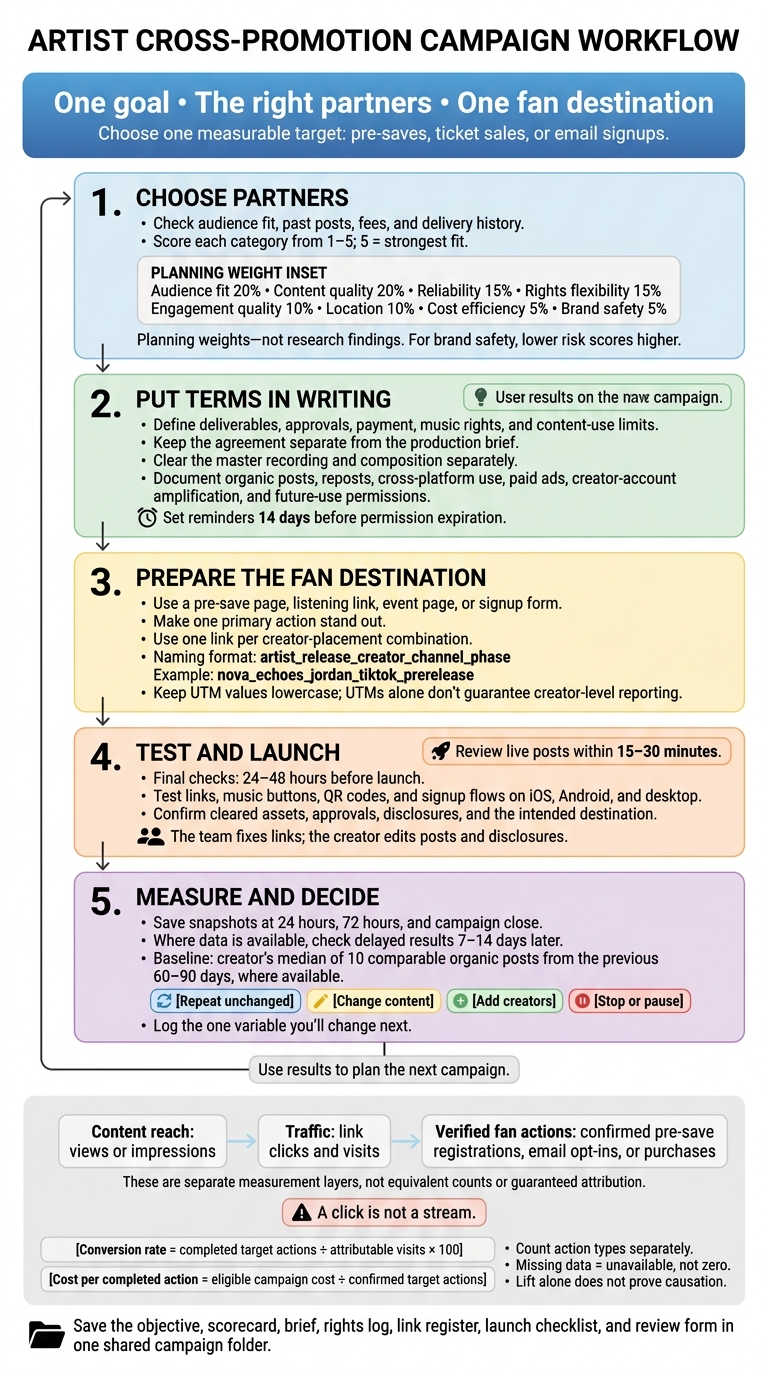
Artist Cross-Promotion: From Partner Selection to Results
How Hopeless Records Approaches Influencer and UGC Music Marketing
sbb-itb-e819543
Choose Partners and Agree on Terms
With the goal set, choose creators who reach the right fans. Put the deal in writing before production starts.
Assign one owner to handle outreach, negotiation, approvals, rights, payment, links, reporting, and archives. Approval of the content does not clear its rights. Keep the agreement, which controls payment and permissions, separate from the brief, which guides production.
Score Creators and Define the Offer
Let the campaign goal guide your shortlist before scoring anyone. Search by genre, location, hashtags, fan comments, and local event communities. Look for creators already using similar artists’ music, too.
Request recent audience demographics and sponsored-post samples. Check posting consistency, typical views, and meaningful comments. Score each category from 1–5, with 5 meaning the strongest fit, using the weights below as a planning guide.
Confirm that the account, audio, and format can be used for branded content or ads. Access through a platform does not mean you have commercial clearance.
| Category | Weight | Evidence to check |
|---|---|---|
| Audience fit | 20% | Genre relevance and audience interests |
| Content quality | 20% | Music-related posts and execution |
| Reliability | 15% | Posting consistency and delivery history |
| Rights flexibility | 15% | Whether the creator will license the uses you need |
| Engagement quality | 10% | Relevant comments, shares, and suspicious spikes |
| Location | 10% | Audience share in target markets |
| Cost efficiency | 5% | Total fee relative to expected qualified actions |
| Brand safety | 5% | Prior sponsorships and conflicts; lower risk scores higher |
Start outreach with one content idea. Spell out each side’s deliverables, compensation, and rights. The offer might include paid deliverables, tickets or experiences, reciprocal posts, affiliate compensation, or a mix.
For exchanges, define what both sides will provide. For affiliate deals, specify eligible sales, the attribution window, and what triggers payment. Compare the full rights package - not just the posting fee.
Write a One-Page Content Brief
Use this compact template and label requirements as mandatory or creator choice. Where possible, let the creator decide the performance style, script, and visual approach.
Require clear disclosure within paid or gifted endorsements, including affiliate arrangements, along with applicable platform disclosure tools. Don’t rely on “collab” alone. Save the live URL or a disclosure screenshot as evidence.
Campaign: Artist, release title/date, objective, audience, approved artist bio, and campaign contact.
Assets and audio: Approved artwork/files, credits, audio version, exact start timestamp, and permitted clip length.
Creative: Hook, required message, and room for the creator’s approach.
Delivery: Post count, format, captions, tags, creator-specific link, link placement, posting deadline/time zone, and minimum live period.
Review: Draft deadline, named approver, review turnaround, included revision rounds, and escalation contact.
Commercial terms: Compensation, invoice requirements, payment trigger, cancellation fee, rescheduling, and remedies for nonpublication. Match the signed agreement.
Disclosure: Required wording, placement, platform tools, and proof.
Once the brief is approved, move straight to rights clearance.
Confirm Music Rights and Content Permissions
Clear the master recording and composition separately, including synchronization, samples, featured performers, and third-party footage or artwork. Document filming permissions, edit limits, exclusivity, and rights to names, likenesses, and voices.
Keep agreements, rights, approvals, and payment records in one shared log. Use the table below to track permissions, and set reminders 14 days before expiration. Get legal review when ownership is unclear or the deal involves minors, union talent, large ad budgets, or broad perpetual rights.
| Use | Permission to document | Duration and territory | Responsible parties |
|---|---|---|---|
| Creator’s organic post | Approved music, recording, and third-party content | Posting window, minimum live period, territory | Creator and rights verifier |
| Artist repost | Creator-content license, credit, editing limits | Named channels, term, territory | Creator and artist manager |
| Cross-platform use | Explicit platform list and cleared audio | Term and territory per channel | Marketing and rights verifier |
| Paid ads | Music, content, likeness, voice, and advertising rights | Ad dates, territory, expiration | Rights owners and marketing |
| Amplification from the creator’s account | Account authorization and permitted edits | Access period, territory, revocation terms | Creator and paid-media owner |
| Future use | Separate renewal permission and fee | New campaign, scope, rate, term, territory | Creator and agreement owner |
After logging permissions, build the campaign links and tracking.
Set Up Links and Campaign Tracking
Once rights are cleared, set up the destination and tracking system before launch.
Build Campaign Pages in PromoLinks.me
Match the destination to your campaign goal. Build the page in PromoLinks.me and make one primary action stand out. Check plan limits and analytics retention before launch. If you collect email addresses, explain what subscribers will receive and include the required consent, privacy, and unsubscribe information.
With the page ready, assign a separate link to every creator placement.
Create a Tracking Link for Each Creator
Use one link per creator-placement combination. Don’t reuse a link across creators or placements. Follow the naming format artist_release_creator_channel_phase.
Example:
nova_echoes_jordan_tiktok_prerelease.
Tracking template: Record the campaign name and ID, creator, platform, format, phase, owner, source URL, destination, short link, UTMs, promo code, launch and expiration dates, status, and redirect notes.
Keep all UTM values lowercase. Set utm_source, utm_medium, and utm_campaign. Add utm_content for creator and creative identifiers, plus utm_id where supported. Keep personal information out of URLs. A separate promo code can support ticket or merchandise tracking, but it shouldn’t replace link tracking.
Check that redirects and reports preserve the identifiers you need. UTMs alone don’t guarantee creator-level reporting. Test links, music buttons, QR codes, and signup consent, confirmation, and unsubscribe flows on iOS, Android, and desktop. Test over cellular data and Wi-Fi, and check both printed and on-screen QR codes. Log the tester, date, device, result, and fix.
For release day, keep one stable short link whenever possible. Update its destination instead of replacing published links. Record the original URL, old and new destinations, effective time, responsible owner, and rollback destination. Test the change immediately.
Once links are live, report content results separately from traffic and conversions.
Measure Content, Traffic, and Fan Actions Separately
Track content reach, traffic, and fan actions as separate layers. Agree on definitions before launch, and use the same reporting windows and denominators across creators.
| Metric | Source | Calculation or definition | Frequency | Decision use |
|---|---|---|---|---|
| Views or impressions | Creator-platform report | Platform-defined exposure counts; keep separate | Weekly | Assess distribution |
| Completion rate | Video-platform report | Completed views ÷ eligible starts × 100 | Weekly | Compare formats |
| Engagement rate | Creator-platform report | (Likes + comments + shares + saves) ÷ impressions or reach × 100 | Weekly | Assess response |
| Link clicks | Link analytics | Recorded creator-link clicks | Daily during launch | Identify traffic-driving placements |
| Visits | Campaign-page analytics | Attributable sessions or visits | Daily during launch | Detect redirect or page issues |
| Verified fan actions | Relevant action report | Confirmed pre-save registrations, email opt-ins, or purchases; count separately | Daily during launch | Measure the goal |
| Click-through rate | Link and platform reports | Tracked clicks ÷ eligible impressions or reach × 100 | Weekly | Compare traffic efficiency |
| Conversion rate | Campaign-page/action reports | Completed target actions ÷ attributable visits × 100 | Weekly | Assess the destination |
| Cost per completed action | Finance and action reports | Eligible campaign cost ÷ confirmed target actions | After reconciliation | Compare efficiency |
Use platform reports for reach, PromoLinks.me analytics for clicks and visits, and action reports for the final result. Reconcile listening results separately: clicks don’t verify streams, saves, or follows, and they don’t establish creator-level attribution. Apply the same cost scope to every comparison, including creator fees, production, amplification, software, and incentives.
Keep raw counts alongside filtered or unique activity where available. Document test clicks, suspected bots, and deduplication rules. Mark missing data as unavailable, not zero. Before enabling tracking pixels, review disclosures, applicable consent requirements, and platform terms. Limit data collection, access, and retention.
Launch, Review, and Repeat
With links and tracking live, use the final 24–48 hours to check every launch detail.
Complete the Launch Checklist
Confirm that the signed agreement matches the approved plan, the assets are cleared, and all launch materials are final. Send each creator a folder with approved files, disclosure language, links, contact details, platform-specific instructions, and an escalation contact. Put paid or gifted disclosures in the post itself, not in comments or text viewers must expand.
Check each published post within 15–30 minutes. Compare it with the approved asset and confirm that it points to the intended destination. Log the live URL, timestamp, format, disclosure, link, audio, call to action, and any corrections.
The team fixes links; the creator edits posts and disclosures. Escalate broken links, missing disclosures, wrong dates, unapproved assets, and platform violations immediately. Watch comments for questions, broken-link reports, misinformation, and safety issues. Let the artist account respond naturally without flooding the creator’s comments or posing as the creator.
Compare Results With Your Baseline
Measure results against the one primary goal set earlier. Save snapshots at 24 hours, 72 hours, and campaign close. Where data is available, check delayed results 7–14 days later.
Use one review form to log the defined goal, supporting metrics, meaningful comments, secondary shares, viewer retention, and approval delays. At campaign close, record results by creator, platform, content format, destination, and paid versus organic placement.
Compare each placement with the creator’s median of 10 comparable organic posts from the previous 60–90 days, where available. Match format, platform, audience size, posting time, and content type. Mark missing benchmarks as unavailable rather than filling in the gaps.
Use retention and landing-page conversion to help determine whether a problem sits with the content or the destination. Also log overlapping ads, press, playlist activity, and other creator posts. Lift alone does not prove the campaign caused it.
Decide What to Repeat or Change
Use the results below to choose whether to repeat, revise, expand, or stop.
| Decision | Evidence to use | Next action |
|---|---|---|
| Repeat unchanged | Strong qualified clicks and conversions; relevant audience; efficient cost; clear rights; reliable delivery | Renew the partner and reuse the proven format and destination |
| Change content | Relevant audience, but weak retention or click-through; rights fit; acceptable cost; reliable delivery | Keep the creator and change one hook, edit, caption, or call to action |
| Add creators | Strong results with limited reach; high-quality actions from a clear audience segment; budget and permissions allow expansion; reliable process | Recruit similar creators and keep the winning destination |
| Stop or pause | Weak completed actions; poor conversion or irrelevant audience; high cost, unclear rights, or poor fit; repeated delays or errors | End or pause the partnership and document the lesson |
Before reusing content, check that the logged permissions cover the next campaign. Obtain any required renewals or approvals.
Send the creator a short recap with live links, reach, qualified clicks, completed actions, the strongest audience responses, and one next step. Plan the next round around releases, events, budget, capacity, and audience response. This is especially critical when promoting a single release where timing and tracking are paramount. Set the next test date, log the one variable you’ll change, and save the decision with the campaign records.
Conclusion: Keep Your Campaign Toolkit Together
Keep your workflow consistent: one measurable outcome, relevant creators, written deliverables and permissions, tested tracking paths, clear launch owners, and decisions based on verified results.
After each campaign review, save the records in one shared campaign folder: the objective worksheet, scorecard, brief, rights log, link register, launch checklist, and review form. Name files consistently so you can find the approved version later.
Include a one-page summary covering the objective, campaign dates, total spend, deliverables, measured results, issues, and next test. If you use PromoLinks.me, save its analytics in that folder, too. Keep click data separate from confirmed streams, saves, or purchases.
Start the next campaign with that folder. Update the scorecard with actual performance and delivery notes. Carry forward what worked, flag permissions that need renewal, and use the records as your baseline for comparison.
FAQs
How much should I budget for my first creator campaign?
There’s no fixed amount to spend. Set your budget based on your resources. If money’s tight, focus on community engagement, short-form content, collaborations, and direct outreach. PromoLinks.me plans start at $7.00 per month when billed annually.
With more room in your budget, consider paid creator partnerships and targeted ads. Use a marketing strategy planner to match your spending to your release goals and the platforms you choose.
Can I cross-promote effectively with a small fan base?
Yes. Smaller audiences are often more engaged, which can make cross-promotion with other artists work well. By combining resources and sharing fan bases, both artists can reach people they might not reach on their own.
Use PromoLinks.me to create co-branded landing pages and track which partner’s audience converts best through shared analytics. Collecting email addresses and sharing promotional links can help turn casual clicks into lasting fan connections.
How long should I test a creator before renewing?
Keep cross-promotion running for at least one month before deciding whether to renew. Most promotion ends after seven days. Check your real-time analytics dashboard to see which channels keep driving traffic beyond release week.
Compare results with your goals to spot trends and see which partnerships perform well. Then decide whether the collaboration generates enough engagement to renew - or whether you need to change your approach.
Related Blog Posts
Ready to create your smart links?
Join thousands of artists using PromoLinks to promote their music smarter.
Get Started Free