Email Timing Strategies for Tour Announcements
Email Timing Strategies for Tour Announcements
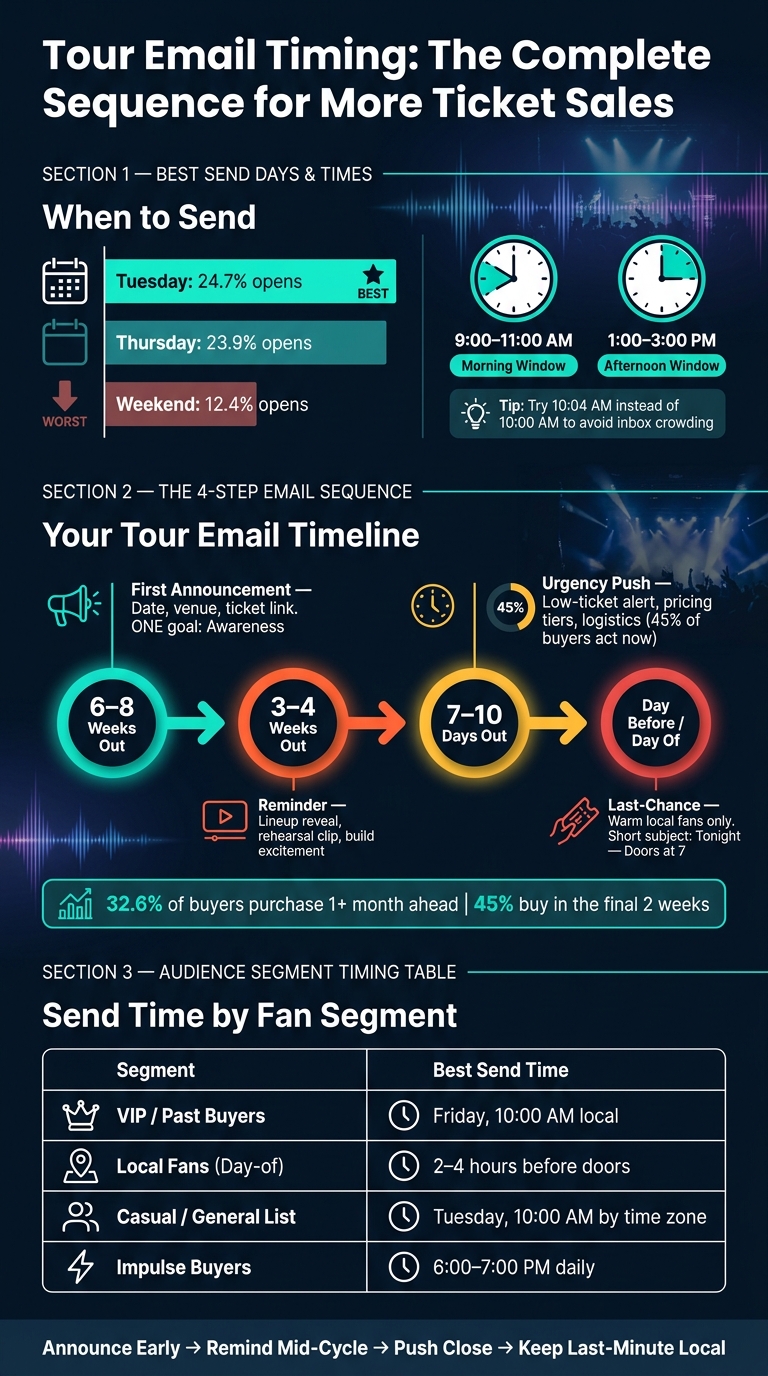
If I want more ticket sales from email, I should start with a simple rule: send tour emails on Tuesday to Thursday, hit each fan in their local time zone, and build a short sequence around 6–8 weeks, 3–4 weeks, 7–10 days, and the day before the show.
The data in this piece points to a clear pattern. Mid-week sends tend to beat weekends, with Tuesday averaging 24.7% opens and weekends dropping to 12.4%. For first sends, I’d start with 9:00–11:00 AM or 1:00–3:00 PM local time. Then I’d watch clicks and ticket sales, not just opens, because clicks show when fans are ready to act.
Here’s the full takeaway in plain English:
-
Use one goal per email
- Awareness for the first announcement
- Clicks for reminder emails
- Sales or attendance for last-minute sends
-
Start with the safest send windows
- Tuesday for the main announcement
- Wednesday or Thursday for follow-ups
- 9:00–11:00 AM and 1:00–3:00 PM local time as starting points
-
Send by local time zone
- Split sends for ET, CT, MT, and PT
- Use city or ZIP code to keep each stop relevant
-
Match the schedule to how fans buy
- 6–8 weeks out for the first tour email
- 3–4 weeks out for a second push
- 7–10 days out when many buyers are ready
- Day-before or day-of only for warm local fans
-
Test one timing change at a time
- Tuesday vs. Thursday
- 10:00 AM vs. 2:00 PM
- Even small shifts like 10:04 AM vs. 10:00 AM
-
Use click data by city
- Opens show attention
- Clicks show intent
- Conversions show what sold tickets
A short way to think about it: announce early, remind mid-cycle, push close to the show, and keep last-minute sends local. That gives me a clean system I can improve from one tour to the next.
Tour Email Timing: The Complete Sequence for More Ticket Sales
Pick the Best Send Days and Times for U.S. Fans
Start with Tuesday, Wednesday, and Thursday
For tour announcements, mid-week is the safest place to begin. Monday inboxes are stuffed with weekend catch-up, and by Friday, a lot of people are already mentally checked out. Tuesday, Wednesday, and Thursday tend to land in a steadier rhythm, when fans are more likely to read and act.
Tuesday is the best starting point for big tour announcements. It averages 24.7% opens. Thursday comes in at 23.9%, while weekend sends drop to 12.4%.
| Day | Best Use Case |
|---|---|
| Tuesday | Major tour announcements and on-sale launches |
| Wednesday/Thursday | Reminders, follow-ups, and "Early Bird" deadline nudges |
| Weekend | Day-of reminders for warm local segments only |
Once you’ve picked the day, the next step is timing it in the fan’s local window.
Use Local-Time Windows Like 9:00–11:00 AM and 1:00–3:00 PM
Start with two time windows: 9:00–11:00 AM and 1:00–3:00 PM in the recipient’s local time. Morning works well because people have settled in but haven’t lost the day yet. Early afternoon catches fans who are checking email around lunch or right after it.
There’s one wrinkle worth knowing: ticket buying peaks between 6:00 PM and 7:00 PM, but Tuesday mornings still test best for brand-new announcements.
If your list leans nightlife-heavy or younger, especially fans ages 17–24, later sends can work better. In that case, test 12:00 PM or an early evening slot before you lock in a morning send.
That approach only works when each fan gets the message in their own time zone.
Segment by Geography Instead of Sending to All Time Zones at Once
A 10:00 AM send only does its job if it arrives at 10:00 AM local time. Send separate ET, CT, MT, and PT versions so fans in each region get the email at the same local hour.
Use city or ZIP code at signup to tighten time-zone accuracy. It also helps you send tour emails only to fans near the venue. That can improve click-through rates and cut down on the annoyance of sending show promos to people in cities that aren’t on the route.
Keep the send labels clear, like 10:00 AM ET or 10:00 AM PT.
That setup makes automated tour schedules more precise.
sbb-itb-e819543
Build an Automated Tour Email Schedule
Once local send times are dialed in, set your email sequence around the way fans actually buy tickets. About 32.6% of buyers purchase at least a month ahead of time, while 45% buy in the final two weeks. That split matters. Your schedule needs to speak to both the planners and the last-minute crowd.
Send the First Announcement 6 to 8 Weeks Before the Show
For a regional run, 6 to 8 weeks is usually the right window. It gives fans time to ask for time off, book a place to stay, and put money aside. If you're promoting a full U.S. tour or a big festival, go earlier: 2 to 3 months, or about 90 days out, is the better play.
This first email should do ONE thing: announce the show. Keep it simple. Include the date, venue, city, and a direct link to tickets or the waitlist.
For smaller local shows, the timing can be tighter. If you have an engaged, city-specific list, a 2 to 6 week lead time can still work well. The more local and active the list is, the less runway you need.
Add Reminder Emails at 3 to 4 Weeks and 7 to 10 Days Out
The 3 to 4 week email should build interest instead of repeating the same pitch. Change the angle a bit. Share a lineup reveal, a short rehearsal clip, or a quick note about why the show means something. The goal is to make the event feel current and worth paying attention to.
Then comes the 7 to 10 day email. This is where urgency starts to kick in. Nearly half of your potential buyers are ready to act during this window. Lead with something specific: a low-ticket alert, a ticket price tier that ends soon, or simple logistics like parking and set times. Small details like that can remove friction for people who are still undecided.
Use Last-Chance and Day-Before Emails Only for Warm Local Segments
Final reminder emails should go to a small, local segment: people near the venue who still haven't bought. Sending a last-chance email to fans outside that market just wears out your list without adding more sales.
"A targeted email to 200 people in one city outperforms a mass blast to 2,000 across the country every time." - Chartlex
The day-of email should be short and direct. A subject line like "Tonight - Doors at 7" or "Only a few tickets left" does the job. This send is meant to drive last-minute walk-up sales and cut down on no-shows.
For automation, use goals instead of fixed wait steps. That way, late subscribers skip emails that no longer fit and drop into the right part of the sequence. Use these send points as your starting framework for later timing tests. Tracking music analytics that matter will help you refine these windows based on actual fan behavior.
Test Send Times and Improve with Click Data
Once your sequence is live, check timing against what your fans actually do. Best-practice advice is a fine starting point, but your own list data should decide the best send time.
Run Simple A/B Tests on Send Time
Keep the test simple. Pick one variable and test only that.
Send half your list at 10:00 AM and the other half at 2:00 PM. Or test Tuesday against Thursday. Keep everything else the same: same subject line, same template, same offer. If you change more than one thing, you won't know what caused the shift.
Open rates show attention. Clicks and ticket sales show intent. That’s why clicks and ticket conversions matter more here. Before you lock in a winner, check the result across a few sends.
It’s also worth testing times a few minutes past the hour. Try 10:04 AM instead of 10:00 AM. A lot of automated emails hit right on the hour, so a small offset can help your message show up near the top of the inbox pile. Then use what you learn as the baseline for the next send.
Use PromoLinks.me Analytics to Find the Best Click Windows
After each test, compare click patterns by city and by stop. Open rates show when fans opened the email. Click data shows when they were ready to do something.
PromoLinks.me event pages and smart links make that part much clearer. You can see when fans in different cities are clicking through to your ticket page.
That gives you city-level click windows. Once those patterns show up, you can time future sends for each tour stop instead of relying on one national blast time.
Adjust Timing by Audience Segment
Next, adjust timing by fan type. Fans don’t all buy the same way, and one send time won’t fit every group.
Segment timing by behavior:
| Segment | Recommended Send Time | Rationale |
|---|---|---|
| VIP / Past Buyers | Friday, 10:00 AM local | Pay-day psychology and weekend planning |
| Local Fans (Day-of) | 2–4 hours before doors | Facilitates entry and captures spontaneous plans |
| Casual / General List | Tuesday, 10:00 AM (by time zone) | "Planning mode" window for the week ahead |
| Impulse Buyers | 6:00–7:00 PM daily | Post-work shift into social decision-making |
Fans who already know you may react well to early-morning access windows. Casual listeners often need an evening nudge. The key is to segment by behavior, not only by geography, so your send time lines up with buying intent.
Conclusion: Build a Simple Timing System and Refine It Over Time
Your tour email timing doesn't need to be complicated. Start with one repeatable cadence: announcement, presale, reminder, and a last-minute local send. That's enough to get the system moving without turning your schedule into a mess.
From there, let fan behavior guide your next move. The best timing isn't the one with the highest open rate. It's the one that gets people to click, visit the event page, and buy tickets.
Use PromoLinks.me data to compare clicks by city and time zone. Then tweak one variable at a time. Maybe you change the send time. Maybe you shift the reminder by a day. Keep it simple so you can tell what changed the result.
Each tour gives you cleaner timing data for the next one.
FAQs
How many tour emails are too many?
It depends on your strategy, but three to five emails is usually the sweet spot.
Send fewer than three, and you may not build enough anticipation. Go past six, and people can burn out fast unless each email gives them a clear reason to care.
A simple way to keep this from feeling like too much: segment by location so fans only get announcements that matter to them. And make sure each email adds something new, like ticket price updates or exclusive content.
What should I track besides open rates?
Beyond open rates, pay attention to a few metrics that show what people do after they open your email:
- Click-through rates (CTR) to see how much interest your message sparks
- Conversion rates to tie email campaigns to ticket sales
- Bounce rates and spam reports to help protect deliverability
You can also use this data to segment your audience based on behavior. For example, split early-bird buyers from last-minute buyers so you can fine-tune your messaging and send times.
How do I send by local time zone?
Schedule announcements for 10:00 a.m. local time so they land early in the workday, when fans are more likely to check their inboxes.
You can use subscriber location data, often estimated by IP address, to split your list by city or region. Automated sequences help keep send times consistent across multiple time zones.
Related Blog Posts
Ready to create your smart links?
Join thousands of artists using PromoLinks to promote their music smarter.
Get Started Free