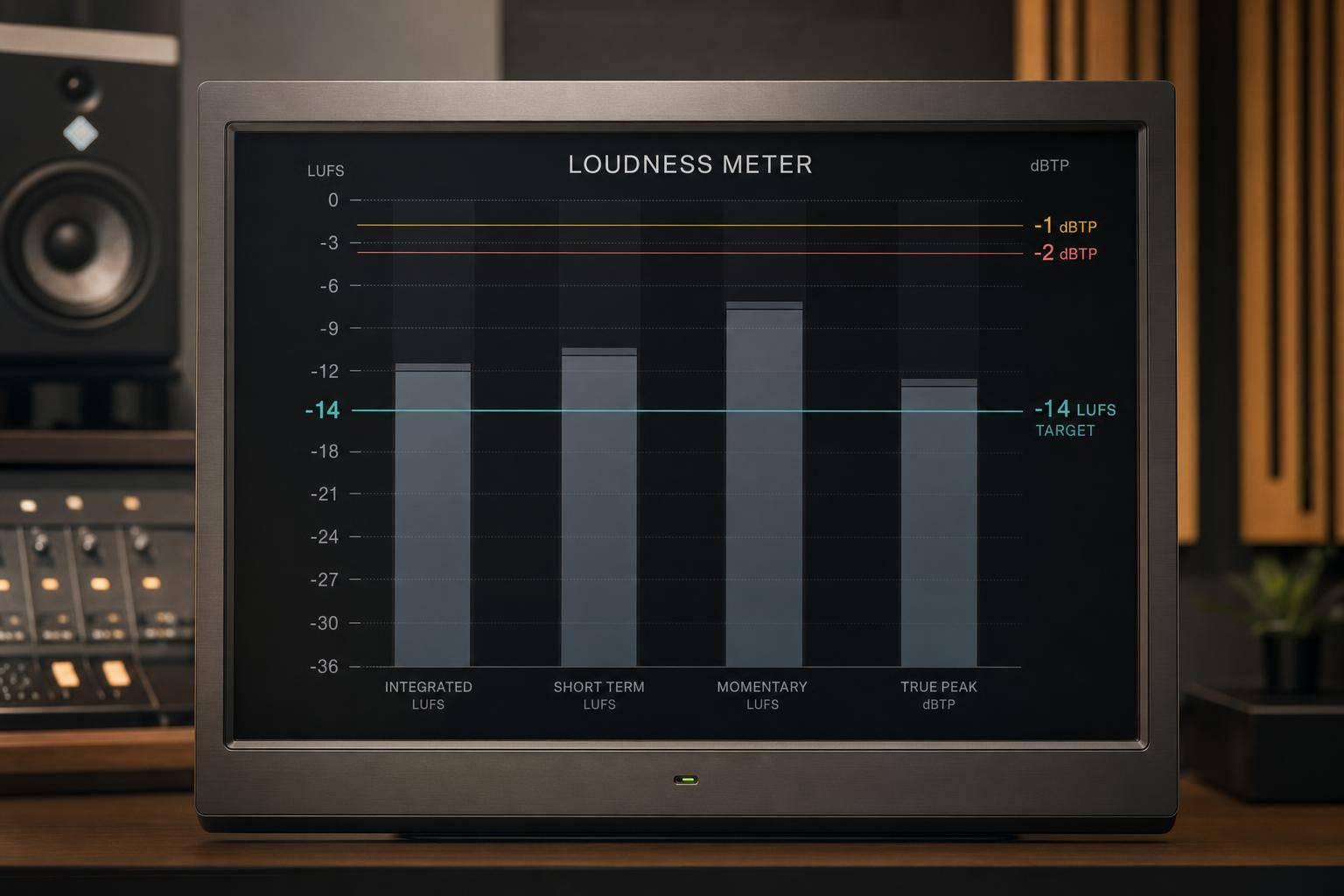
Mastering for Streaming: Loudness Standards Compared
Mastering for Streaming: Loudness Standards Compared
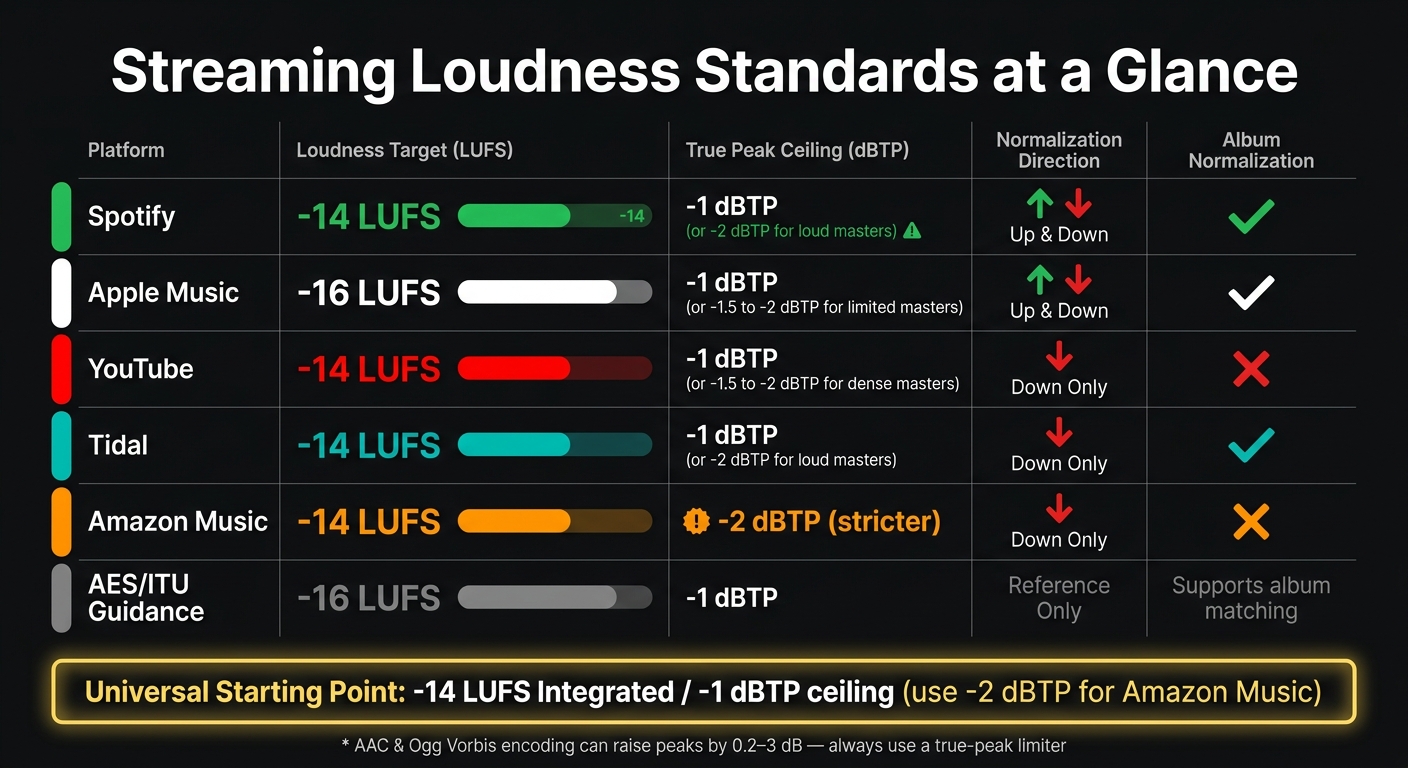
If you want one streaming master that works almost everywhere, I’d start at -14 LUFS integrated with a -1 dBTP ceiling. The one big exception is Amazon Music, where I’d leave -2 dBTP.
Here’s the short version:
- Spotify, YouTube, Tidal, and Amazon Music sit around -14 LUFS
- Apple Music sits lower at -16 LUFS
- Spotify and Apple Music may turn quiet tracks up
- YouTube, Tidal, and Amazon Music only turn loud tracks down
- True peak headroom matters because AAC and Ogg encoding can push peaks up by 0.2 dB to 3 dB
- A master pushed to -8 LUFS won’t play louder after normalization. It usually just gets turned down
So when I look at these platforms side by side, the takeaway is simple: chasing loudness past the target usually costs punch without giving playback gain back. For most releases, a moderate master translates better than an over-limited one.
Quick Comparison
| Platform | Loudness Target | True Peak Ceiling | Normalization Style | Album Handling |
|---|---|---|---|---|
| Spotify | -14 LUFS | -1 dBTP, or -2 dBTP for louder masters | Up or down, based on headroom | Yes |
| Apple Music | -16 LUFS | -1 dBTP, often -1.5 to -2 dBTP for limited masters | Up or down with Sound Check | Yes |
| YouTube | -14 LUFS | -1 dBTP, sometimes -1.5 to -2 dBTP | Down only | Not the main focus |
| Tidal | -14 LUFS | -1 dBTP, or -2 dBTP for louder masters | Down only | Yes |
| Amazon Music | -14 LUFS | -2 dBTP | Down only | No |
| AES/ITU guidance | -16 LUFS for music | -1 dBTP | Reference only, not a platform rule | Supports album-based matching |
If I had to boil the full article down to one line, it would be this: master for balance, not brute force.
Streaming Platform Loudness Standards Compared: LUFS & True Peak Guide
You don't need to master to -14 LUFS | iZotope
sbb-itb-e819543
1. Spotify
Spotify’s Normal setting aims for -14 LUFS under ITU-R BS.1770. So in plain English, if you’re mastering for Spotify, that’s the level to keep in mind.
A good working ceiling is -1 dBTP for most masters. If your track ends up louder than -14 LUFS, Spotify recommends -2 dBTP instead. The reason is simple: inter-sample peaks can jump during transcoding to Ogg Vorbis or AAC, which can lead to clipping after upload.
Spotify applies normalization as playback gain, not as a change to the audio file itself. That matters. If you slam a master past the platform target, Spotify just turns it down on playback. So extra limiting doesn’t give you an edge. Instead, focus on music analytics that matter to see how listeners actually engage with your tracks.
Spotify also gives listeners three playback settings, and each one changes how your master is heard:
| Playback Setting | Target Loudness | Behavior |
|---|---|---|
| Loud | -11 LUFS | Boosts quiet tracks |
| Normal (default) | -14 LUFS | Boosts or lowers tracks based on available headroom |
| Quiet | -19 LUFS | Lowers tracks to a quieter level |
There’s one more Spotify-specific detail that matters if you care about sequencing. Spotify uses album normalization when songs play back-to-back from the same release. That means it applies one gain offset across the album so the volume relationships between tracks stay intact. Track normalization only kicks in during shuffled playback or in playlists that mix songs from different albums.
Apple Music uses a lower target, so the exact same master will often be treated differently there.
2. Apple Music
Apple Music is the main outlier in this comparison because it normalizes to -16 LUFS, not -14 LUFS. That puts it 2 LUFS lower than the target used by most other major services listed here.
Apple uses Sound Check for normalization. Sound Check only applies linear gain. In plain English, it can turn a quiet track up, but only if there’s enough peak headroom to do it safely.
Use -1.0 dBTP as your default ceiling. If you’re dealing with heavily limited masters, move down to -1.5 or -2.0 dBTP. That extra margin matters because AAC encoding can push inter-sample peaks above the source file. With AAC 256 kbps, those peaks can rise by 0.2 dB to 3 dB.
Apple also offers lossless streaming through ALAC up to 24-bit/192 kHz. That avoids lossy codec artifacts, but loudness normalization still applies.
For album work, Apple Music supports album normalization. So if tracks are played back-to-back, the relative volume differences between them stay in place.
YouTube lands near the same target, but the rule is simpler: it only turns loud tracks down.
3. YouTube
YouTube uses the same broad normalization idea, but the rule is simpler: it only turns loud material down. This consistency is key when building custom domains for artist branding across different platforms. For mastering, that matters a lot. Playback loudness is normalized only downward, so extra limiting won't make your track play back louder.
YouTube targets -14 LUFS integrated and applies only negative gain. So if your master comes in quieter than that, it stays quieter. And if you push it harder with more limiting, you don't get a playback-level win. You just give up punch once normalization kicks in.
True peak also matters here. Transcoding can push peaks up, so leave at least -1.0 dBTP of headroom. If the master is heavily limited or packed with dense high-end, some engineers suggest leaving -1.5 to -2.0 dBTP instead.
If you want to check what YouTube did to your upload, "Stats for Nerds" shows the loudness adjustment.
Tidal and Amazon Music follow a similar negative-only model, but their playback-level handling can differ in practice.
4. Tidal
Tidal lines up with the -14 LUFS target, but there’s a catch: its always-on album normalization makes track order matter more here than it does on most other services. It only turns tracks down, not up. So if your master lands at -18 LUFS, it stays under Tidal’s target and may sound softer than the songs around it in mixed playlists.
Tidal also applies album normalization in playlists and shuffle, which keeps the album’s internal level balance intact.
For true peak, aim for -1 dBTP. If the master is heavily limited, go with -2 dBTP for extra room during codec conversion. Even though Tidal offers lossless streaming, playback normalization still happens, so careful true-peak control still matters.
Use -14 LUFS and -1 dBTP as your starting point, then compare Amazon Music’s playback behavior on its own.
5. Amazon Music
Amazon Music uses the same -14 LUFS target you see on several other platforms. But there’s a catch: its peak ceiling is tighter. Amazon sticks to -14 LUFS and applies a stricter -2 dBTP limit.
That extra headroom matters. When a file goes through codec conversion, peaks can jump above what was in the source file. So on Amazon, peak control matters more than it does on platforms with looser peak limits.
Amazon’s normalization is down-only and track-based, with no album balancing. If your song comes in at -18 LUFS, it stays at -18 LUFS. In plain English: it will play back lower than louder tracks. And unlike Tidal, Amazon does not use album normalization.
For Amazon deliveries, use -2 dBTP as your ceiling. Since Amazon turns louder masters down anyway, there’s no upside to heavy limiting.
6. AES/ITU Loudness Guidance
AES TD1008 isn't a platform rule. It's an industry recommendation, written with input from major streaming services, to push things toward a more consistent loudness range. It builds on ITU-R BS.1770, the measurement standard behind LUFS and dBTP. In plain English, AES/ITU connects the way loudness is measured to the way platforms put that measurement to work.
AES TD1008 points to -16 LUFS for music, not one target for every kind of audio. Speech tends to feel louder than music at the same LUFS, so the guidance sets a lower target for it.
For true peak, both AES and ITU recommend a ceiling of -1 dBTP for streaming. That bit of headroom helps lossy encoders like AAC and Ogg Vorbis rebuild waveforms without clipping. Amazon Music goes further and calls for -2 dBTP.
Set beside platform targets, AES works best as a reference point, not a playback rule. AES recommends -16 LUFS for music. Most streaming services sit around -14 LUFS, while Apple Music lines up with -16 LUFS.
AES also supports album-wide gain matching, so the level relationships between tracks stay in place. That feeds straight into one of mastering's oldest balancing acts: loudness versus dynamics.
How Loudness Standards Shape Mastering Decisions
Once you know each platform’s target, the next step is simple in theory and tricky in practice: how do you master one version that works well everywhere?
Target Loudness Differences Across Services
Most platform targets now sit close to -14 LUFS, while Apple Music sits at -16 LUFS. That small gap changes how a master behaves in playback.
A -14 LUFS master will usually be turned down on Apple Music. A -16 LUFS master will usually land much closer to target on Spotify. And even the loudest chart masters don’t get to bully their way through. Once normalization kicks in, they get turned down too. So if you slam a track with extra limiting, that extra loudness usually doesn’t make it through playback.
True Peak and Codec Conversion Risk
True-peak headroom is not optional. Lossy conversion can create peaks that were not in the source file.
Encoders like AAC and Ogg Vorbis can push peak levels 0.2 dB to 3 dB higher than the original file. That’s why a ceiling of -1 dBTP works for most streaming uploads. For Amazon Music, -2 dBTP is the safer move.
And this part matters: always use a true-peak limiter. A standard peak meter won’t catch inter-sample peaks.
That’s also why peak control still matters even when loudness normalization is handling playback volume.
Why Upload Loudness and Playback Loudness Differ
Normalization changes playback gain only. It does not change the file you upload.
So a master at -8 LUFS and a master at -14 LUFS can hit the listener at about the same perceived volume on Spotify. In plain English, a louder upload does not play back louder.
There’s one catch, though. Not every service turns quiet tracks up.
Spotify and Apple Music will add upward gain to masters below their targets. YouTube, Tidal, and Amazon Music only turn tracks down. They do not boost quieter uploads. So if you send in a very dynamic master at -18 LUFS, it will sound plainly quieter on those services because it won’t be lifted to target.
Dynamics vs. Louder Masters
The table below shows how three common master types translate across major services. This technical preparation is a critical step when you promote a single release to ensure your music sounds professional on every store.
| Master Type | Integrated LUFS | Spotify (-14 LUFS) | Apple Music (-16 LUFS) | YouTube / Tidal / Amazon (-14 LUFS) | Mastering Outcome |
|---|---|---|---|---|---|
| Loud Master | -8 to -10 LUFS | Attenuated 4–6 dB | Attenuated 6–8 dB | Attenuated 4–6 dB | More attenuation, less crest factor, higher clipping risk |
| Moderate Master | -12 to -14 LUFS | Minimal to no change | Attenuated 0–2 dB | Minimal to no change | Balanced translation across all platforms |
| Dynamic / Quiet Master | -16 to -18 LUFS | Boosted by 2 dB | No change | Remains quiet | Most dynamics, but softer playback where normalization does not boost |
A moderate master around -14 LUFS is the practical sweet spot for music promotion across platforms. It avoids heavy turn-down on most services, stays fairly close to Apple Music’s target, and leaves enough crest factor - ideally 8–10 dB - to help transients keep their snap after normalization.
"Every dB of loudness past the target is a dB of dynamic range you sacrificed for nothing. The platforms just turn you back down anyway." - Philippe Pegasi, Music Industry Analyst
Once you go past the target, the loudness win disappears, but the loss in dynamics stays.
Pros and Cons of Current Streaming Loudness Standards
Loudness normalization has made streaming easier on the ears. Songs move more smoothly inside playlists, and mastering engineers don't have to smash a track with limiting just to win a volume contest. A 2024 analysis found that tracks mastered between -12 and -16 LUFS had a 14% lower 30-second skip rate than tracks mastered louder than -8 LUFS. That's a strong signal. Beyond mastering, using the best music promotion tools can help ensure those listeners stay engaged once they find your track. But even with that added consistency, platform-by-platform trade-offs still matter.
What Loudness Standardization Gets Right
The biggest upside is predictability. More than 90% of Spotify listening sessions run through loudness normalization, which gives engineers a target they can work around and a playback result that's usually close to expected. Album normalization also helps keep the intended balance between songs on albums. That matters because the old loudness war pushed a lot of records toward flat, over-limited playback.
Where Playback Still Varies
This is where things get messy. Quiet masters don't get treated the same way everywhere: some services turn them up to hit target, while others only turn loud tracks down. So two songs with the same master can still play back a bit differently depending on the app.
User settings add even more variation. Spotify's "Loud" mode shifts the target to -11 LUFS and applies a limiter, which can change the feel of a carefully mastered track. On Apple Music, Sound Check is still controlled by the listener, so some people may hear your master normalized while others hear the original playback level. At that point, the last bit of inconsistency comes from how each service handles quiet material and true peak headroom.
AES/ITU Guidance vs. Platform Practice
AES TD1008 recommends -16 LUFS for music, which matches Apple Music's target and leaves more room for dynamics. But in day-to-day platform practice, most major services sit at -14 LUFS.
The table below shows the mastering trade-offs that matter most.
| Platform/Standard | Pros for Mastering | Cons for Mastering |
|---|---|---|
| Spotify (-14 LUFS) | Predictable target; album normalization | Loud mode uses -11 LUFS |
| Apple Music (-16 LUFS) | Best for dynamic masters; boosts quiet tracks | Sound Check can be disabled |
| YouTube (-14 LUFS) | Down-only normalization | Never boosts quiet masters |
| Tidal (-14 LUFS) | Album-based normalization | Does not lift quiet tracks |
| Amazon Music (-14 LUFS) | Clean playback; strict peak control | No upward normalization; -2 dBTP ceiling |
| AES TD1008 (-16 LUFS) | Based on ITU loudness measurement; dynamic-range friendly reference | Not a platform rule |
The gap between AES guidance and what platforms do in practice is only 2 dB, but that small spread still affects how you set a master for cross-platform playback. Apple Music lines up most closely with AES TD1008 on target loudness, while most other services bunch around -14 LUFS. For mastering, that's the difference between aiming for a bit more dynamic room or leaning toward the target most services already use.
Conclusion
Best Approach for Cross-Platform Mastering
After looking at platform targets side by side, the practical move is pretty clear: use about -14 LUFS integrated and -1 dBTP as your default streaming master. For Amazon Music, set -2 dBTP instead. Then check integrated loudness with a BS.1770 meter and run a codec preview before delivery.
Main Takeaway for U.S. Digital Releases
Once the master is approved, the next step is release routing. One master should play well across platforms, and loudness chasing won't make playback louder. Use PromoLinks.me to send listeners to the right platform from one smart link and track where they come from. The master controls the sound. The smart link controls the reach.
FAQs
Should I master separate versions for different platforms?
No. You usually don’t need a different master for each platform.
Most major streaming services use loudness normalization. That means one well-made master will usually play back fine across platforms.
A solid all-purpose target is:
- -14 LUFS integrated
- True peak ceiling of -1 dBTP to -2 dBTP
The main thing is dynamic range. If you push loudness too far, streaming platforms will often just turn the track down anyway.
How do I check LUFS and true peak before uploading?
Use a loudness meter plugin that supports ITU-R BS.1770 and true peak monitoring, like Youlean Loudness Meter, iZotope Insight, or FabFilter Pro-L 2.
Put it on your master bus and measure Integrated LUFS across the entire track. For most platforms, -14 LUFS and -1.0 dBTP is a safe target. Some engineers go with -2.0 dBTP to leave more room and help avoid codec distortion.
What happens if my master is quieter than -14 LUFS?
If your master is quieter than a platform’s target, like -14 LUFS, the platform may turn it up during playback to hit its reference level, as long as there’s enough headroom to avoid digital clipping.
Your original file doesn’t change. So instead of chasing one exact number, focus on making your track sound competitive, punchy, and dynamic at the level you choose.
Related Blog Posts
Ready to create your smart links?
Join thousands of artists using PromoLinks to promote their music smarter.
Get Started Free