10 Mistakes to Avoid in Pre-Save Campaigns
10 Mistakes to Avoid in Pre-Save Campaigns
Most pre-save campaigns fail for simple reasons: bad timing, weak messaging, poor tracking, and no release-day plan.
If I want more day-one streams, I need to do more than post one link. The article shows that tracks with 200+ pre-saves can get 40%–60% more first-week algorithmic playlist support, but only when the campaign is set up the right way.
Here’s the full article in one quick scan:
- Start early: run the campaign for 14–21 days
- Give people a reason: don’t post a link without context
- Repeat the ask: one post is not enough
- Use one clear landing page: mobile-first, fast, and simple
- Don’t push cold traffic straight to pre-save: warm people up first
- Collect email addresses: don’t rely only on platform data
- Check tech details: metadata, URI, ISRC, and link flow
- Track every source: use UTMs, pixels, and day-one stream data
- Swap links on release day: pre-save pages should become Listen Now
- Judge success by streams, not just pre-saves: a strong day-one conversion rate matters more than a big total
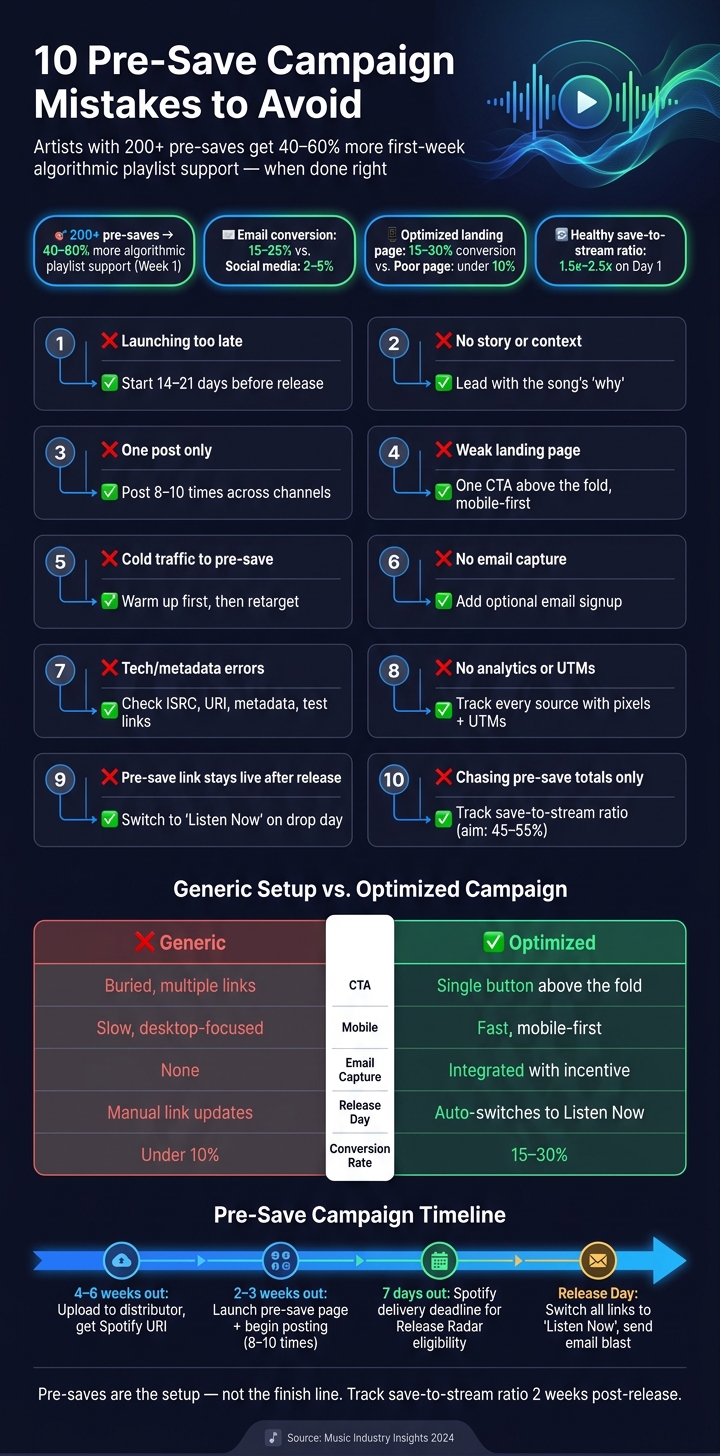
Generic vs. Optimized Pre-Save Campaign: Key Differences & Stats
Quick Comparison
| Mistake | What goes wrong | What I should do instead |
|---|---|---|
| Launching too late | Not enough time to build saves | Start 2–3 weeks before release |
| No story or context | Fans don’t care enough to act | Lead with the song’s why |
| Treating it like one post | Low reach and low repeat exposure | Post across channels several times |
| Weak landing page | Clicks don’t turn into saves | Keep one CTA above the fold |
| Sending cold traffic | Low-intent saves and drop-off | Warm audiences first, then retarget |
| Skipping email capture | Lost fan contact after release | Add optional email signup |
| Tech setup errors | Broken flows, bad data, missed saves | Test links and check metadata |
| No analytics | Can’t tell what worked | Track music analytics that matter like links, sources, and retargeting |
| Leaving pre-save links live after release | Fans hit extra steps | Switch all links to streaming pages |
| Chasing pre-save totals only | Good-looking numbers, weak streams | Watch save-to-stream performance |
Bottom line: a pre-save campaign should support the release, not stand in for it. For a complete strategy, follow our single release promotion playbook.
sbb-itb-e819543
1. Launching the Pre-Save Campaign Too Late
Launching a pre-save just a few days before release doesn’t give you enough runway. You need time to build momentum, and every hour between the announcement and a live link is a lost chance to turn interest into a save.
The issue comes down to timing. Pre-save growth usually starts slow, picks up in the middle, and then jumps in the last 48 hours. If your campaign runs for fewer than 10 days, you miss that middle stretch and the results tend to be weaker. Of course, that only works if your release setup is ready on the back end.
There’s also a hard deadline many artists miss: Spotify requires music to be delivered at least 7 days before release to qualify for Release Radar. Miss that cutoff, and you lose both Release Radar eligibility and access to pitching. A safer move is to upload your track to your distributor 4–6 weeks before release, so your Spotify link is live and your pitch window is open.
Once your release date is locked in, use the full campaign window to push the link more than once. A 14–21 day campaign gives fans about 3–5 chances to see it, and that’s often enough to get the save. Tools like PromoLinks.me can track results as they come in, so you can spot which channels are driving saves and make changes before release day.
Don’t announce the release until your pre-save link is live and ready to share.
2. Running Pre-Saves Without a Clear Story or Context
A context-free pre-save usually looks like this: one post that says, "New song dropping Friday - link in bio." No backstory. No teaser. No reason to care. That’s a notification, not a campaign. And fans are far more likely to pre-save when the release already feels like it means something.
That matters because a pre-save isn’t a tiny ask. You’re asking fans to authorize access to their Spotify account, so there needs to be a clear reason to do it. A well-built pre-save landing page usually converts 15–30% of visitors, while a poorly set-up or context-free page often drops below 10%.
So don’t lead with the link. Lead with the why.
Give the release some shape before you ask for the click. Share a short clip. Post a studio moment. Tell the song’s backstory. Those touchpoints help fans connect with the release, and they make the pre-save ask feel like a natural next step instead of a cold prompt. It also helps to mix up the format during the campaign window so you’re not posting the same ask again and again.
Your CTA matters too. Once the story is clear, make the next step plain. Vague lines like "support my music" don’t tell fans what to do. A direct CTA works better: "Pre-save to hear it first on Friday".
3. Treating the Pre-Save as a Single Post Instead of a Campaign
Sharing a pre-save link once usually means missed saves. The pattern is common: one feed post, one bio link, one Story, and then nothing until release day. The problem is simple. A pre-save tends to work better when fans run into it more than once, and in more than one place.
One post isn't enough. A typical social post reaches only about 15% of followers, and most fans need 3 to 5 exposures before they click. That first impression still matters. But repeated visibility is what turns mild interest into action.
A better move is to run the pre-save campaign for 2 to 3 weeks before release and share the link 8 to 10 times across channels. Mix up the format so each post feels new instead of copy-pasted.
For example, you can rotate through:
- a feed post
- a Story
- a Reel or short video
- a bio link mention
- an email or text push, if you have one
The goal isn't to spam people. It's to make the pre-save easy to notice, easy to remember, and easy to act on. That only works if every click goes to one clear destination.
4. Sending Fans to a Confusing or Generic Landing Page
A click means nothing if the landing page doesn’t make the save easy. Once fans tap through, the page needs to do its job fast.
Most weak pre-save pages run into the same problems: too many links, a long artist bio, or a design that feels disconnected from the teaser content. Fans land there, hesitate, and bounce. They’re not sure what this is, when it’s coming out, or what they’re meant to do next.
A solid pre-save landing page should convert 15%–30% of visitors. If yours is under 10%, the page is likely the issue. That’s why the CTA needs to be impossible to miss.
The page should answer three things right away:
- What is this?
- When does it drop?
- What should I do next?
Put the pre-save button above the fold, design for mobile first, and keep load times short. Most clicks come from mobile.
Keep the page lean: the song title, artist name, high-quality cover art at least 1,000 x 1,000 px, a release date or countdown timer, and one clear call to action. You can also add an email field like "Get notified when it drops" to collect fan data without adding extra friction.
PromoLinks.me can build focused pre-save pages with email capture and real-time analytics.
5. Pushing Pre-Saves to Cold Audiences
Even a strong landing page can't save cold traffic. Pre-saves work best when some interest is already there. They don't create demand on their own.
Here's the problem: every extra step loses people. And if you're asking strangers to pre-save unreleased music they don't care about yet, most of them will bounce.
A better play is to use cold ads for awareness first. Push a short snippet, a hook, or a piece of the song that gets attention. Then retarget the people who watched, clicked, or engaged with that content and send them to the pre-save link.
The numbers back this up. Pre-save conversion from email usually lands around 15–25%, while social media often brings in just 2–5%. And low-intent pre-saves can do more harm than good. They can weaken the save-to-stream ratio and hurt release-day signals.
A healthy benchmark is about 1.5x to 2.5x pre-saves to first-day streams. If you're below 1x, that's a red flag.
PromoLinks.me supports tracking pixels and real-time analytics, which makes this much easier to track. You can see which channels bring in engaged pre-saves, not just empty clicks. Then you can retarget the listeners who already showed interest.
6. Skipping Email Capture and First-Party Fan Data
A common mistake is treating the save like the finish line. It isn’t. Once a fan clicks through, the goal shouldn’t be just a pre-save. It should also be a contact you own.
A pre-save is a one-time action. An email address is a direct line you can use again for the next release, the one after that, and everything in between.
That’s where the bigger payoff sits. Email is still one of the highest-converting music promotion tools, with typical conversion rates of 15% to 25%, compared with just 2% to 5% for social media. So if your pre-save campaign isn’t helping you collect owned fan data, you’re leaving a lot on the table.
The best move is simple: make email capture easy to see, but optional. A clear prompt like "Get release updates" works well. It turns the pre-save page into two things at once:
- a conversion tool for the current release
- a list-building tool for future campaigns
That keeps friction low while still helping you grow a fan list you control. PromoLinks.me includes email capture as part of its pre-save campaign setup, so you can collect fan data and drive saves in the same flow. It also helps to segment your list by release, so your follow-up messages stay targeted.
7. Getting Release Dates and Technical Details Wrong
Even a strong landing page can fall apart if the backend details are off. Small tech mistakes can break a pre-save before fans even see the problem. What you see instead is low clicks, failed saves, or data that doesn't line up.
Send your track early enough to get the Spotify URI from your distributor, set up the pre-save page, and go live on schedule.
Metadata mistakes can hit just as hard. One misspelled collaborator name or the wrong ISRC can split profiles and hold up royalties. Before anything goes live, check every field against your release paperwork and split sheets:
- song title
- artist names
- collaborator spellings
- genre tags
Then test the link itself. Open it in an incognito browser window and on a mobile device, since that's where most of your traffic will come from. Make sure the artwork loads, the pre-save flow works from start to finish, and the email capture fires the way it should. If the pre-save flow is broken, fans get annoyed, saves drop, and tracking gets messy.
The most common issues are late delivery, the wrong ISRC or URI, misspelled metadata, and links that were never tested. Fixing these details helps protect launch-day saves and keeps tracking clean. PromoLinks.me can help spot routing or tracking issues before launch.
8. Not Using Analytics or Retargeting
Once your page is live, tracking tells you if the campaign is working or just burning through your budget. If you run a pre-save campaign without tracking, you're basically flying blind. You won't know which channels are driving saves and which ones are dead weight. And without UTM parameters on each link, there's no clean way to tell whether your Instagram bio, Stories, email, or paid ads are doing the job.
This gets even more important on release day. That's when streaming data shows whether the campaign built real intent or just collected low-quality pre-saves. A pre-save only means something if the fan comes back and streams the track when it drops. If day-one streams are weak, intent was weak too.
One number deserves close attention: the pre-saves-to-day-one streams ratio. A big pre-save total can look good on paper and still hide a problem. That's why you need to track where each save came from, so you can spot weak traffic sources and cut them before release day.
Then use that data in a smart way. Retarget recent visitors with release-day ads instead of spending on cold audiences. PromoLinks.me includes pixel retargeting and real-time analytics, which makes it easier to build that warm audience before release day. Once you see which channels convert, move more of your budget there.
One more thing: ad dashboards undercount conversions after iOS 17. So don't treat platform reporting as the final word. Use first-party data and link tracking as your main source of truth.
9. Continuing to Push Pre-Saves After Release Day
Pre-saves stop working when release day begins. Once the track is live, every pre-save link needs to go.
At that point, fans should land on the song right away, not on a permission screen. That extra step kills momentum.
The fix is pretty simple: switch every link destination as part of your music promotion across platforms the moment the track drops. You can use a smart link tool like PromoLinks.me to change the page to "Listen Now" on release day. If you're doing it by hand, make the change that morning and test it on both mobile and desktop.
Also check any paid ads that still point to the old pre-save page. Send that traffic to the live track instead.
10. Treating Pre-Saves as the Main Goal Instead of a Supporting Step
Once the link switches to Listen Now, the goal changes too. Before release, you're collecting intent. On release day, you're trying to turn that intent into actual plays.
It's easy to get hung up on pre-save numbers because they look like a scoreboard. Bigger number, better campaign - at least on paper. But a pre-save only puts the track in a fan's library. That alone doesn't guarantee they’ll press play when the song drops.
The metric that matters most is your save-to-stream ratio, not the raw pre-save total. A strong campaign usually gets 45–55% of pre-savers to stream on day one. If that number falls below 25%, the gap can send a negative signal to the algorithm.
Pre-saves sit in the middle of the release funnel. They should help build awareness and support release-day streaming, not stand in for either one.
The difference is easier to see in the side-by-side comparison below.
Side-by-Side: Generic Pre-Save Setup vs. Optimized Pre-Save Campaign
There’s a big gap between a pre-save page that gets a few taps and one that helps build day-one momentum.
This table breaks down where that gap usually shows up. Small setup mistakes can cost you clicks, saves, and streams right out of the gate.
| Category | Generic Pre-Save Setup | Optimized Pre-Save Campaign |
|---|---|---|
| CTA Clarity | Buried among multiple links; requires scrolling to find | Single, prominent button visible above the fold |
| Mobile Experience | Slow-loading; desktop-focused layout | Fast, mobile-first design with consistent branding |
| Email Capture | None; relies entirely on the platform auto-save | Integrated capture with an incentive like exclusive content |
| Release-Day Readiness | Manual link updates; no follow-up plan | Automatically switches to a Listen Now link; 48-hour email/DM push |
| Conversion Rate | Low | Higher |
Use this table as a quick audit before launch. If one area looks weak, fix it before you start sending traffic.
The biggest thing most artists miss is email capture. A pre-save shouldn’t just help this release. It should also give you a way to reach people again for the next drop.
Add UTM tracking and pixels, and you get a much clearer view of which channels brought in people with real intent. That makes your day-one push a lot less guesswork. PromoLinks.me includes built-in email capture, pixel retargeting, and real-time analytics, so you can handle all of that in one place.
Conclusion
The gap between a weak campaign and a strong one usually comes down to execution. Each step has to connect. A pre-save campaign is one part of release execution. It is not the full release plan.
The best campaigns use pre-saves to build launch-day momentum. They do that by lining up timing, a clear story, data capture, tracking, and a smooth handoff on release day.
Before you go live, run one last check:
- Is the page mobile-first?
- Is there one clear CTA?
- Is email capture turned on so each campaign grows your owned list?
- Does the link switch on release day?
- Is the release-day email scheduled for your biggest listener market’s time zone?
Two weeks after release, look at your save-to-stream ratio. A healthy campaign turns pre-saves into first-day streams at a rate between 1.5x and 2.5x, and you can also check whether the release appeared in Release Radar or Discover Weekly. Compare those results to your own past releases, not to other artists.
Pre-saves only work when they fit into the full release funnel. Think of pre-saves as the setup, not the finish line.
FAQs
How many pre-saves is enough?
Aim for at least 200 pre-saves if you want to see a clear effect. But the raw total isn’t the main thing. What matters more is your save-to-stream ratio.
Here’s why: a big pre-save number can look good on paper, but if those people don’t show up and stream the song on release day, that can send a weak engagement signal.
A solid benchmark is 1.5x to 2.5x. So if you get 200 pre-saves, aim for around 300 to 500 first-day streams.
And one more thing: judge the result against your own audience size, not someone else’s. That gives you a much clearer read on what’s working.
What if my release is less than two weeks away?
If your release is less than two weeks away, you're working with a tight timeline. That can make it harder to build momentum before launch. In many cases, campaigns that run for fewer than 10 days get 50% to 70% fewer total pre-saves than campaigns that run for two to three weeks.
That said, don't sit on your hands. Launch your pre-save link right away with PromoLinks.me. Even if you missed the ideal three-week window, it can still help drive day-one streams and send a strong signal to the algorithm.
How do I improve pre-save conversion?
Keep your landing page clean and centered on one clear call to action.
With PromoLinks.me, you can show your release artwork, a clear release date, and an audio preview right up front. That gives fans the main details fast, without making them hunt around.
Cut friction by removing extra links and long bios that pull attention away from the main goal. Before launch, test every link on both mobile and desktop to make sure the page works the way you expect.
You can also add an email capture field to reconnect with fans on release day.
Related Blog Posts
Ready to create your smart links?
Join thousands of artists using PromoLinks to promote their music smarter.
Get Started Free