Best Spotify Smart Link Pages for Singles and EPs
I recommend one main listening action: a short page for a single, or a longer page with a tracklist for an EP. Start with Pre-save, then switch to Listen now when the release is available.
Here’s how I’d set up each page:
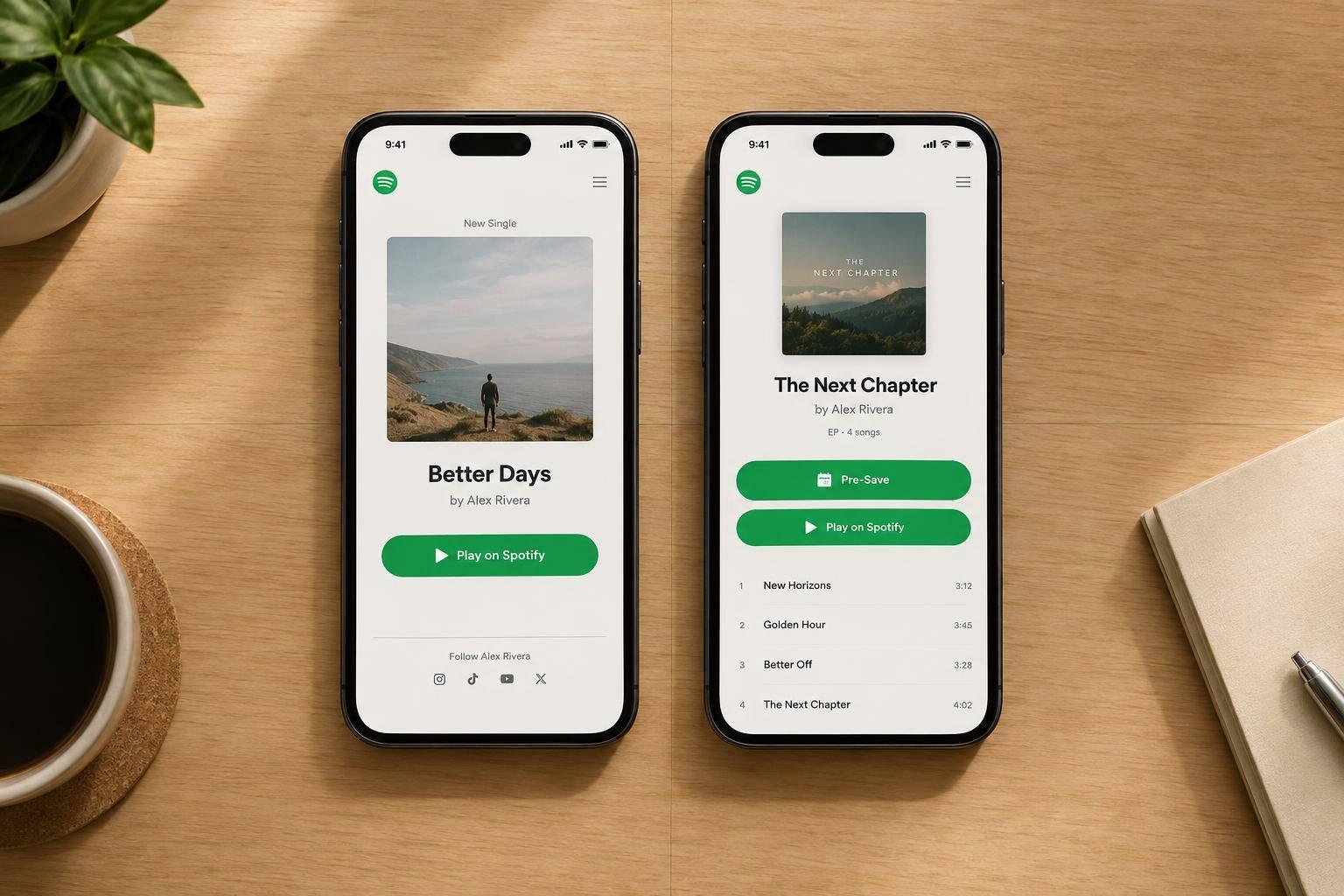
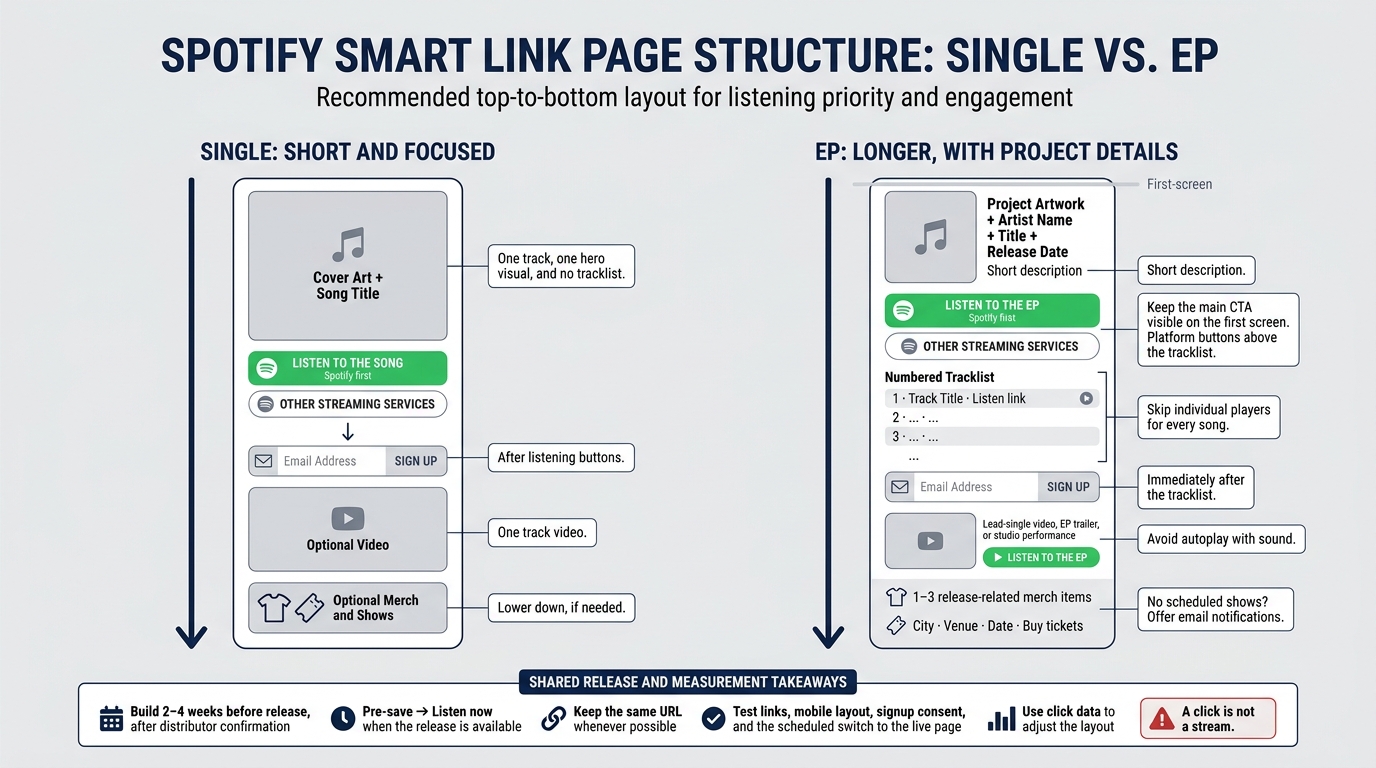
- Single: One song, cover art, and a main CTA. Put email signup below the listening buttons.
- EP: Project artwork, a short description, and numbered tracks. Put platform buttons above the tracklist and email signup below it.
- Both: Lead with Spotify, offer other streaming services, and keep video, merch, and tour links secondary.
Quick Comparison
| Page choice | Single | EP |
|---|---|---|
| Length | Short and focused | Longer, with project details |
| Track display | One song; no tracklist | Numbered tracklist |
| Main CTA | Listen to the song | Listen to the EP |
| Email signup | After listening buttons | After the tracklist |
| Video | One track video | Lead-single video or EP trailer |
| Merch and shows | Lower down, if needed | Below listening content |
I’d build the page as part of your pre-release checklist 2–4 weeks before release, check PromoLinks.me’s tools and plan limits, and test links, mobile layout, signup consent, and the scheduled switch to the live page. Then I’d use click data to adjust the layout - not as proof of streams. <u>A click is not a stream.</u>
Spotify Smart Link Layouts: Single vs. EP
1. Single-Release Page Setup
Page Length and Track Display
Keep the single-release page focused: one track, one hero visual, and no tracklist. Use artwork or a looping clip tied to the track - not a generic project motif. The CTA should be the fan’s next decision.
CTA Order and Analytics
Place fan email signup directly below the listening buttons. Use a custom domain and track which platforms and channels drive clicks in real time. Keep secondary content out of the way until after the primary action and email signup.
Video, Merch, and Tour Links
Place video below the CTA, or add it later if it helps keep clicks coming. Put merch and tour links below the main CTA, or leave them off unless they support the release.
sbb-itb-e819543
2. EP-Release Page Setup
Page Length and Track Display
An EP page needs more room than a single page so listeners can browse the project before they commit. Lead with the EP, then make the tracklist easy to scan. Use a medium-length vertical page with the EP artwork, artist name, title, release date, and one main CTA above the full tracklist. Keep that CTA visible on the first screen.
For most EPs, compact rows work best: include track numbers, titles, and one listen link per track. Skip individual players for every song.
CTA Order and Email Signup
After release, change the main CTA to Listen to the EP or Play on Spotify, keeping the same URL whenever possible. Place the main platform buttons above the tracklist.
Put email signup immediately after the tracklist. Give listeners a clear reason to subscribe, such as release reminders or tour updates.
Video Placement
Add one supporting video once the tracklist is in place, without pushing the main CTA down. Feature one lead-single video, EP trailer, or studio performance below the tracklist to support the EP campaign. Place a Listen to the EP button directly beside it.
Avoid autoplay with sound. Keep any extra videos farther down the page or behind a Watch more link.
Merch and Tour Links
Keep merch and live dates lower on the page so listening remains the main action. Feature one to three release-related merch items alongside upcoming shows. For each show, include the city, venue, date, and a direct Buy tickets link.
If no dates are scheduled, offer email notifications for future shows instead. Keep the merch tied to this release so it supports the EP rather than distracting from it.
Single vs. EP Page Design
Choose the simplest shareable music links and page structure that fits your release.
Page Length and Track Display
| Page element | Single-release setup | EP-release setup |
|---|---|---|
| Initial screen | Artwork, title, and a streaming CTA | Artwork or video background, a short introduction, and an EP CTA |
| Tracks | One clearly labeled song | A tracklist or track cards for the full project |
| Previews | A single-track preview player | A multi-track preview or lead-track player |
| Secondary content | Other platform links below the main CTA | Tracklist navigation or links to individual tracks |
CTA Order and Email Signup
| Page element | Single-release setup | EP-release setup |
|---|---|---|
| Primary CTA | A Spotify play button for the song | Play EP, Listen to Full EP, or Focus Track |
| Secondary DSPs | Apple Music, YouTube Music, and other services below Spotify | The same services, below the main EP CTA |
| Track actions | One main listening action | Links to individual EP tracks |
| Footer content | Fan email signup | Tour dates or merch |
Video Choice and Placement
| Page element | Single-release setup | EP-release setup |
|---|---|---|
| Visual type | Static or animated single cover art | Main EP artwork or a video background |
| Visual role | Support the featured song | Support the full project and its tracklist |
| Motion use | Animated artwork or motion graphics | A shared visual motif across the release |
Merch and Tour Links
| Page element | Single-release setup | EP-release setup |
|---|---|---|
| Lower-page content | Fan email signup | Tour dates or merch |
| Page focus | Keep the release front and center | Support the project after the main listening CTA |
Strengths and Trade-offs
| Setup | Advantages | Trade-offs | Best-fit campaigns |
|---|---|---|---|
| Single page | A focused listening path | Less room for discovery | Promotion centered on one song |
| EP page | More project detail and track choice | More scrolling and a greater risk of distraction | Full-project discovery |
| EP page with a focus-track layout | Connects a song-specific entry point to the rest of the EP | Song and project actions compete for attention | Lead-single promotion supporting an EP |
Build and Track Pages With PromoLinks.me
Once you’ve chosen your page structure, use PromoLinks.me to publish and track it. Before you build, check the editor tools, page limits, analytics, and custom-domain access. PromoLinks.me supports artist subdomains and connected custom domains. Plan to add EP tracklists and merch manually unless the editor includes tools for them.
| Feature | Single-release use | EP-release use |
|---|---|---|
| Smart links | Send fans to the single on Spotify and other services. | Send fans to the EP on their preferred streaming service. |
| Customizable templates | Build a compact layout centered on the release artwork. | Build a structured layout that presents the EP as one complete project. |
| Pre-save campaigns | Launch a pre-save page for the single. | Launch a pre-save page for the EP. |
| Audio previews | Add a short teaser clip. | Preview the lead single or a highlight track. |
| Fan email capture | Collect release-update opt-ins. | Collect project-update opt-ins. |
Keep your artist or label name, artwork treatment, and branding consistent across releases. Build the pre-save page 2–4 weeks before release, immediately after distributor confirmation. PromoLinks.me automatically switches pre-save pages to live smart links on release day. Before launch, confirm Spotify and Apple Music pre-save support.
Use real-time analytics to review views, clicks, platform preferences, and location data. Let those results guide button and CTA order, page emphasis, page length, and media placement. A click is not a stream, so check Spotify’s own reporting for streaming results.
Page Recommendations and Publishing Checklist
Once you’ve chosen the single or EP layout above, run these checks before publishing.
Release check: Confirm the Spotify artist profile, release title, release URL, artwork, featured artists, and track version. Make sure single pages open one track and EP pages open tracks in their final order. Look for duplicate artist profiles and outdated releases.
Mobile check: Test every button on iPhone, Android, and a logged-out desktop browser. Check redirects, video sizing, captions where needed, and loading over a slow cellular connection. Turn off autoplay with sound. Confirm merch inventory and ticket destinations, including the venue, event date, and purchase flow.
Consent and measurement check: Explain why fans should sign up and how often they’ll hear from you. Link to the privacy policy, then test signup confirmations and consent records. Marketing emails need an unsubscribe option, and U.S. opt-out requests must be honored within 10 business days. Scan every QR code before printing. Check UTM labels by source, redirects, and separate events for listening, signups, merch, and tickets. Obtain any required consent before using nonessential analytics tracking.
Launch-state check: Before release day, test both the pre-save page and the live page at the same URL. Record scheduled updates with a full date, time, and time zone - not just “release day.” Confirm that the schedule matches actual release availability. Recheck the page immediately after the switch, since platforms may go live at different times.
FAQs
Should my EP’s lead single have its own smart link page?
Yes. Give the EP and its lead single separate smart link pages. That way, fans land on the right release, and you can track each one separately. On release day, each page can switch from pre-save to “Listen now” without changing its URL.
Use one rollout URL for the EP campaign, from the first teaser through 30–90 days after release. Place secondary actions, like email signup, lower on the page.
How can I tell if my page has too many links?
Track your click-through rate and user behavior. Too many options can overwhelm fans, making it harder to choose and reducing engagement. Research suggests that pages with three to five links perform best. More than eight to ten links often prompts users to scroll, compare, and leave.
If your click-through rate is low, a cluttered layout may be the cause. Simplify the page around one primary call-to-action.
How do I measure success beyond clicks?
Track click-to-stream rate, email sign-up rate, list growth, and conversions from pre-saves to follows or streams. Use PromoLinks.me real-time analytics to see which referrers send quality traffic, which platforms fans listen on, and how traffic breaks down by location and device.
Add campaign-specific UTM parameters to make attribution clearer. Check outbound clicks and your pre-save-to-stream ratio - a healthy range is 1.5 to 2.5.
Related Blog Posts
Ready to create your smart links?
Join thousands of artists using PromoLinks to promote their music smarter.
Get Started Free