Discord vs Geneva for Artist Fan Communities
I’d choose Discord for a new artist fan community. Geneva’s standalone app shut down in September 2025 after its technology moved into Bumble BFF, so its former tools aren’t a current alternative.
My starting plan: use a few Discord channels for releases, tour dates, and fan chat. This setup works best when integrated into your music promotion across platforms. Add private supporter roles, set moderation rules, and test 1 release cycle and 1 fan event before adding more.
Quick Comparison
| What I’d compare | Discord | Geneva |
|---|---|---|
| Current access | Available | Standalone app shut down |
| Community layout | Servers and channels | Formerly homes and rooms |
| Moderation and access | AutoMod, timeouts, and role permissions | Historical admin and invite controls |
| Text and live sessions | Text, voice, video, and Stage channels | Historical chat and live rooms |
| Events | Scheduled events | Historical calendars and RSVPs |
| Devices | Mobile, desktop, and browser | No current standalone access |
| Costs and staff time | Check prices; budget for moderation and access management | No current standalone service to compare |
My rule: start small, check what new fans can see, and <u>test private-channel access before sharing your invite</u>. The choice comes down to fan habits, your event plans, and how much daily work your team can handle.
Launch an Artist Fan Community on Discord
Discord: Channels, Permissions, and Live Chat
Set Up Release, Tour, and Supporter Channels
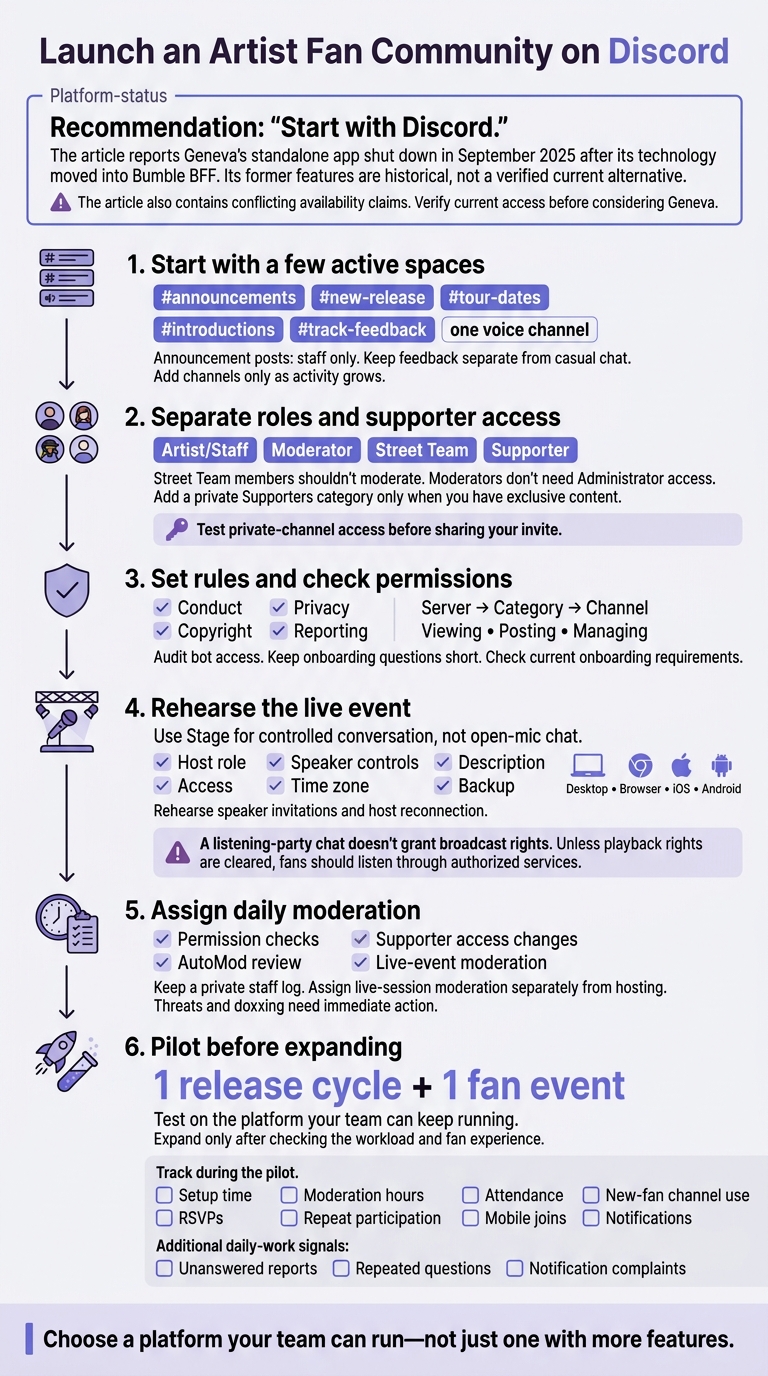
With Geneva off the table, build Discord around a few active spaces fans will use. This setup is especially effective when launching pre-save campaigns to drive early engagement.
Start with channels your team can maintain: #announcements, #new-release, #tour-dates, #introductions, #track-feedback, and one voice channel. Limit announcement posts to staff, and keep feedback separate from casual chat. Add a private Supporters category only when you have exclusive content, with visibility controlled by the Supporter role. Let fan activity guide when you add more channels.
Set Roles, Onboarding, and Rules
Give Artist/Staff, Moderator, Street Team, and Supporter roles separate permissions. Street Team members shouldn't moderate, and moderators don't need Administrator access. Review permissions at the server, category, and channel levels together: viewing, posting, and managing each have separate controls. Audit bots, remove access they don't need, and archive inactive channels.
Post a clear rules channel covering conduct, copyright, privacy, and reporting. Community Onboarding requires Manage Server and Manage Roles, or Administrator, and uses questions to help fans choose channels and roles. Keep required questions short. Fans can update their choices later in Channels & Roles. Check Discord's current setup requirements before turning onboarding on.
Run Stage Sessions and Scheduled Events
Use Stage for controlled conversation, not open-mic chat. Selected speakers talk while the audience listens, and moderators handle requests to speak. Creating a Stage channel requires Manage Channels and Manage Roles. Stage moderators need Manage Channels, Mute Members, and Move Members at the channel level.
Before announcing a session, check the host role, access, speaker controls, time zone, description, and backup moderator. Scheduled event permissions can vary by event location, and permission to create events is separate from permission to manage them. Stage works on desktop, browser, iOS, and Android. Rehearse speaker invitations and host reconnection across those devices.
A listening-party chat doesn't grant broadcast rights. Unless you've cleared playback rights, have fans listen through authorized services and use the session for timestamps and discussion.
With the live format set, the next planning step is deciding who moderates it and how often.
sbb-itb-e819543
Geneva: Current Access, Rooms, and Events
If Discord is the active option, treat Geneva as a legacy case. Verify access before using it.
Check Availability and Supported Features
First, check whether U.S. users can still create and manage communities. Public sources disagree on whether Geneva remains a standalone product or became part of Bumble BFF in September 2025.
Check the official website, the U.S. App Store, and Google Play for the current product name, signup process, and ability to create new communities. Historical listings show phone-number signup, not email registration. If you need to capture fan emails without a website, consider alternative tools. Browser support and whether mobile offers the same features remain unverified. Before planning discussions or events, confirm that fans can join and admins can manage access.
Organize Fan Discussions Into Rooms
Geneva previously grouped communities into homes with rooms: chat for short conversations, posts for longer discussions, and audio, video, and broadcast rooms. These options have not been verified for new fan communities.
Official materials describe broadcasts with up to 9 people on-air and thousands of viewers. Current access and permission controls remain unverified.
Plan Events and Set Member Access
Event tools included invitations, a central calendar, RSVPs, and reminders. Roles determined who could invite members, create rooms, and moderate messages. Invite-only homes and entry gates helped limit admission.
For an existing or migrated community, check event permissions, message moderation, and whether ownership or moderation controls changed after the Bumble transition.
Test the full event flow before inviting fans.
Schedule a private test for 8:00 p.m. ET, invite one test member, and check account access, RSVPs, reminders, event discussion, and moderator permissions. Join from both a mobile app and a desktop browser, and verify time-zone display plus microphone or camera permissions where needed.
Automatic time-zone conversion, guest access, browser participation, and reminder behavior remain unconfirmed. If discontinuation or migration prevents registration or community creation, Geneva is not a practical choice for a new artist community.
If Geneva still works for your audience, check whether your team can manage moderation and access controls each day without added hassle.
Discord vs Geneva: Moderation and Daily Tasks
Once setup is done, your team needs to handle day-to-day moderation. Geneva’s features below are historical, not verified current tools.
Assign Moderators and Control Access
Give moderators only the permissions they need. Keep a private staff log of warnings, removals, AutoMod alerts, and permission changes.
| Daily task | Discord | Geneva (historical) |
|---|---|---|
| Review permissions | Check role and channel permissions for message moderation, channel management, and member removal. | Roles controlled invitations, room creation, and moderation. |
| Control messages | Use AutoMod and Slowmode, with staff reviewing alerts and disputes. | Message moderation existed; filtering and rate limits remain unverified. |
| Maintain supporter access | Use role-restricted channels. Document who grants access, removes expired access, handles cancellations, and resolves payment disputes. | Invite and role controls restricted access; supporter workflows remain unverified. |
| Staff live sessions | Assign live-session moderation separately from hosting. | Live-session controls remain unverified. |
Remove content that breaks the rules, warn or time out the member, and escalate repeat or severe abuse immediately. Threats and doxxing need immediate action, not a routine warning.
Compare Notifications, Mobile Access, and Costs
Keep one official announcement space and use mass mentions sparingly. During a release cycle, track moderator hours and community analytics, unanswered reports, repeated questions, and notification complaints. Features matter, but so does your team’s ability to keep up with daily work.
| Daily concern | Discord | Geneva (historical) |
|---|---|---|
| Visibility | Fans control server, category, and channel notifications. Event reminders require opt-in. | Forum rooms separated announcements; notification behavior remains unverified. |
| Mobile use | Members can complete onboarding on any device; administrative setup requires desktop. | Joining steps, mobile limits, and browser access remain unverified. |
| Live participation | Stage supports desktop, browser, iOS, and Android. Test microphone access and speaker controls. | Device support remains unverified. |
| Costs | Current dollar prices are unverified in the supplied sources. Budget for server upgrades, bot upkeep, membership integrations, and moderation services. | Price unverified. Past free access does not establish current availability or cost. |
| Staff load | Set aside time for permission checks, AutoMod review, access changes, and live-event moderation. | No reliable workload comparison is possible without usable admin tools. |
Treat personal subscriptions as personal expenses unless the team pays for them. Budget for staff time, too: automation still needs human review and someone to handle appeals.
Conclusion: Choose a Platform Your Team Can Run
Choose Discord for an active, role-based community with channels, live chat, and scheduled events. Keep Geneva off your shortlist unless you confirm current U.S. access, device support, and the rooms, messaging, moderation, and event tools your team needs.
| Decision factor | Discord fits when… | Geneva is worth considering only if… |
|---|---|---|
| Fan habits | Fans already use servers, channels, and persistent topic spaces. | Fans prefer a room-based setup. |
| Moderation capacity | Staff can handle roles, permissions, and moderation controls. | Its controls suit your team’s workload. |
| Live interaction | You need voice/video spaces for listening sessions or watch-alongs. | Its live and messaging tools work for your planned sessions. |
| Event planning | Scheduled events, RSVPs, and reminders support your plans. | Its event workflow meets your team’s needs. |
Match the Platform to Your Fans
Genre offers a starting point, but fan habits and your team’s moderation capacity should guide the choice. Consider Geneva only after verifying its current rooms and event tools.
| Artist community | Practical fit |
|---|---|
| Gaming-adjacent musicians | Favor Discord when fans already know channels and voice chat. |
| Large street teams | Favor Discord for delegated roles and controlled access. |
| Singer-songwriters | Use Discord for songwriting discussions and listening sessions. |
| Emerging bands | Start with a few Discord channels your team can keep up with. |
| Local scenes | Use Discord’s show and regional channels. |
Connect Your Community With Music Promotion
Once you choose a community platform, use a separate tool for promotion. PromoLinks.me supports smart links, artist pages, pre-saves, QR codes, event pages, and fan email capture. Keep those tasks separate from chat and moderation.
Test 1 Release Cycle and 1 Fan Event
Before committing, test one release cycle and one fan event on the platform your team can keep running. Track setup time, moderation hours, RSVPs, attendance, repeat participation, new-fan channel use, mobile joins, and notifications. Use that test to check whether your team can maintain the platform after release week.
FAQs
How can I move my Geneva fan community to Discord?
There’s no direct migration tool, so you’ll need to rebuild your Geneva community’s structure manually on a new Discord server. Create matching channels, then share the server invite in Geneva before closing your old community.
You can also use PromoLinks.me to create a smart link to your new Discord server. Track clicks on that link to help gauge how the move is going.
How do I keep fans engaged between releases?
Stick to a regular schedule, like a weekly poll or monthly live Q&A. Give fans a say in merch designs or tour cities through polls. Use Q&As to get to know them and learn what matters to them.
Bring these interactions together on a PromoLinks.me smart link page. Collect fan emails and track engagement to spot - and reward - your most active supporters.
When should I add more moderators?
Add more moderators when your community needs real-time support during live sessions. They can filter questions and manage interactions while you focus on connecting with fans.
If casual chats turn into in-depth discussions or high-volume Q&A, extra moderators can guide the conversation, enforce boundaries, and keep discussions constructive.
Related Blog Posts
Ready to create your smart links?
Join thousands of artists using PromoLinks to promote their music smarter.
Get Started Free