7 Live Dashboards For Artist Audience Data
If you want to react in the first 24–48 hours after a release, you need real-time analytics, not weekly reports. I’d split these seven tools into three jobs: campaign tracking (PromoLinks.me), cross-platform audience tracking (Chartmetric, Soundcharts, Viberate, Songstats), and native platform data (Spotify for Artists, YouTube Analytics).
Here’s the short version:
- PromoLinks.me shows which links, pre-saves, and channels turn into action
- Chartmetric gives me a broad view of audience, playlists, charts, and growth signals
- Soundcharts is built for radio, charts, playlists, and global market movement
- Viberate connects audience data with venues and festival lineups
- Songstats is strong for instant playlist and chart alerts
- Spotify for Artists shows Spotify listener behavior in real time
- YouTube Analytics shows video watch time, traffic sources, and viewer data
A few numbers stand out right away:
- PromoLinks.me users see an average 3.2x more day-one saves
- About 68% of those fans stream within 48 hours
- Soundcharts tracks 61 metrics, 16 million artists, and 7.3 million+ playlists
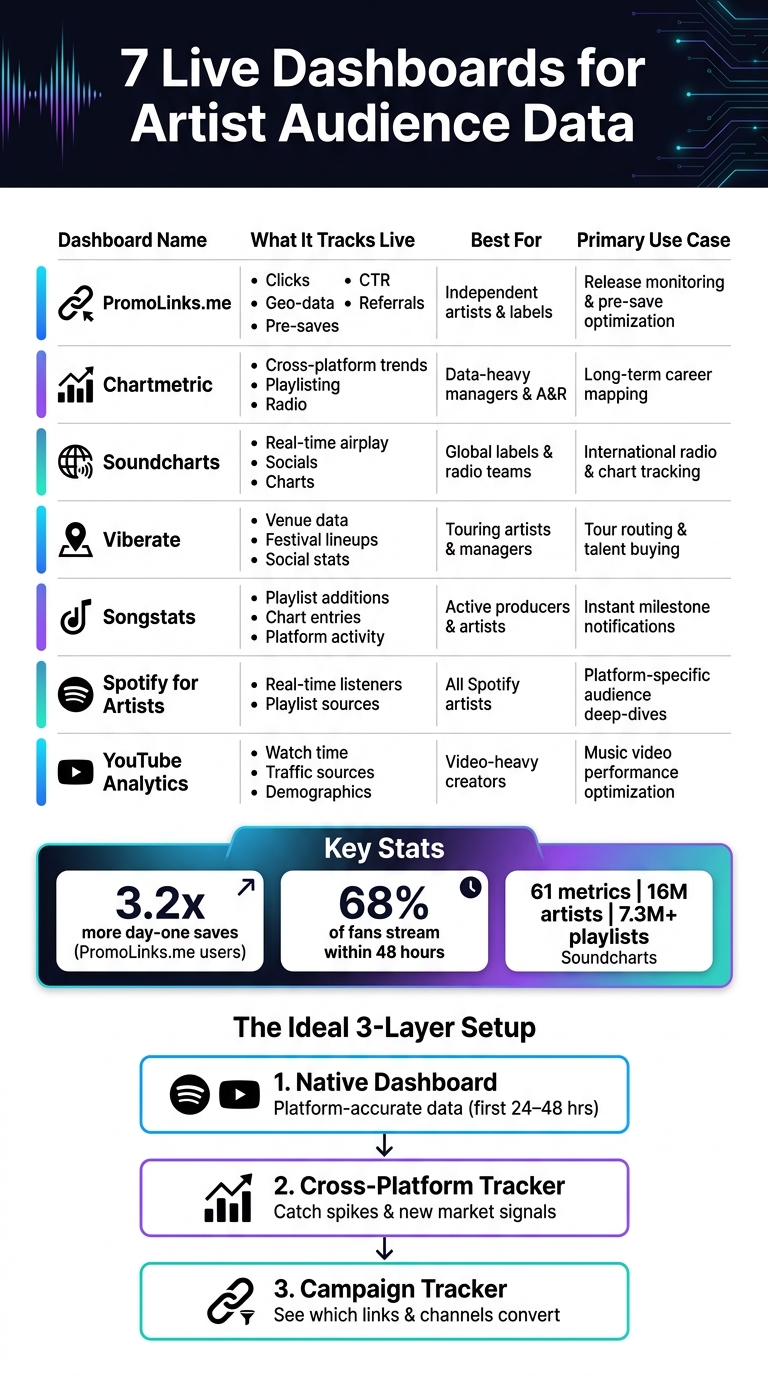
7 Live Dashboards for Artist Audience Data: Side-by-Side Comparison
Chartmetric - Artist Overview Tab (Tutorial)
sbb-itb-e819543
Quick Comparison
| Dashboard | Live focus | Best fit | Main job |
|---|---|---|---|
| PromoLinks.me | Clicks, CTR, geo data, referrals, pre-saves | Indie artists and labels | Release tracking and pre-save follow-up |
| Chartmetric | Streaming, social, playlists, charts | Managers, labels, A&R | Long-range audience and career tracking |
| Soundcharts | Radio, charts, playlists, TikTok, socials | Labels and radio teams | Market movement and airplay tracking |
| Viberate | Streaming, socials, radio, venues, events | Touring artists and managers | Tour routing and market checks |
| Songstats | Playlist adds, chart entries, platform activity | Artists, producers, small teams | Instant release and milestone alerts |
| Spotify for Artists | Real-time Spotify streams and sources | Any artist on Spotify | Platform-level listener analysis |
| YouTube Analytics | Views, watch time, traffic, demographics | Video-led artists and teams | Video release tracking |
In other words: if I want to track music analytics that matter like where fans come from and where momentum starts, these are the dashboards I’d check first.
Quick Comparison Table
Not every dashboard measures the same things. Some pull data from many platforms. Others stay inside a single app or channel. This side-by-side view shows what each one tracks live, who it's for, and where it fits in a release or tour plan.
| Dashboard | What It Tracks Live | Best For | Primary Use Case |
|---|---|---|---|
| PromoLinks.me | Clicks, CTR, geo-data, referrals, pre-saves | Independent artists & labels | Release monitoring & pre-save optimization |
| Chartmetric | Cross-platform trends, playlisting, radio | Data-heavy managers | Long-term career mapping & A&R |
| Soundcharts | Real-time airplay, socials, charts | Global labels | Monitoring international radio & chart positions |
| Viberate | Venue data, festival lineups, social stats | Touring artists | Tour routing & talent buying |
| Songstats | Playlist additions, chart entries | Active producers & artists | Instant notifications for new milestones |
| Spotify for Artists | Real-time listeners, playlist sources | All artists | Platform-specific audience deep-dives |
| YouTube Analytics | Watch time, traffic sources, demographics | Video-heavy creators | Optimizing music video performance |
PromoLinks.me is built around pre-saves, clicks, and fan conversions before release day. In plain English, it tracks the actions that help build day-one traction, when each click and save can affect how a release starts moving.
First up: PromoLinks.me. This tool is a core component of music promotion across platforms, helping artists bridge the gap between social discovery and streaming.
1. PromoLinks.me
PromoLinks.me tracks smart-link clicks, pre-saves, QR scans, and fan email captures in one place, so artists can watch release-day performance without digging through a mess of tabs. The dashboard is built for independent artists, labels, and managers who want a clear read on what’s happening when a song goes live.
The pre-save tracker breaks things down into pledges, pending saves, confirmed saves, failed saves, and conversion rate. On release day, PromoLinks.me runs an automated job at 6:00 a.m. UTC to process pending pre-saves. Artists using the platform see an average 3.2x more day-one saves than with manual sharing, and about 68% of those fans stream within 48 hours of release.
You can also set up channel-specific links for Instagram, TikTok, and X. That makes it much easier to see which source brings in the most clicks and conversions instead of guessing based on likes or views.
Fan email capture works through Link Gates, which hide content behind an email signup or one-time password. Each redemption is logged with a timestamp, country, and city. That’s handy when you want to focus on local markets or reach out to press and DJs in places where interest is already showing up. Future Save adds another layer: fans can opt in once, and future releases are added to their library automatically.
For broader cross-platform monitoring, the next dashboard widens the view beyond release-day actions.
2. Chartmetric
If you need more than day-one conversion numbers, Chartmetric gives you a much broader look at the audience funnel. It pulls streaming, social, playlist, and chart data into one live dashboard, so teams can see cross-platform audience behavior without hopping between services.
The audience view goes past simple play counts. Chartmetric can show follower demographics across major platforms, plus the top cities and countries where fans are clustered. That helps teams spot which markets are worth targeting with regional ads, localized content, and tour planning. (For more insights, check out our music promotion guides).
For release tracking, Chartmetric watches playlist adds, chart movement, and streaming spikes. Its metrics update on a regular basis, which gives teams near-real-time signals for active releases. If momentum starts building, teams can adjust playlist pitching, posting, or ad spend right away.
Chartmetric also includes its own Artist Growth metric. It compares an artist's 30-day performance average with the 60-day average and labels momentum on a scale from Explosive to Decline. That makes it a fit for artists, managers, labels, digital marketers, and A&R teams that want a broad view of audience behavior.
If your team needs even faster alerts for airplay and chart movement, the next dashboard is built for that.
3. Soundcharts
If the last dashboard gave you a broad view across platforms, Soundcharts zooms in on radio and chart movement. It’s built for teams watching global radio, chart, playlist, and social momentum. The platform tracks 61 metrics across 16 million artists, monitors more than 7.3 million playlists across Spotify, Apple Music, and Deezer, and most metrics refresh daily. TikTok video counts update in real time. It’s a strong fit for labels, managers, and radio promo teams.
Where Soundcharts stands out is international radio airplay and chart tracking. That matters when a team wants to spot markets that are heating up before ad spend begins. Its AI Heat Score offers a quick snapshot of where momentum is building, while automated alerts for new playlist adds or radio spins help teams move fast with posts, outreach, or tour routing. Real-time TikTok counts also make viral spikes easier to catch the moment they happen.
In plain English: if an artist starts popping off in one country first, Soundcharts can help you see it early enough to act on it. That can shape release timing, promo plans, and tour decisions in the places where momentum shows up first.
The Artist plan starts at $10/month for monitoring and alerts. Pro starts at $129/month and adds TikTok charts and benchmarking.
4. Viberate
When your audience starts bunching up in certain markets, Viberate adds venue data to the mix. It pulls streaming, social, playlist, radio, and event data from Spotify, TikTok, YouTube, Instagram, and Shazam into one dashboard. That makes it a solid fit for artists in the 5,000 to 10,000 monthly listener range and the teams managing them.
For release and tour planning, Viberate brings together streaming, social, and venue data. If traction is building in a handful of cities or regions, that can help shape ad targeting, tour routing, and pre-save promotion. In plain English, it helps teams turn audience signals into booking and release choices.
Viberate also lets teams benchmark other artists. That makes it easier to see where an artist is picking up pace compared with others in the same lane.
There’s a free basic tier that covers social analytics and venue booking data. Full analytics require a paid subscription.
5. Songstats
Songstats shifts the focus away from venue data and puts the spotlight on streaming, playlist activity, and chart movement. It pulls data from more than 10 platforms - including Spotify, Apple Music, YouTube, Deezer, TikTok, Instagram, Shazam, SoundCloud, and Beatport - and brings it into one place.
The standout feature is its real-time activity feed. When a track lands on a new playlist or enters a chart, Songstats sends an instant notification. That gives artists and teams a chance to move fast, share the placement on social, and line up follow-up outreach while the buzz is still there.
Songstats tracks:
- Plays
- Monthly listeners
- Followers
- Views
- Popularity
- Playlist adds
- Chart movement
All of that works across connected platforms. It’s a strong fit for artists and small label teams that want release tracking and playlist tracking in one dashboard.
The mobile-first layout is another big draw. Teams can keep an eye on release momentum while they’re out and about. If you’re actively pitching playlists, that mobile feed helps keep TikTok spikes and playlist adds front and center, even when you’re not at your desk.
Pricing starts with an Artist Plan. Premium adds full catalog tracking and advanced audience demographics.
For a native platform view, the next dashboard is Spotify for Artists.
6. Spotify for Artists
Spotify for Artists is Spotify’s own live dashboard for seeing how your audience behaves on the platform. Once you claim your profile, it’s free to use.
During the first 24–48 hours after a release, the dashboard updates in real time with streams, followers, and playlist adds. That early window matters. If a song starts moving, you can spot it fast and shift your promo while people are still finding it.
One of the most useful parts is Discovery Sources. It shows where your streams are coming from, including editorial playlists, algorithmic playlists like Release Radar and Discover Weekly, user-made playlists, and direct profile visits.
There’s a catch, though: you only get your own Spotify data. That means no cross-platform comparison and no competitor view.
It also includes audience details like age, gender, and location. City and country data can help with tour planning and local ad targeting.
Next: YouTube Analytics for video-specific audience data.
7. YouTube Analytics for Artists
YouTube Analytics for Artists is a free native dashboard for artists with a claimed Official Artist Channel on YouTube. It fits best for video-first artists, label teams, and tour planners. The dashboard tracks the main numbers that matter during a video-led release: views, watch time, unique viewers, real-time activity, and audience demographics.
The real-time activity card stands out in the first 24–48 hours after a music video, visualizer, or lyric video goes live. You can see spikes as they happen and act on them while attention is still there.
Watch time tells you if people are sticking around. Unique viewers tells you how many people you reached. Put those together, and you get a clearer read on whether the video is pulling in empty clicks or holding attention.
Age, gender, and location data can also help you spot markets that make sense for local promotion or tour routing.
One catch: it only shows data from your own channel, so you can't use it to compare performance across platforms.
Conclusion
These seven tools help with the same core job: spot audience movement early enough to do something with it.
The best setup uses three layers of insight:
- A native dashboard for platform-accurate data in the first 24–48 hours after a release
- A cross-platform tracker to catch spikes and respond to new market signals
- A campaign tracker like PromoLinks.me to see which links and channels turn into streams and pre-saves
Pick the dashboard that fits your main goal: conversion, momentum, or platform-specific audience insight.
FAQs
Which dashboard should I check first after a release?
On release day, do a technical check that evening. Make sure the song is live, the metadata is correct, and every link works.
Once that’s done, head to your PromoLinks.me dashboard. That’s your main spot to track total clicks, unique visitors, and recent activity.
After launch, use Pre-Save Analytics to look at conversion rates and see how your pre-release marketing performed.
Do I need both native and cross-platform data tools?
Yes. Native analytics like Spotify for Artists or Apple Music for Artists are a must for tracking streams, saves, and listener retention. But they don't show where that traffic started.
That's the missing piece.
Cross-platform tools like PromoLinks.me track clicks, traffic sources, and conversions before fans land on a streaming service. So when you use both, you get a clearer picture of what's actually driving streaming growth.
How can live audience data improve tour planning?
Live audience data makes tour planning a lot less like throwing darts in the dark. Instead of guessing where demand might be, you can use real-time location data from your smart links to see where fans are already showing up. That gives you a clear view of which cities have the strongest interest and helps you build routes around places with proven demand.
It also sharpens your local promotion. Once you know where you already have organic traction, you can put local social campaigns, venue outreach, influencer partnerships, and radio pitching in the right markets. That link between digital engagement and tour performance is what turns online interest into people in the room.
Related Blog Posts
Ready to create your smart links?
Join thousands of artists using PromoLinks to promote their music smarter.
Get Started Free