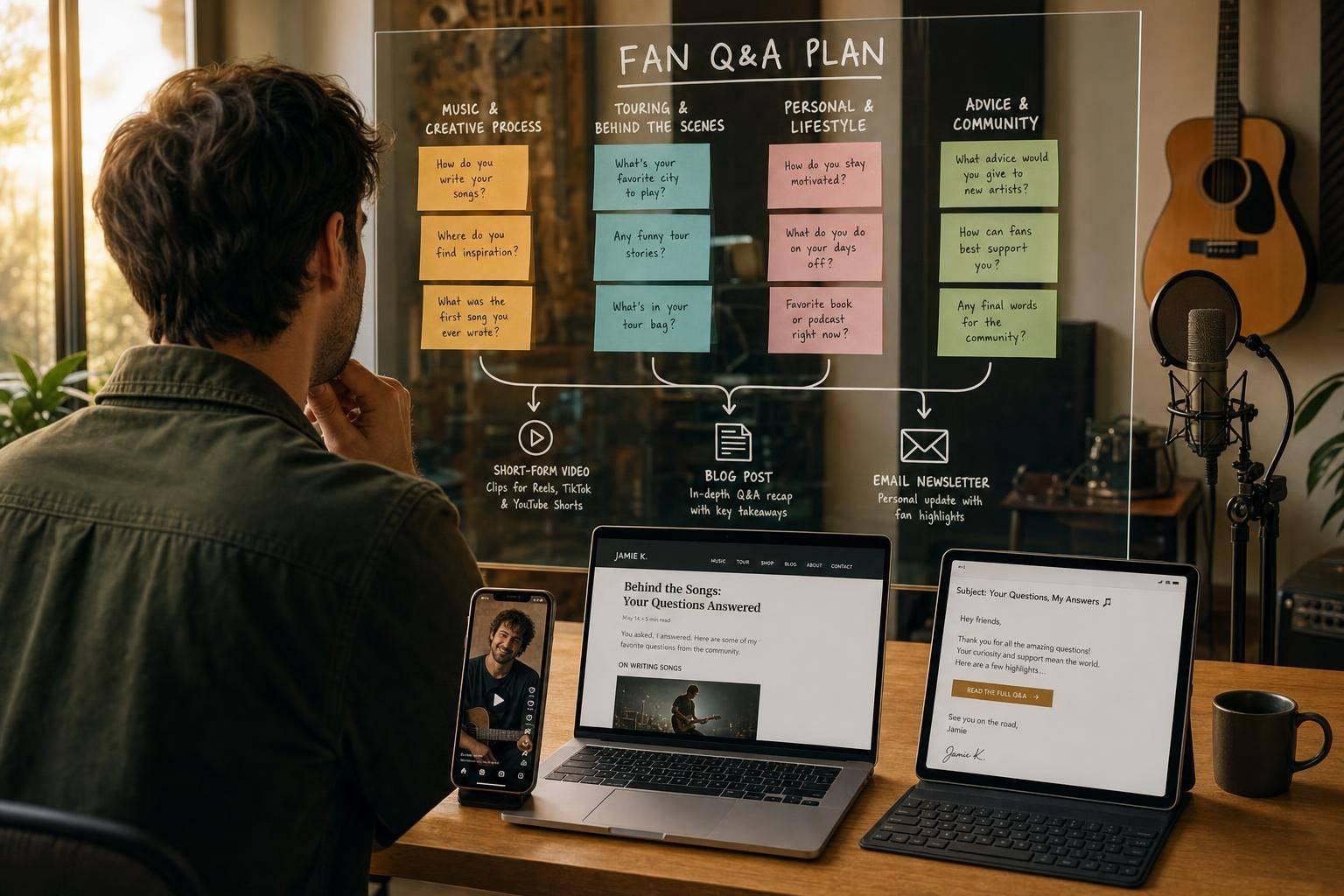
Fan Engagement for Musicians: Q&A Post Guide
If I want more fan replies without making more from scratch, Q&A posts are one of the easiest ways to do it. A simple plan works: post a light Q&A every 1–2 weeks, go live once a month, sort questions into a few topic groups, and turn the best answers into clips, text posts, and email copy.
Here’s the article in plain English:
- What Q&A posts are: fans ask questions, and I answer in public on Stories, TikTok, YouTube, Discord, or in comments.
- When to use them: before a single release, EP, tour, or video, or after a milestone when fan interest is higher.
- How often to post: start with one light Q&A every 1–2 weeks plus one live Q&A each month.
- What prompts work best: narrow prompts like songwriting, lyrics, gear, live shows, collabs, or the new release.
- How to sort questions: group them into music process, personal story, release details, fan requests, and career advice.
- How to reuse answers: one answer can become a short video, quote graphic, caption, carousel, recap, or newsletter section.
- How to tie Q&A to releases: answer first, then add a link to the song, show, merch page, or smart link.
- What to track: story taps, video clicks, pre-save campaigns, ticket clicks, email clicks, and repeat topic patterns.
A few numbers stand out. The guide suggests pulling the best 5–10 answers within 24–48 hours after a session. It also suggests turning each strong answer into 1–3 new pieces of content. That means one live Q&A can fill much of a week’s posting schedule.
The short version: keep the system simple, repeat it on a set schedule, and use fan questions to feed both your content calendar and your release posts.
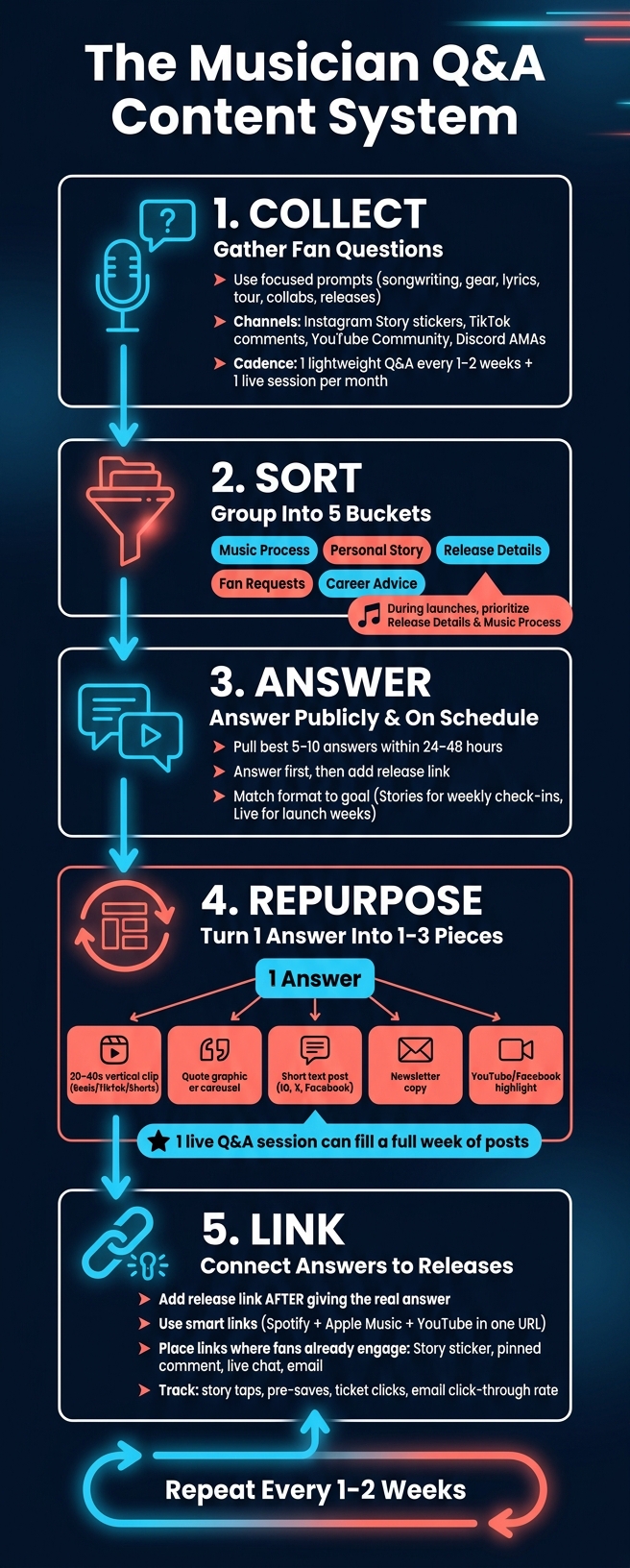
Musician Q&A Content System: Collect, Sort, Answer, Repurpose, Link
What Fan Q&A Posts Are and When to Use Them
Q&A posts turn fan interest into a back-and-forth. Fans ask, artists answer, and that exchange becomes the content itself. They work well when you want more direct fan input, more comments, or a simple content idea tied to a release, tour, or milestone.
What Counts as a Musician Q&A Post
A musician Q&A post is any planned format where fans send in questions and you answer them in public.
On Instagram, you can use Story question stickers and reply in later Story frames. On TikTok, you can answer question-marked comments with short videos. On YouTube, you can use Community tab prompts or live chats. On Discord, you can run text or voice AMAs in a channel set aside for that purpose.
Caption prompts count too. You might post a photo, ask for touring questions, and then answer the top comments in a follow-up video.
Why Q&A Content Works for Fan Engagement
Q&A works because it pulls fans into the process. They’re not just watching from the sidelines. They’re part of what happens next.
When someone sees their question answered by an artist they follow, that moment feels personal. It gives them a sense of being seen, and that can build loyalty that lasts longer than one release.
It also makes life easier for small teams. Fan questions supply the ideas. You don't need a big setup. And you can use tools that already exist on the platforms you're on. A weekly Instagram Story Q&A or a monthly Discord AMA can take little more than time, and each session can give you material for follow-up posts, short clips, and email content.
Once you know what counts as a Q&A post, the next step is deciding how often to run one and which format matches your goal.
sbb-itb-e819543
How Often to Run Q&A Posts and Which Format to Pick
Set a Q&A Schedule You Can Stick To
Once you know what counts as a Q&A post, the next move is picking a rhythm you can keep up with.
The best Q&A cadence is the one you can maintain without burning out. A solid starting point is one lightweight Q&A post every 1–2 weeks and one live session each month. Here’s an easy gut check: could you keep that pace for three straight months, even in the middle of a busy campaign? For example, you might run one Story Q&A each week and one live session each month.
You should also adjust your cadence around releases. In the 3–4 weeks before a single, EP, tour announcement, or video drop, add more Q&A moments. That’s usually when fan curiosity starts to spike, so the questions tend to show up on their own. In release week, a simple mix works well: one Story Q&A, one short video reply, and one live session after the drop. When things are quieter, go back to your baseline.
After cadence, the next call is format.
Match the Format to the Goal
Pick the format that fits that week’s goal. Some formats are better for low-effort check-ins. Others make more sense when you want deeper back-and-forth or a bigger moment. Use the table below to line up the format with the outcome you want.
| Format | Time Investment | Replay Value | Reach | Best Use Case |
|---|---|---|---|---|
| Instagram/TikTok Stories | Low | Low | High (existing followers) | Weekly check-ins, quick prompts |
| Short video replies | Medium | Medium | Strong shareability | Answering one fan question at a time with personality |
| Live sessions (Instagram Live, YouTube Live, TikTok LIVE) | High | High | Strong real-time energy | Launch weeks, album drops, tour announcements |
| Discord AMAs | Medium–High | Medium | Lower broad reach, high community depth | Super-fan spaces, dedicated community conversations |
A simple way to think about it: use Stories and short video replies for steady, always-on engagement. Save live sessions and Discord AMAs for release windows and big announcements.
Once you’ve picked your cadence and format, the next step is gathering questions that are worth answering.
How to Collect Better Fan Questions and Sort Them Quickly
Use Prompts That Get Specific, Usable Questions
Skip broad prompts like “ask me anything.” They tend to bring in a mixed bag, and a lot of it won’t turn into strong content.
Focused prompts work better because they lead fans toward questions you can answer in a clear, useful way. They also make the whole pile easier to sort later.
A smart move is to rotate prompts by topic so things don’t get stale. For example, “Ask me anything about how I write hooks” will pull in songwriting questions. Meanwhile, “Curious about what specific lines on the new EP mean? Ask about any lyric and I'll break it down” connects straight to a current release.
Other prompt themes that tend to work well include songwriting, studio process and gear, touring and live shows, lyrics and meaning, collaborations, and upcoming releases. Keep it simple: use one prompt per slide or post.
Better prompts don’t just improve question quality. They also make the next step a lot less messy.
Group Questions by Theme Before Answering
Don’t answer submissions as they come in. Sort them first.
Use five buckets:
- music process
- personal story
- release details
- fan requests for topics, setlists, or covers
- career advice
After that, rank questions inside each bucket using three filters: what helps the most people, what keeps coming up across multiple Q&A rounds, and what ties in cleanly to an active release or campaign. Using shareable music links ensures that when you answer these questions, fans can jump straight to the music regardless of their preferred platform.
During launch windows, put release details and music process first. Between campaigns, lean more on fan requests and career advice.
Once you’ve done that sorting, the best answers can do more than fill a Q&A. They can turn into other content pieces too.
Pick a Collection Method You Can Reuse
Use the channel fans already know and the one you can run again without rebuilding the whole system each time.
Story stickers are fast and familiar. The catch is that submissions disappear after 24 hours, and sorting is mostly manual. Comments are good for surfacing popular questions since fans can like each other’s submissions, but you still have to sort them by hand. DMs feel more personal, though they get messy once volume picks up. Discord channels and simple forms are the strongest choices if you want a lasting archive, since both support theme tagging and easy review across campaigns.
| Collection Method | Ease of Use | Organization | Theme Tagging | Anonymity | Archive Value |
|---|---|---|---|---|---|
| Instagram Story question sticker | Very easy | Low | Low | Low | Low |
| Comments | Very easy | Low | Low | Low | Medium |
| DMs | Easy | Low | Low | Medium | Low |
| Discord channel | Medium | Medium | Medium | Medium | High |
| Simple form | Medium | High | High | Medium | High |
For solo artists, a simple setup often works best: use Story stickers during release-week bursts, then use a simple form for repeat collection. Add a topic field so submissions come in pre-tagged inside a spreadsheet.
Small label teams can go one step further and add a Discord channel for a searchable archive. That setup makes repurposing much easier in the next step.
How to Turn Q&A Answers Into More Content
Repurpose One Answer Across Short Video, Text, and Email
Treat your best answers like content assets, not throwaway replies.
A single 2–3 minute answer about the idea behind your latest single’s artwork can do a lot more work than you might think. You can turn it into a Reel trimmed in-app on Instagram or TikTok, a short caption that points out one detail fans may have missed, a quote graphic built around one strong line, and a fan email that opens with the question and ends with a link to the single.
One answer can power a Reel, caption, quote card, and email. That shifts Q&A from being just a post to being a source.
The goal is to reformat, not rewrite. One session can give you enough material for a full week of posts.
Put the most weight on answers that are evergreen, story-based, or tied to a release. More time-sensitive answers, like reactions to yesterday’s news, usually work better as one-off live replies or short-lived Stories.
Build a Recurring Series From Repeat Topics
When the same themes keep coming up across multiple Q&A rounds, take the hint. Don’t keep treating those questions like one-offs. Turn them into a series.
A fixed format like "Studio Sunday" can make this much easier. Maybe it’s a short weekly clip or a carousel built from a studio-related answer. Either way, you’re not starting from scratch every week. You’re pulling the next answer from your archive and dropping it into the same setup.
Use one template and swap in the next answer. That archive helps keep the series steady from week to week.
Map Q&A Assets to a Content Calendar
Fan questions turn into reusable community content when you have a simple pull-and-post workflow.
Here’s the basic flow:
- Capture the session with video or screenshots
- Pull out the strongest 5–10 answers within 24–48 hours
- Give each answer 1–3 formats
- Schedule those pieces across the week
You don’t need polished transcripts. Bullet-point notes with rough timestamps are enough to work from.
The table below shows how common Q&A assets can turn into other formats, along with a posting pace that makes sense for independent artists:
| Source Asset | Repurposed Format | Suggested Cadence |
|---|---|---|
| Live Q&A video recording | 20–40s vertical clips (Reels/TikTok/Shorts) | 2–4 clips per week |
| Live Q&A video recording | Longer YouTube or Facebook video highlights | 1 upload every 1–2 weeks |
| Rough transcript or notes | Short text posts (IG, Facebook, X) | 2–3 posts per week |
| Rough transcript or notes | Quote graphics or lyric-style cards | 1–2 posts per week |
| Rough transcript or notes | Newsletter copy | 1 email every 1–2 weeks |
| Text replies (Stories, etc.) | Carousel of top fan questions and answers | 1 carousel per week |
| Chat logs or comments | "Fan Questions This Week" recap post | 1 recap post per week |
| Chat logs or comments | Topic-based series (Studio Sunday, etc.) | 1 themed post per week per series |
Batch your best answers once, then drop the finished pieces into open calendar slots. Keep release-related answers close by for the next move: connecting them to music links without making the post sound like a sales pitch.
How to Connect Q&A Posts to Music Releases
When a fan question turns into good content, use that moment to guide people toward the release. The key is simple: answer the question first. Then, once you've given a real answer, point to the release as the next step.
Say a fan asks about the story behind a song. Give them the full answer. After that, add a light nudge. You might mention that the song is on your latest EP and share a link where fans already spend time. That way, the link feels useful, not forced.
Add Release Links Where Fans Already Engage
Where you place the link matters more than how many times you post it. Put the link right next to the answer so it feels like a natural next move.
For example:
- Use a Story link sticker on the exact frame where you mention a show date
- Pin a comment with a direct track link under a TikTok Q&A video
- Paste the release link in YouTube Live chat when the topic comes up
- Send a follow-up email after a session where several fans asked about the same project
This works because the fan doesn't have to go hunting. They hear the answer, see the link, and can act right away.
Use Smart Links and Artist Pages to Keep the Path Simple
If you want one link that keeps things clean, use a smart-link page. Sending fans to a link for just one service can make them search for the platform they use. A smart link puts Spotify, Apple Music, YouTube, and other choices in one place.
PromoLinks.me lets you create smart links, artist pages, pre-save campaigns, QR codes, and email capture for release promotion. Its artist pages can act as a central hub for your latest single, upcoming shows, and merch.
You can also make a QR code for your music tied to that same page and show it on-screen during a livestream Q&A, so fans can scan it on the spot. And if you want to turn interest into a direct line of contact, the email capture feature on release pages helps you invite fans to join your list without making the pitch feel heavy-handed.
Track Which Questions Drive Clicks and Conversions
Not every Q&A topic leads to the same result. Questions about song meaning, studio process, and tour details often lead to the strongest follow-through.
Here's how different Q&A surfaces can include links or QR codes, and what you can track from each:
| Q&A Surface | How Links or QR Codes Are Featured | Key Data to Measure |
|---|---|---|
| Instagram Story Q&A | Link sticker on the specific answer Story | Taps per Story, platform choice, taps that don't reach the release page |
| TikTok Q&A video | Pinned comment under the answer video | Clicks from TikTok, platform button selected, pre-saves |
| YouTube Live Q&A | Release link in the stream description; link pasted in chat when relevant | Clicks during and after the live, ticket or merch purchases |
| Discord or Patreon Q&A | Pinned post or channel with a smart link; QR image shared in chat | Clicks from community members, email signups, repeat visits |
| Email Q&A recap | Text links and buttons for singles, albums, shows, and merch | Open rate, click-through rate, pre-save or ticket conversions |
Track taps, pre-saves, and ticket clicks. Then repeat the format that gets the best response. Over time, the numbers will show which questions, formats, and link placements are worth using again.
Conclusion: A Simple Q&A Workflow Musicians Can Repeat
Once your prompts, sorting system, and repurposing plan are set, keep the schedule simple. A Q&A system works best when it's predictable and easy to keep up with. Publish at the same local time each cycle. That steady rhythm builds trust and turns engagement into part of your normal routine.
From there, the workflow stays straightforward. Use focused prompts to gather usable questions. Group them into a few recurring themes before you answer. Then turn each strong answer into source material for a short vertical video, a text post, and an email segment. That answer archive feeds straight into your content calendar, so you’re not starting from zero every time.
After you repurpose the strongest answers, let the top-performing topics shape your release links. When a question naturally connects to a release, add a helpful link after your answer, not before. PromoLinks.me can track clicks and pre-saves. Use that data to pick your next questions, formats, and link placements.
The goal isn’t perfect Q&A. It’s repeatable Q&A: collect, sort, answer, repurpose, link.
FAQs
How do I keep Q&A posts from feeling repetitive?
Focus on how you present your core message, not on changing the message itself.
Repetition helps people remember you. But that doesn’t mean every post has to feel the same. You can share the same update from a few different angles to keep fans interested, like a hook snippet, a behind-the-scenes studio video, or a countdown milestone.
Add your PromoLinks.me smart link to each post so fans always have one clear place to go. When you rotate these assets, your feed stays fresh and your music stays top of mind.
What should I do if fans submit very few questions?
If only a few questions come in at first, don’t let that throw you. A quiet start is normal.
One simple move is to seed the Q&A yourself. Add a few common questions people are likely to ask, or pull from topics your community already cares about, like your creative process or upcoming projects.
You can also post milestone updates or behind-the-scenes moments to get people talking. Then use PromoLinks.me to track engagement and spot which content formats get the most response, so you can fine-tune your approach and build momentum.
Which Q&A topics usually get the most clicks?
Topics with a personal angle and behind-the-scenes detail often get the most clicks. With the 70/20/10 content rule, about 70% of your content should lean into personality and value. Think creative inspiration, studio moments, and the stuff fans don’t usually get to see.
Posts about your process or the meaning behind your lyrics also tend to do well. Why? They help fans feel closer to your journey.
Related Blog Posts
Ready to create your smart links?
Join thousands of artists using PromoLinks to promote their music smarter.
Get Started Free