Social Media Schedule For Music Releases
If I want more streams, I need a posting plan that starts weeks before release day and keeps going after week one.
Here’s the short version: I split the campaign into 5 phases - early teaser period, pre-save push, final countdown, release week, and post-release follow-up. I keep one link at the center of the campaign, switch that link from pre-save to stream now on release day, and give each post one job: get attention, drive pre-saves, push plays, or keep the song moving.
A few numbers from the guide stand out:
- I start planning about 6–8 weeks before release
- I post teaser clips about 3–5 times per week early on
- I can keep a steady pace with about 3–7 total posts per week
- I should reply to fan messages and mentions within 24–48 hours
- A lot of first-year streams come after month one, so post-release work matters
What this means in plain English:
- Before release: tease the song, reveal the art, and push pre-saves
- On release day: swap every bio and post CTA to one live stream link
- During launch week: change the post angle each day, but keep the same destination
- After launch: share milestones, repost fan content, and keep what gets clicks
I’d treat the whole thing like one campaign, not random posts. Simple schedule, one link, clear CTA. That’s the core idea.
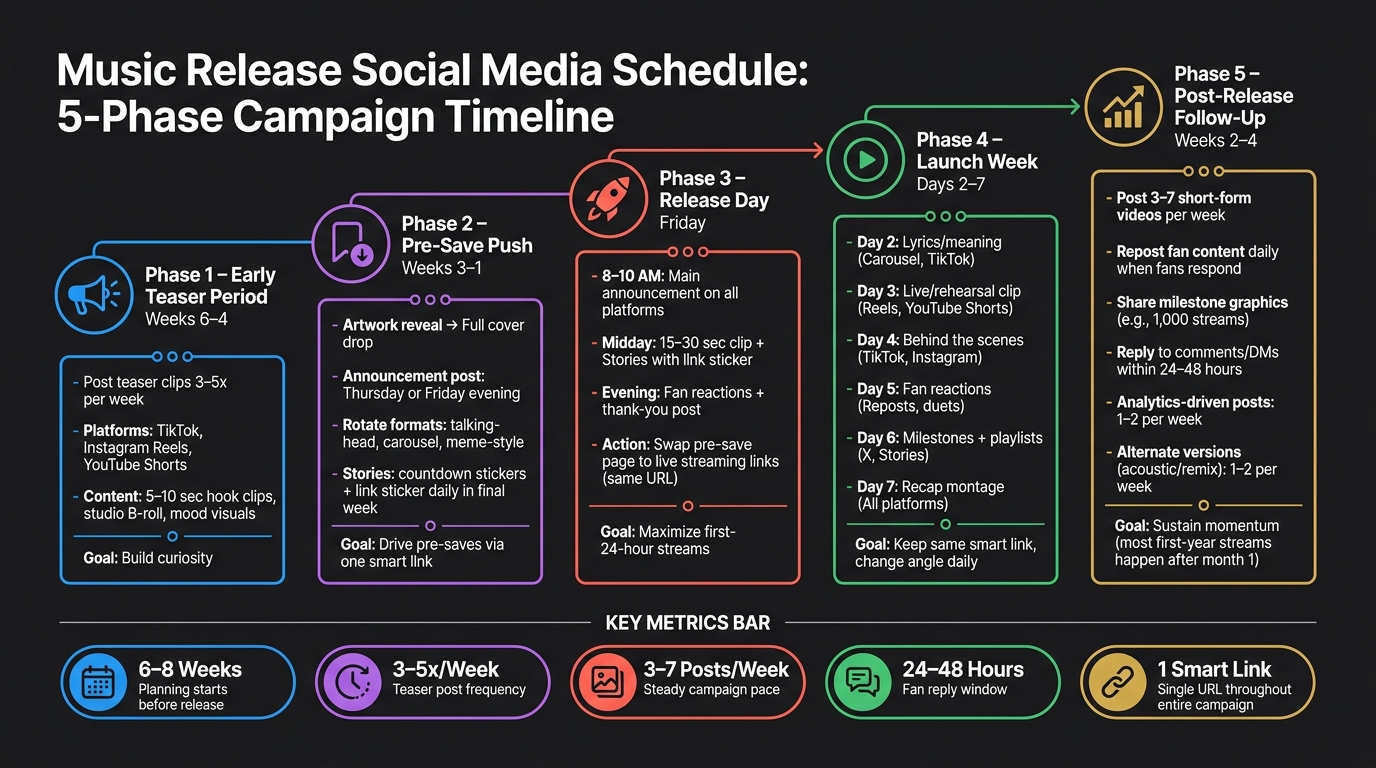
Music Release Social Media Schedule: 5-Phase Campaign Timeline
How To Promote A Single In 2026 (THE 60-DAY PLAN) MAJOR UPDATE!
sbb-itb-e819543
Schedule pre-release posts from teaser clips to pre-save reminders
With your calendar locked in, give each week in the pre-release window one clear job.
Weeks 6–3: teaser posts, artwork reveals, and the release announcement
This is the stretch where campaigns either pick up steam or fall flat. Your job here is simple: give fans a reason to care before they can even stream the song.
Start with short teaser clips. Think 5 to 10 seconds of the hook, an instrumental loop, or a mood-first visual. Post these 3 to 5 times per week across TikTok, Instagram Reels, and YouTube Shorts. Hold some cards back. You want curiosity, not the whole song.
Studio B-roll works well in this phase because it feels close and personal without giving too much away. That can be:
- recording vocals
- adjusting levels
- a quick drum take
Around week 4, move into the reveal phase. Start small. Show part of the artwork first, like the color palette one day and the typography the next. Then post the full cover.
Your main announcement post should go out on a Thursday or Friday evening. Include the final cover art, the song title, and the release date in U.S. format, like Friday, October 9, 2026. Pin that post on Instagram and TikTok so new visitors see it right away. Keep the caption short, and use a light CTA like follow for updates.
Once the announcement is live, the focus changes. Now you're not just building interest. You're pushing pre-saves.
Weeks 3–1: rotate pre-save calls to action with fresh formats
After the announcement, pre-saves become the main goal. The tricky part is saying the same thing for three weeks without sounding stuck on repeat.
The fix is simple: change the format and the angle, not the destination. Every post should lead to the same pre-save link, but each one should feel a little different.
A talking-head video can share the story behind the lyrics. A carousel can show lyric snippets or walk through part of the production process, then end with a pre-save slide. A meme-style post can use humor or a trend that fits the song's theme and still close with the pre-save link in bio.
On Stories, use countdown stickers set to the release date, like October 9, 2026, 12:00 AM ET, plus a link sticker that sends people to the pre-save page. In the final week, when fan intent is at its highest, post Stories daily or close to it. At that point, make the CTA more direct: pre-save now.
Set up the smart link and pre-save page before the announcement
Get your smart link and pre-save page ready before the announcement goes live.
That means your Spotify and Apple Music pre-save destinations should already be connected. Your page should include the cover art and a short audio preview. And the bio link on Instagram, TikTok, Twitter/X, and your YouTube channel description should already point to one URL.
PromoLinks.me lets artists build a branded pre-save page with Spotify, Apple Music, email capture, and click tracking. Its real-time analytics show which posts are driving pre-saves, broken out by platform and location. That gives you a clear read on what's working while the campaign is still live, so you can put more effort behind the posts that are pulling their weight.
Plan release day and launch week posts around one smart link
Once pre-saves end, your campaign URL should switch from coming soon to stream it now. That one move matters more than it might seem. Release day is where a lot of artists lose steam, mostly because traffic gets split across too many links. Your posts, Stories, and bio should all send people to one smart link.
Release day: post in the morning, midday, and evening with clear calls to action
The night before release, follow a music marketing checklist and test the smart link on both mobile and desktop. Then make sure every bio points to the updated URL.
On release morning, post your main announcement between 8:00 and 10:00 AM on Instagram, TikTok, X/Twitter, Facebook, and YouTube Community. Keep the caption short and direct: Out now. Listen via the link in bio. Pin that post on X/Twitter and Facebook. Add an Instagram Story with a link sticker that goes to the same smart link.
By midday, move into Stories and replies. Share a 15- to 30-second clip with a link sticker and send fans to the bio link. This is a good moment to use a little social proof. Thank early listeners, then invite people to tap the sticker.
In the evening, post fan reactions or a short thank-you message. Let the tone feel a bit warmer and more personal. It gives people one more reason to click instead of scrolling past.
Early engagement in the first 24 hours helps streaming platforms pick up momentum. Spacing your posts across the day helps keep those early clicks, saves, and shares coming.
Launch week: change the angle each day while keeping the message consistent
After release day, change the angle each day, but keep the same link and the same call to action.
| Day | Angle | Format | Platform Focus |
|---|---|---|---|
| Day 1 | Out now | Announcement + cover art | All platforms |
| Day 2 | Lyrics + meaning | Carousel or TikTok breakdown | Instagram, TikTok |
| Day 3 | Live or rehearsal version | Performance clip | Instagram Reels, YouTube Shorts |
| Day 4 | Behind the scenes | BTS video or photo carousel | TikTok, Instagram |
| Day 5 | Fan reactions | Reposted Stories, duets, comments | Instagram, TikTok |
| Day 6 | Milestones + playlists | Screenshot or graphic | X/Twitter, Instagram Stories |
| Day 7 | Recap | Short montage or recap post | All platforms |
Each post should end at that same smart link. What changes is the angle. That’s what keeps things from feeling stale. Someone who saw the announcement on Day 1 may still stop for a lyric breakdown on Day 2 because it feels different, even though the destination stays the same.
Swap the pre-save page to live streaming links without changing the campaign URL
On release day, swap the pre-save page to live streaming links without changing the campaign URL. With PromoLinks.me, you can convert the current campaign page by replacing the pre-save setup with the live streaming URLs - Spotify, Apple Music, YouTube, and more. Keep the same URL so every bio link, pinned post, and Story sticker now sends fans to the live release.
Keep the branding the same too: same artwork, same color scheme, same layout. If someone clicked the pre-save link before release, the page should still look familiar when they come back.
Once the page is live, PromoLinks.me's real-time analytics show which platform gets the most clicks and which posts drive traffic. Use that release-day click data to decide which launch-week format is worth posting again.
Keep momentum after launch week with recap posts and fan reposts
Most first-year streams happen after month one. That’s why weeks 2–4 matter so much. Once day 7 passes, move away from launch-day urgency and lean into proof and retention. Keep using the same live smart link in every post so all that traffic points to one place.
Weeks 2–3: share recap posts, milestones, and behind-the-scenes follow-ups
In weeks 2 and 3, shift the focus from release-day hype to fan response. If you hit 1,000 streams, share it. Milestone graphics work well here, especially when you pair them with behind-the-scenes clips that show how the song came together.
This is also a good time to keep your short-form video output steady. Post 3–7 short-form videos per week during weeks 2–4. That gives you enough room to test what still gets attention without flooding people’s feeds.
Weeks 2–4: repost fan content to extend reach and credibility
From weeks 2–4, repost fan clips and reactions as they come in. This helps your reach grow and gives people social proof that the song is landing with listeners.
Speed matters here too. Aim to reply to every comment, DM, and Story mention within 24–48 hours during this stretch. A fast response can turn a casual listener into someone who shares the track again.
Use analytics to decide what content stays in rotation
Not every post format will keep working after launch week. Watch click-throughs, saves, and shares, then keep only the formats that still send people to the release page.
PromoLinks.me’s analytics can show which posts are still driving traffic. Use that data to keep your best-performing formats in rotation and cut the ones that have gone flat.
| Post-Release Content Type | Purpose | Timing | Recommended Frequency |
|---|---|---|---|
| Fan Content (Reposts) | Extend reach and credibility | Weeks 2–4 | Daily when fans respond |
| Analytics-Driven Posts | Target platforms or regions showing growth | Weeks 2–4 | 1–2 posts per week |
| Alternate Versions | Tease an acoustic or remix version | Weeks 3–4 | 1–2 posts per week |
Build a reusable weekly template for future releases
Take the posts that got the most clicks and saves, and turn them into your default release template. The goal is simple: build one repeatable system for every single, EP, or album. Consistency matters more than volume.
Give each platform a clear job in the campaign
When each platform has a clear role, posting gets a lot easier. You know what goes where, and you stop guessing.
Use TikTok, Reels, and Shorts for discovery, or grow your fanbase with pre-save campaigns to capture early interest. Use the Instagram feed for artwork and milestone posts. Use Stories for countdowns and fan reposts. Use X for links and stream updates.
Here’s the practical upside: one vertical clip can become a TikTok, Reel, and Short with small edits. Then your Instagram feed handles the polished artwork, and your X feed handles the link and the numbers. So instead of making brand-new content for every platform, you’re planning 1–2 core assets per week and assigning each one a place.
Build a weekly posting rhythm for each phase of the release
Most independent artists can keep up with 3–7 total posts per week across platforms. That’s enough to stay present without burning out.
Use the same weekly skeleton for every release, then change the angle based on the phase. In most cases, each week should revolve around one anchor post, often on Friday, with lighter repurposed posts filling the rest of the week.
| Phase | Day | Post Theme | Primary Platform | Link Destination |
|---|---|---|---|---|
| Pre-Release | Tuesday | Teaser or audio clip | TikTok / Reels | Pre-save page |
| Pre-Release | Thursday | Artwork reveal or reminder | Instagram Feed | Pre-save page |
| Pre-Release | Sunday | Countdown or behind-the-scenes | Instagram Stories / X | Pre-save page |
| Release Day | Friday AM | "Out Now" announcement | All platforms | Live smart link |
| Release Day | Friday Midday | Lyric or performance clip | TikTok / Reels | Smart link in bio |
| Release Day | Friday PM | Thank-you + fan reaction screenshots | Instagram Stories / X | Smart link |
| Post-Launch | Weekend | Fan reposts or milestone graphic | Instagram / X | Smart link |
Use this setup for a single. Repeat it for an EP. For an album, keep the same structure and stretch the post-launch period a bit longer. The key is to keep the schedule fixed and change only the content angle.
Conclusion: Keep the schedule simple, linked, and consistent
This system works best when you stick to three rules: plan by phase, use one smart link, and give each post one clear CTA.
Keep the same campaign URL inside your template so link changes take just one edit. PromoLinks.me lets you update the destination behind a single URL - switching from pre-save to live streaming on release day without changing any bio links or pinned posts.
Repeat the template, swap the angle, and keep posting after week one. A repeatable template beats an ambitious plan you drop halfway through. A repeatable schedule beats building a new plan for every release.
FAQs
What if I only have time for a few posts each week?
If you only have time for a few posts each week, pick quality and consistency over volume. A small number of solid posts will do more for you than posting every day just to stay busy.
Put your energy into the moves that matter most, like launching a pre-save campaign with PromoLinks.me 2 to 3 weeks before release.
Then keep things simple:
- Batch your content in one session 3 weeks ahead
- Keep your smart link in your bios all month
- Use PromoLinks.me analytics to see which platforms send the most traffic
That way, you're not guessing. You're spending your time where it counts.
When should I switch my bio link from pre-save to stream now?
Switch your bio link on your official release day. From that point on, your main call to action should push people to the live stream.
If you use PromoLinks.me, your pre-save page can update on its own into a full smart link once the music is live. You should still change your social bios that day so everything matches.
How long should I keep promoting a song after release day?
Keep promoting your song for at least a month after release day. A lot of artists ease off after week one, but that’s often too soon. Streaming algorithms can look at performance across several weeks when deciding whether a track has a shot at playlist placement.
To keep the momentum going, post follow-up content instead of pushing the same clip again and again. That can include:
- acoustic versions
- remixes
- lyric breakdowns
- fan reposts
Also, keep your smart link in your social bios. Then check your analytics to see which channels are sending the most traffic.
Related Blog Posts
Ready to create your smart links?
Join thousands of artists using PromoLinks to promote their music smarter.
Get Started Free