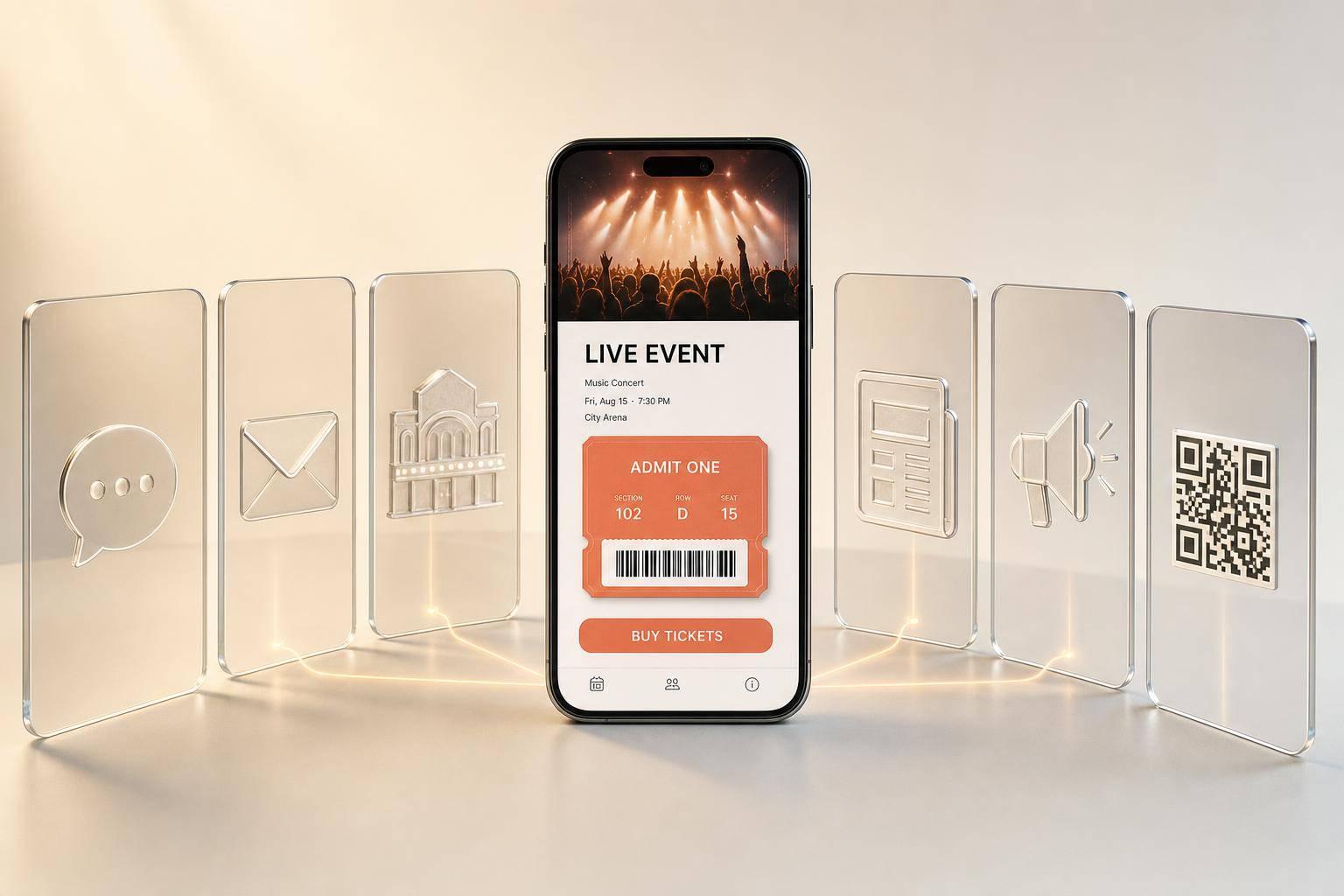
10 Live Event Promotion Tips for Ticket Sales
Most shows don’t miss ticket goals because the music is weak. They miss because the promo is too thin. I’d sum this guide up in one line: use one ticket hub, push it across social, email, venue, press, ads, and QR codes, and follow a week-by-week plan until show day.
For me, the article comes down to 10 moves:
- Use one event page for every ticket click
- Announce across all social platforms at the same time
- Post short videos between launch and show day
- Send three emails: on-sale, reminder, last call
- Update the artist page with clear show info
- Work with the venue on shared promo
- Pitch local press and event calendars early
- Run geo-targeted ads near the venue
- Use QR codes on posters and flyers
- Stick to a timed rollout from launch to final 48 hours
A few numbers stand out. Live shows can make up about 65% of artist revenue. Social buyers may spend $82 per ticket versus $51 from older channels. And 30%–50% of club-show ticket sales can happen in the last week. So if I want more sales, I need to stay visible the whole way through - not just on announcement day.
Here’s the short version of what each tip does:
| Tip | Main job | What I’d focus on |
|---|---|---|
| Smart link hub | Cut drop-off | One URL everywhere |
| Social rollout | Get early attention | Same-day multi-platform launch |
| Short video | Keep interest up | 2–5 posts per week |
| Drive direct clicks | 3-send sequence | |
| Artist page | Confirm show details | Clear Buy Tickets button |
| Venue promo | Reach local fans | Shared assets and tracked link |
| Press/listings | Add local reach | Submit 3–6 weeks out |
| Geo ads | Reach nearby buyers | Tight radius around venue |
| QR codes | Turn offline views into clicks | Track each placement |
| Timeline | Keep promo active | Push hardest in final week |
If I had to keep just one lesson, it would be this: don’t split traffic across random links. Send every post, email, ad, flyer scan, and venue mention to the same page so I can track what sells tickets and fix what doesn’t.
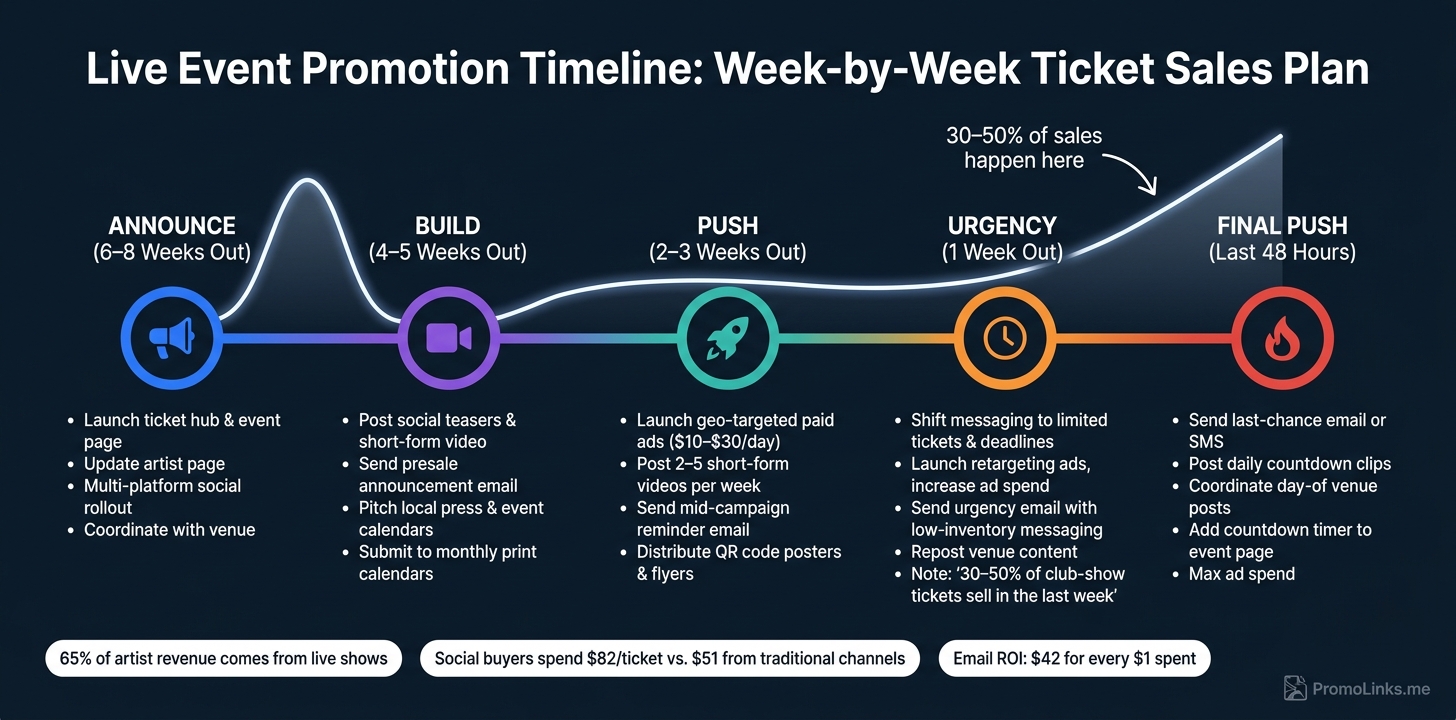
Live Event Promotion Timeline: Week-by-Week Ticket Sales Plan
A Crash Course In Live Show Advertising
sbb-itb-e819543
Why Centralized Promotion and Good Timing Sell More Tickets
Ticket sales go up when promotion is simple, steady, and repeated. Split up your links, and people drop off. Every extra click or choice hurts conversions, especially on mobile.
Use one URL across every channel so fans always land on the same ticket page. Your Instagram bio, TikTok profile, email campaigns, venue posts, press mentions, and printed QR codes should all send people to the same place. That kind of consistency works even better when your promotion rolls out over time instead of all at once, following a music promotion guide for multi-platform consistency.
A last-minute blast usually isn’t enough. People need to see a show more than once before they act. Phased promotion - announcement, presale, mid-campaign push, and a final urgency window - spreads your messages out so fans hear about the event several times before they buy. And that plan works best when every channel repeats the same ticket path.
Each channel should point fans to the same hub, so every click, scan, and mention strengthens the same buying path. PromoLinks.me can centralize ticket links, show details, email capture, QR codes, and smart links on one event page. When all traffic runs through one hub, your analytics show which posts, emails, or placements drove clicks and scans - and which ones fell flat.
The next tip shows how to turn that hub into your main ticket destination.
1. Use PromoLinks.me Smart Links and Event Pages as Your Ticket Hub
Here’s how to turn that central hub into a ticket page that gets people to act. Use one PromoLinks.me event page across every channel so fans land on the same ticket hub every time. That keeps the ticket link, event details, and Buy Tickets CTA in one place.
Use a clean event page with the Buy Tickets CTA above the fold, the ticket price in USD, and full event details laid out clearly. For example: Friday, October 18, 2026 · 8:00 PM · The Roxy Theatre, Los Angeles, CA. In the final 72 hours, add a countdown timer. It gives fans a small nudge without making the page feel cluttered.
For touring acts, set up one page per city with local ticket links and the right time zone. If you’re running a 10-city tour, give each stop its own page so each market buys through the same central system. That also lets you keep one URL live while changing the destination as sales move forward.
Track traffic and ticket clicks by market and channel in one dashboard. Then keep that same URL live for the full campaign and switch its destination as sales open. When general on-sale starts, the same link can send fans straight to checkout. No need to go back and fix every post, bio, or story link.
2. Announce the Show With a Multi-Platform Social Media Rollout
Once your event page is live, announce the show across Instagram, TikTok, Facebook, X, and YouTube Shorts within the same few hours. Keep the main details the same in every post: artist name, venue, city, date, on-sale date, and a direct call to action like Tickets on sale now. Then shape the format for each platform, but use the same ticket link every time so each post points fans back to one event page.
Make the path from post to purchase as short as possible. Add that same event link through your bio, story sticker, and caption. The goal is simple: someone sees the post and can buy without extra steps. That matters because Ticketmaster's LiveAnalytics research found that social media ticket buyers spend an average of $82 per ticket vs. $51 for buyers from traditional channels.
Timing matters here too. Post when tickets go on sale, add reminders as show day gets closer, and share one last urgency update when the deadline gets near or ticket inventory shifts. Change up the format so the posts don't all blur together. A poster image, a short video clip, or a countdown graphic can each catch people in a different way. If someone skips the first post, the next one might land. You can also line up those same milestones with your email sends and event page updates.
To track what works, use separate tracking links for Instagram, TikTok, and Facebook. That way, you can see which channels drive clicks and which ones turn into sales.
Tag the venue, promoter, and support acts. Also name the city and venue in every post. That gives local fans instant context, and it helps each platform connect the post to the right audience. In plain English: it keeps the promo tied to ticket sales in your market, which sets up the next step in your campaign.
3. Post Short-Form Video Teasers to Build Ongoing Interest
After the launch post goes live, use video to keep the campaign in motion. Short-form clips help your show stay visible in the gap between the announcement and event day. And every post should push people back to the same hub.
This format often beats static posts and can put you in front of local fans who don’t follow you yet. One benchmark puts TikTok’s median engagement rate at 4.25%, which is more than double Instagram’s 1.81% for standard posts.
Build your video calendar around three points in the campaign.
- In the first week, post a short vertical clip that introduces the show: date, city, venue, and a ticket CTA on screen.
- In the middle of the campaign, switch to behind-the-scenes footage like rehearsal snippets or soundcheck moments.
- In the final 7–10 days, post countdown clips every day, such as “3 days to go” or “Last tickets available.”
The first 1–2 seconds matter most. Lead with a strong musical moment, a crowd shot, or a direct shout-out to the city. Then end with a clear CTA. A simple text overlay like “Tickets: artist page vs. link in bio” works well, along with a link sticker or bio link that sends people to your event page. Short-form video tour posts can drive up to 142% higher ticket sales than text-only posts.
To make this easier, batch-record clips during one rehearsal session and schedule them ahead of time. A good target is 2–5 short-form posts per week during the middle stretch of the campaign, then more often in the final week. Add platform-specific UTM tags to your ticket link, such as ?utm_source=tiktok and ?utm_source=reels, so you can track which platform is driving ticket clicks. You can also reuse your top clips in email and paid ads.
4. Send a Fan Email Campaign With Presale and Reminder Messages
Email is one of the most direct ways to sell tickets because you're talking to people who already signed up to hear from you. Average open rates sit around 39% to 43%. But opens aren't the main win here. Ticket clicks are.
Build the campaign around three sends, each tied to a different moment in the buying process: announcement, reminder, and urgency.
| Timing | Primary Focus | |
|---|---|---|
| Presale announcement | When tickets go on sale | On-sale alert, direct ticket link |
| Mid-campaign reminder | ~1 week before the show | Reminder, new details, urgency |
| Last-chance send | 24–72 hours before show day | Final push, one clear CTA |
The presale email should go out the minute tickets are live. Say what the show is, where it's happening, when it is, and how to get tickets. Put the ticket link above the fold so fans can act right away instead of hunting for it.
The mid-campaign reminder should land about a week before the show. Give people one new reason to pay attention. That could be low ticket inventory, a newly announced opener, or a useful venue detail. A reminder works better when it adds something new instead of repeating the first send.
The last-chance email should go out 24 to 72 hours before show day. Keep it short. Keep it direct. Use one clear button to buy tickets.
Every email should link straight to the event page, not your homepage or a generic bio link. If you're using PromoLinks.me event pages, you can send fans to one URL that includes ticket links, a countdown, and venue details. You can also add UTM tags like ?utm_source=email to track which send drives clicks.
A couple of small moves can make a big difference:
- Segment by location so nearby fans get the strongest urgency
- Remove anyone who already bought a ticket from later sends
That keeps the message tight and stops you from emailing buyers again.
Tone matters too. Write these emails like a direct invite, not a promo blast. A short note about why you're excited to play that room will usually land better than a generic reminder. It feels more personal. And when an email feels like it was written for the reader, it's much easier to turn “maybe” into a ticket sale. That same clarity should carry onto your artist page.
5. Update Your Artist Page With Clear Event and Ticket Details
Your artist page is often the first place fans visit after a social post or email click. If the show info is missing or out of date, people leave and look somewhere else. A lot of them won’t return. One ticketing study found that 77% of ticket buyers who visited an artist website did so specifically to find upcoming show information. So after that first click, this page needs to do its job fast.
At a glance, each event listing should show the artist, date, time, venue, price, and a Buy Tickets link. For example: Sat, Nov. 14, 2026 - 8:00 p.m. - The Basement, Nashville, TN - Tickets from $28 - Buy Tickets. Put door time and age limits right below the main details so fans don’t have to hunt for the basics.
Place a clear Buy Tickets button near the top of the page, and make sure it’s easy to tap on mobile. Send fans to the direct ticket link, not your homepage and not a generic bio link. Every extra click gives people a chance to drop off.
If you’re using PromoLinks.me to build your artist page, mirror the same show details there and give fans a way to join your email list if they’re not ready to buy yet. That way, the page does more than inform. It helps move people from interest to action. The artist page confirms the show. The ticket link gets the sale.
Keep the page up to date for the full sales window. Make changes within 24 hours of any tour announcement, on-sale date, or show update. Match those edits to the same rhythm as your announcement, reminder, and urgency pushes so every channel stays in sync. A current artist page also gives the venue a clean link to share.
6. Partner With the Venue on Cross-Promotion
A venue can put your show in front of local fans you may not reach on your own. But that only helps if both sides are clear on who’s posting what.
When no one owns the promo plan, things slip. So treat venue marketing like a shared job. Agree early on what gets posted, when it goes live, and which channels each side handles.
Send a show info package 6–8 weeks out with the basics the venue needs to post fast:
- date and time
- ticket price
- age limit
- short bio
- ticket link
- ready-to-post graphics and copy
Ask the venue to put the show on its calendar, in its newsletter, and across its social channels. Once they have the package, turn those same assets into joint posts.
Use the same event URL everywhere the venue promotes the show, including its calendar, newsletter, and social posts. On social, use Instagram collab posts and Facebook co-hosting so the announcement shows up on both profiles. That gives the post more reach without making new assets for each channel.
If you’re using a PromoLinks.me event page, send the venue that same URL with a utm_source=venue parameter. That lets you track how many ticket sales came from the venue’s push versus your own. Then you can use that data to shape the final-week push.
That same package also works well for local press and event listings.
7. Pitch Local Press, Event Calendars, and Community Listings
A lot of people who might buy a ticket never see your Instagram posts. Local press and community listings put your show in front of people who are already hunting for something to do this weekend. Use the same event details and the same ticket URL from your main hub so every listing leads to one purchase path.
Local coverage can move tickets. Local coverage can raise attendance by 37%, and pre-event coverage can lift first-time market attendance by 63%.
Timing matters here. Submit to monthly print calendars and alt-weeklies 4–6 weeks out. Send pitch emails to local newspapers and online calendars 3–4 weeks before the show. Community boards, local Facebook Groups, and Nextdoor can also help you reach hyper-local audiences. If you wait until the last minute, you’ll usually miss print deadlines and weekend guide cutoffs.
When you pitch, keep it short and easy to publish. Include:
- Artist name
- Venue and address
- Date and time
- Ticket range
- Age policy
- One ticket link
Add a tight 2–3 sentence description of the act, plus one local angle. That angle could be a hometown show, a local support act, or a neighborhood cause. That small detail can help a basic listing turn into preview coverage.
Use one stable event URL with utm_source=local_press so you can track clicks and sales. It also gives you one place to update details if anything changes. Track which outlets drive clicks so you can put paid local spend where demand is strongest.
8. Run Geo-Targeted Ads Around the Venue Market
Paid ads help you reach local people beyond press mentions and venue posts. Organic social posts and listings mostly reach people who already know you. Geo-targeted ads reach people nearby who may not follow you yet, but are close enough to show up. Platforms like Meta and Google Ads let you target a set radius, a city, or selected ZIP codes around the venue, so you’re putting money in front of likely ticket buyers instead of spraying it everywhere.
That radius matters more than a lot of artists think. A 2019 analysis found that nearly two-thirds of location-based ad spend was wasted because of poor targeting. In a dense market, start tight with a 5–10 mile radius. If the venue is in a suburban or regional area where fans usually drive farther, open it up to 15–50 miles. Then watch the data. If most of your results come from a few ZIP codes, narrow future campaigns to those areas.
Meta and Google Ads do different jobs. Meta works well for discovery. It puts your show in front of fans who weren’t searching for it, but might click after seeing it in their feed. Google Search is better for high-intent traffic from people already looking for artist tickets or nearby concerts. If your budget is tight, don’t force both. Pick the channel that lines up with how people are most likely to buy. On Meta, you can also narrow delivery to people who live in, recently visited, or are traveling through the area.
Every ad should point to one tracked event page. Make the ad feel local right away: name the city, venue, and date up front. Add clear pricing like Tickets from $25 so the offer feels concrete, not vague. Then link each ad straight to your PromoLinks.me event page. That keeps the path simple, and real-time analytics on PromoLinks.me make it easier to see which local markets and ads drive the most clicks.
A simple spend pattern works well here:
- Start ads on sale day
- Spend about $10–$30 per day early
- Increase spend in the final 5–7 days
- Switch the copy to last-chance messaging near the end
That late push matters. In the United States, 30%–50% of ticket purchases for club-level events can happen in the last week, so those final days often do the heavy lifting. When you ramp up spend, keep the message direct and send every click straight to the ticket page.
9. Use QR Codes on Posters, Flyers, and In-Person Materials
Fans still find shows through posters, flyers, and signs they see in person. Offline promotion works best when every scan leads to the same ticket path. Send each scan to the same event page used across the campaign. Most phones can scan QR codes right from the camera app.
Once that path is set, make sure the code is easy to scan in the places where people will actually see it. Format QR codes so they read well in person. Print indoor codes at least 1.5–2 inches square, and go bigger if people will scan from farther away. Use strong contrast, leave enough blank space around the code, and place it in the lower third of the poster, below the main copy. Add a short call to action next to it, like Scan to buy tickets or Scan for presale access. Before you print a large batch, test the final version with both an iPhone and an Android.
Use dynamic codes so you can track each poster, flyer, or handout on its own. Generate a different code for each placement through PromoLinks.me. For example:
- one code for venue lobby posters
- another for campus flyers
- another for bar table tents
That way, you can see which placements and neighborhoods drive scans, then shift more materials there. Use a separate code for each market. Then use scan data to move posters and flyers into the final week’s push.
10. Follow a Week-by-Week Promotion Timeline Until Show Day
Once your ticket hub, social posts, email, press, and ads are live, the next step is simple: put them on a clear schedule. Ticket sales tend to jump when tickets first go on sale, flatten out in the middle, and then climb again during the final two weeks. So timing matters just as much as the message.
That’s why the same ticket page, email plan, social rollout, press, and ads tend to work better when they follow a set week-by-week timeline.
For most club-level or mid-size shows, start promotion six to eight weeks before the event. For smaller local shows, three to four weeks can be enough.
Use this schedule:
| Phase | Timing | What to Do |
|---|---|---|
| Announcement | 6–8 weeks out | Launch the show and ticket link. |
| Content build | 4–5 weeks out | Keep attention with teasers, presale email, and press outreach. |
| Broader push | 2–3 weeks out | Increase reach with ads, email, and posts. |
| Urgency phase | 1 week out | Shift to limited-tickets and deadline messaging. Launch retargeting ads. |
| Final push | Last 48 hours | Increase posting, send last-call email or SMS, and coordinate with the venue. |
The middle stretch matters more than many promoters think. That’s where campaigns often lose steam. Instead of doing one big launch and going quiet, stay visible week after week. The goal is steady repetition, not one loud burst.
Keep each post and message tied to the same event date, city, and ticket hub so every channel points people down the same path to purchase.
Supporting Tables and Visuals
The schedule above shows when to move. These tables show what to send, where to put money, and who should handle each part.
Use them as a simple working guide to pick channels, line up messages, assign owners, and time each push.
Organic Social Posts vs. Paid Ads
Start here when you're deciding how to split effort between organic and paid.
Average Facebook organic reach is only about 5.5% of your follower count. Paid event campaigns, on the other hand, often bring back $3–$5 for every $1 spent. Some have gone much higher, with 710% ROAS on paid social and 814% ROAS on search.
| Factor | Organic Social Posts | Paid Social Ads |
|---|---|---|
| Primary goal | Community engagement and social proof | Reaching new fans near the venue |
| Audience | Existing followers and fans | Fans in the venue market and people who have already shown interest |
| Reach | Limited to your follower base and algorithmic distribution | Scalable by budget |
| Targeting | Broad | Geo-targeted and retargeting |
| Typical content | Announcements, behind-the-scenes clips, fan reactions | Ticket-link boosts, urgency posts, retargeting ads |
| Cost | $0 in ad spend, but time-intensive | Variable budget |
| Ideal timing | Throughout the campaign | Once organic engagement is building, especially 2–3 weeks out and during the final push |
| Conversion strength | Moderate | High |
| Recommended measurement | Engagement, clicks, and shares | ROAS, CTR, and cost per ticket sale |
A good rule of thumb: lead with organic, then put money behind the posts that already show signs of life.
Announcement vs. Reminder vs. Last-Chance Emails
Email tends to beat social when the goal is ticket sales. Average email ROI sits at $42 for every $1 spent, and entertainment event reminder emails can hit open rates of 45%–60% with click-through rates of 20%–35%.
| Email Type | Send Timing | Primary Goal | Key Message | Call to Action | Urgency |
|---|---|---|---|---|---|
| Announcement | 6–8 weeks out | Awareness and first ticket push | Artist, date, venue, ticket link | Get tickets | Low |
| Reminder | 2–4 weeks out | Re-engage and add urgency | Social proof, lineup details, reason to act now | Grab yours before prices rise | Medium |
| Last-Chance | Final 48 hours | Convert holdouts | Low inventory and deadlines | Final chance to buy | High |
Each email has a different job. The first one gets the show on people's radar. The reminder gives them a nudge. The last-chance send is where deadline pressure does the heavy lifting.
Live Event Promotion Timeline
This table turns the campaign into a simple sequence, so the team knows what should happen at each stage.
| Phase | Timing | Key Actions |
|---|---|---|
| Announce | 6–8 weeks out | Launch the ticket hub, update the artist page, and coordinate with the venue |
| Build | 4–5 weeks out | Post social content, send the first email, and pitch local listings |
| Push | 2–3 weeks out | Post short-form video, run paid geo-targeted ads, and send reminder emails |
| Urgency | 1 week out | Intensify posts, send urgency emails, and repost venue content |
| Final push | Final 48 hours | Send last-chance messaging, post day-of reminders, and share QR codes |
If you're trying to keep things from getting messy, this is the table to come back to.
Artist-Led vs. Venue-Led Promotion
This split makes ownership clear fast. That matters more than people think. When promotion stalls, it's often because everyone assumes someone else is handling it.
| Task | Artist Handles | Venue Handles |
|---|---|---|
| Digital presence | Artist page, smart link in bio, and social posts | Venue website listing and event calendar |
| Direct fan outreach | Fan email blast and direct calls to action | Local event listings and community promotion |
| Physical assets | Tour posters and QR codes | In-venue signage, marquee, and box office flyers |
| Advertising | Retargeting existing fans | Geo-targeted ads to local fans |
| Cross-promotion | Repost venue content | Share artist content with local followers |
Next, measure which channels actually drove clicks and ticket sales.
How to Measure What Actually Drove Ticket Sales
Next, look at which pushes turned into ticket sales.
The goal isn't to measure what got attention. It's to measure what moved tickets. Once you know which channel led to sales, you're not guessing anymore. You have a plan you can use again.
Start with ticket sales timing. Export daily or hourly sales data from your ticketing platform, then match it against your promo calendar. If sales jump right after an email send, that email likely drove the spike. Eventbrite's 2024 ticket statistics show that 57% of tickets were sold a week or less from the show date. That's a big deal. Treat that late-buying window as its own phase, because it often does most of the work.
For email, track:
- Open rate
- Click-through rate
- Click-to-purchase conversion
- Revenue per send
Each metric shows something different. One email might get plenty of opens but few buyers. Another might get fewer clicks and still sell more tickets. That's the one you want to spot.
Track each channel on its own so big traffic numbers don't hide poor conversion.
For social, go past likes. Look at reach, engagement rate, and link clicks by content type, including feed posts, Reels, and Stories. Give each format its own tracked link so you can compare them side by side.
Use separate tracked links for every channel so you can compare clicks, referrals, and sales in one place. PromoLinks.me lets you monitor clicks, referral sources, and geographic data in real time from one dashboard.
QR codes can help too. Use a different QR code on each poster, flyer, or handout so you can compare scans by location and time. Connect each QR code to one tracked link, then compare scans against sales. Venue-area placements often convert better because those fans are already closer to buying.
Use this scorecard to review channels after each show.
| Metric Category | What to Track | Why It Matters |
|---|---|---|
| Ticket Sales Timing | Daily or hourly sales mapped to campaign actions | Shows which pushes caused revenue spikes |
| Email Performance | Open rate, CTR, click-to-purchase conversion, revenue per send | Reveals which message type closes sales |
| Social by Format | Reach, engagement rate, and link clicks per post type | Identifies which format drives the most conversions |
| Link Clicks | Clicks by channel, referral source, and geography | Attributes traffic to specific placements |
| QR Code Scans | Scans by location and time of day | Measures impact of physical promo materials |
After the show, rank your top and bottom channels by tickets driven. Then start the next campaign with what worked and cut what didn't.
Conclusion
Ticket sales go up when your promo works like a system, not a single post. Social, email, artist pages, smart links, venue posts, press, and a weekly schedule all help keep the show in front of people until they buy.
That setup gets much easier when the tools sit in one place. PromoLinks.me can put smart links, event pages, QR codes, and fan email capture into one campaign hub, so it's easier to see what drives clicks and sales.
The biggest mistake is starting too late or leaning on one announcement. Start early, then keep the campaign moving all the way to show day.
Build the ticket hub first. Then plan your email, venue, press, and social pushes around it.
FAQs
How early should I start promoting a live show?
Start promoting your live show as soon as the event details are locked in. The earlier you start, the more time fans have to find the event page, grab tickets, and RSVP.
It also helps to get a dedicated event page up early. That page should include ticket links, RSVP forms, and any updates you want to share as the date gets closer.
What should I include on my ticket event page?
Include the event title, date and time with the correct time zone, plus clear venue details or a direct note that it’s a virtual event. Add a high-quality cover image, use your brand colors and font, show a countdown timer, and make the ticket link or RSVP form easy to spot.
You can also add a short description, social media links, and a Releases section with your PromoLinks to keep fans connected to your music.
Which promo channels usually sell the most tickets?
For music promotion as a whole, email often brings the best conversion rates. It’s direct, personal, and it reaches people who already showed some interest in what you do.
For concert and tour promotion, event pages do most of the heavy lifting. They help drive ticket sales and give fans a simple way to RSVP in one place.
To see what’s pulling its weight, use UTM parameters and PromoLinks.me analytics. That lets you track which channels - like social media, email, or even physical posters - bring in the most traffic. Once you know your top performers, put more time and budget there.
Related Blog Posts
Ready to create your smart links?
Join thousands of artists using PromoLinks to promote their music smarter.
Get Started Free