Smart Links for Artist Branding: Guide 2026
Your smart link page is your first brand check. If most fans find music through social and video apps - 82% of Gen Z and 70% of millennials do - then that first tap needs to do one job fast: send them to the right place and make your artist page look clear, matched, and easy to act on.
Here’s the short version:
- Pick one main goal for each campaign, like streams, pre-saves, tickets, or email signups.
- Keep the page on-brand with the same art, colors, photo, and type style fans saw on social.
- Limit choices so people don’t stall; around 4–8 links is a good range.
- Use one campaign link before and after release, then switch its destination from pre-save to live platforms.
- Add email signup if you want a direct way to reach fans after the first click.
- Use QR codes on posters, merch, and print, then test them on both iPhone and Android.
- Track results like click-to-stream rate, signups, and platform picks so you can improve the next campaign.
In other words: a smart link is not just a URL. It’s a small landing page that can shape whether a new listener streams, follows, joins your list, or leaves.
If I had to sum up the article in one line, it would be this: make every click look the same, feel the same, and lead to one clear next step.
Smart Link Tools for Artist Branding: What Each Does & What to Track
What are SMART LINKS and How Can Musicians Use Them?
sbb-itb-e819543
1. Build a branded smart link page for the first click
Your smart link page is the first branded touchpoint you control.
Pick one primary action per campaign
Each campaign needs one clear goal. Maybe you want streams. Maybe it’s pre-saves, email signups, or ticket clicks. Pick one, then shape the page around that goal.
Put the main action in the most visible spot: the largest button at the top. Everything else - other streaming platforms, social profiles, merch - should sit below it as secondary choices. When the page has one main job, the next step feels obvious.
Match the page to your visual identity
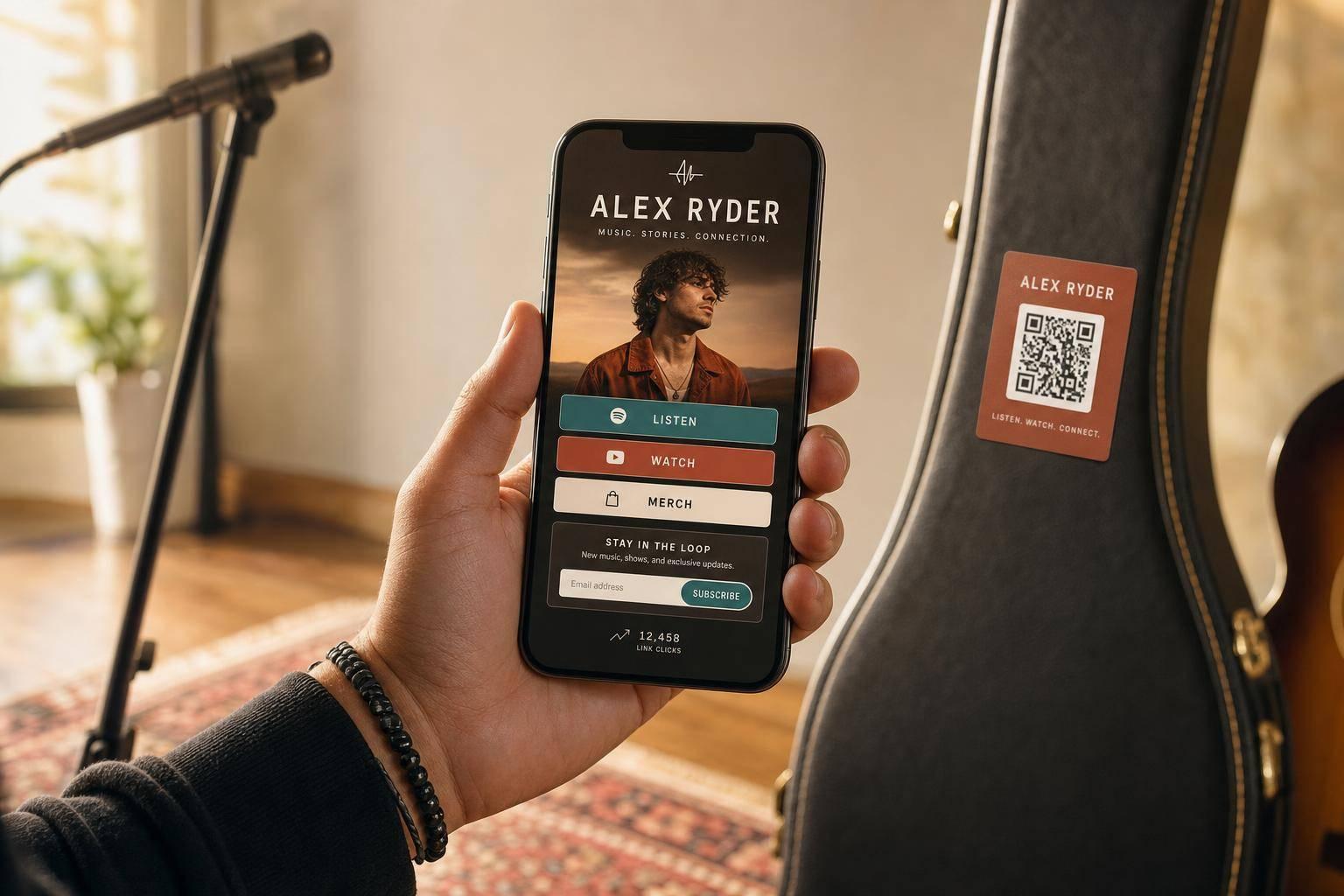
Start with the visuals fans notice first. If someone taps your link from social media, the page should feel like a natural extension of what they just saw. That means using the same cues: artist name, release title, cover art, logo, colors, and typography.
Say your Spotify canvas and Instagram story covers use a neon-purple accent and a bold sans-serif font. Those same choices should show up on your smart link page. Your profile photo or press shot - whichever image fans know from TikTok or Instagram - should lead the header. If the visuals don’t match, people can hesitate for a split second and wonder if they landed in the right place.
PromoLinks.me makes this easier by letting artists save branded templates, so each new smart link can inherit the same logo, colors, and font choices.
Keep the page simple enough to convert
Keep the page tight: aim for 4–8 links total, and try not to go past 10. Add too many choices and fans start scrolling, comparing, and leaving.
A focused page is easier to scan, easier to tap, and more likely to convert on mobile. Since most U.S. music promo traffic comes from phones, build and preview the page on a smartphone before you publish it - not just on a desktop. Use buttons that are easy to hit with a thumb and text people can read at a glance.
Short action labels help too. Use lines like:
- Listen now
- Pre-save on Spotify
- Get tickets
Short labels make the path clear.
Once the page is branded and focused, connect the release and social links that move fans deeper into your ecosystem. Following a music marketing checklist ensures you don't miss these critical steps before your launch.
2. Connect release links, social links, and fan email flow
One stream is just the first step. What you want next is simple: bring that new listener into the rest of your world - your socials, your email list, and your next release.
Set up release links for pre-save and launch day
Build your pre-save smart link 3–4 weeks before release day and stick with one link for the whole campaign. That way, you’re not sending people to one page before launch and a different one after.
When the release goes live, that same link should switch from pre-save destinations to live streaming links on Spotify, Apple Music, YouTube, and other platforms. No dead pages. No wrong artwork. No mess. At release time, switch that same smart link from pre-save to live platforms, then test it on mobile before launch.
Once the release link is live, keep using that same page to drive follows and email signups.
Use social links to reinforce your artist identity
Use the same smart link in every bio: Instagram, TikTok, YouTube, Facebook, and X. When someone taps it, they should land on a page that feels like you.
That only works if your profiles line up. Use the same artist photo, the same handle format, and one short bio tagline across every platform. Inside the smart link, group your social links under a label like Follow [Your Name] and use clear action text like Follow on TikTok and Subscribe on YouTube.
Put the platforms where you post most often at the top of that group. For U.S.-based artists, that’s often TikTok and Instagram. Also, audit your profile photos, handles, and bios twice a year, and before major releases or tours.
Capture fan emails without a website and plan your next message
Add an opt-in block right on your smart link page. If email growth is the main goal for that campaign, place it above the fold. Offer something specific so fans know what they’re getting:
- Early access to unreleased tracks
- A presale code for U.S. tour dates
- Behind-the-scenes studio content
Keep the form short. Ask only for an email address and, if you want, a first name.
Then move fast. After someone signs up, send a follow-up within 24 hours, then again on release day and before the next show or merch drop. PromoLinks.me has built-in fan email capture tied to each campaign, so you can track which smart link or release brought in each signup and send tighter follow-ups later.
You can also carry these same campaign links into QR codes for shows, merch, and print.
3. Use QR codes to carry your brand into shows, merch, and print
QR codes turn a smart link into an offline entry point. No typing, just a scan. And by 2026, 102.6 million U.S. smartphone users are projected to scan QR codes, which makes them a practical part of music promotion. This fits into a broader music promotion strategy that connects physical and digital touchpoints.
Place QR codes where fans can act right away
The best placements have one thing in common: fans already have their phones out and a few spare seconds. A QR code on a show poster near the venue entrance works well because people are standing in line. Table cards at a bar can beat wall posters because fans are sitting down and have time to check out a full smart link page.
A merch insert inside a T-shirt or vinyl order can work even better because the timing is strong. That person already bought something. So a prompt like scan to unlock a bonus track or scan to join the email list for early access feels natural, not forced.
The page after the scan needs to load fast, keep the main action above the fold, and use buttons that are easy to tap. One source notes that 53% of mobile site visits are abandoned if a page takes longer than three seconds to load. It also helps when the page matches the printed design, so fans know right away they're in the right place.
Use the setting to decide the goal. In some spots, the code should push ticket sales. In others, it should drive streams, email signups, or pre-save campaigns.
Test scan speed, readability, and destination flow
Before you send anything to print, test the code in conditions that match real life. Scan it on a recent iPhone and a mid-range Android. Try it in low light, from normal viewing distance, and on standard mobile data.
Print quality matters more than people think. Use a vector file or a high-resolution PNG so the code doesn't blur or break up. A matte finish helps cut glare from stage lights or bar lighting. For handheld items like flyers or business cards, the code should be at least 0.8 × 0.8 inches. For wall posters, go bigger. A useful rule is that the scan distance should stay within roughly 10x the code width. And yes, high contrast is a must.
Pick the right call to action for each physical setting
The CTA next to the code should match exactly what fans see after they scan. If the poster says Scan for tickets, the first button on the landing page should say Get Tickets. Not Follow on Spotify. That kind of mismatch loses people fast.
| Physical Setting | Fan Context | Best Primary Action | Branding Notes |
|---|---|---|---|
| Show poster | Walking by a venue or waiting in line | Tickets, pre-save, or latest release | Use a bold CTA and match the poster's visual theme; keep the code large enough for distance scanning. |
| Merch packaging / insert | Unboxing at home or right after purchase | Email signup, bonus track, or next release | Tie the code to a reward or exclusive benefit; make it feel like part of the merch design. |
| Business card | Industry contact at a conference or showcase | Smart-link page or press kit | Keep it clean and professional; replace long URL lists with one hub. |
With PromoLinks.me, the QR code can point to a dynamic smart link, which means you can swap the destination after printing. A tour poster can start by sending fans to pre-sale tickets, then later point to a post-show recap page or a live recording after the show. No reprint needed. That gives one printed code more mileage as the campaign shifts.
4. Keep branding consistent across platforms with PromoLinks.me
Once your page, release links, and QR codes are live, there’s one more job: make sure every destination looks and feels connected. When branding shifts from page to page, fans notice less than you’d think - but the effect adds up. PromoLinks.me templates help you keep one visual system across release pages, pre-saves, QR destinations, and artist hubs. Start with the template that’s closest to your current look, set your primary colors, pick from 16 font options, and add your logo and press photo. Pro plans also include Animated Backgrounds, including Grain Gradient and Aurora Waves. For teams managing more than one act, label-level templates keep multiple artists under one visual system while still leaving room for each artist’s identity. That way, every click feels like it leads to the same artist - not some random new page.
Use templates and artist pages to standardize your look
New release smart links, pre-save campaigns, and event pages can all be cloned from your base template, which keeps each touchpoint familiar. A fan might come from Instagram, scan a QR code at a show, or open a link from an email. No matter where they start, they land on something that immediately feels like you. That kind of recognition helps people remember the brand without having to think about it.
Track what moves fans from click to follow
After that, the numbers show whether your branding is guiding fans forward or just pulling in traffic. PromoLinks.me analytics show which streaming platform fans pick after clicking a smart link, where traffic comes from, and how behavior changes by device and location.
A few metrics matter most:
- Click-to-stream rate
- Email sign-ups
- Pre-save-to-follow rate
Test one change at a time, like layout, CTA, or featured platform. Tracking pixels also help connect PromoLinks.me behavior to ad platforms, so you can retarget fans who clicked but didn’t follow or sign up.
Over time, trends start to show up. Instagram may bring in more email captures. TikTok may lead to more streaming clicks. That gives you a clearer sense of where to put your branding effort for the best return.
Match tools to each stage of the fan journey
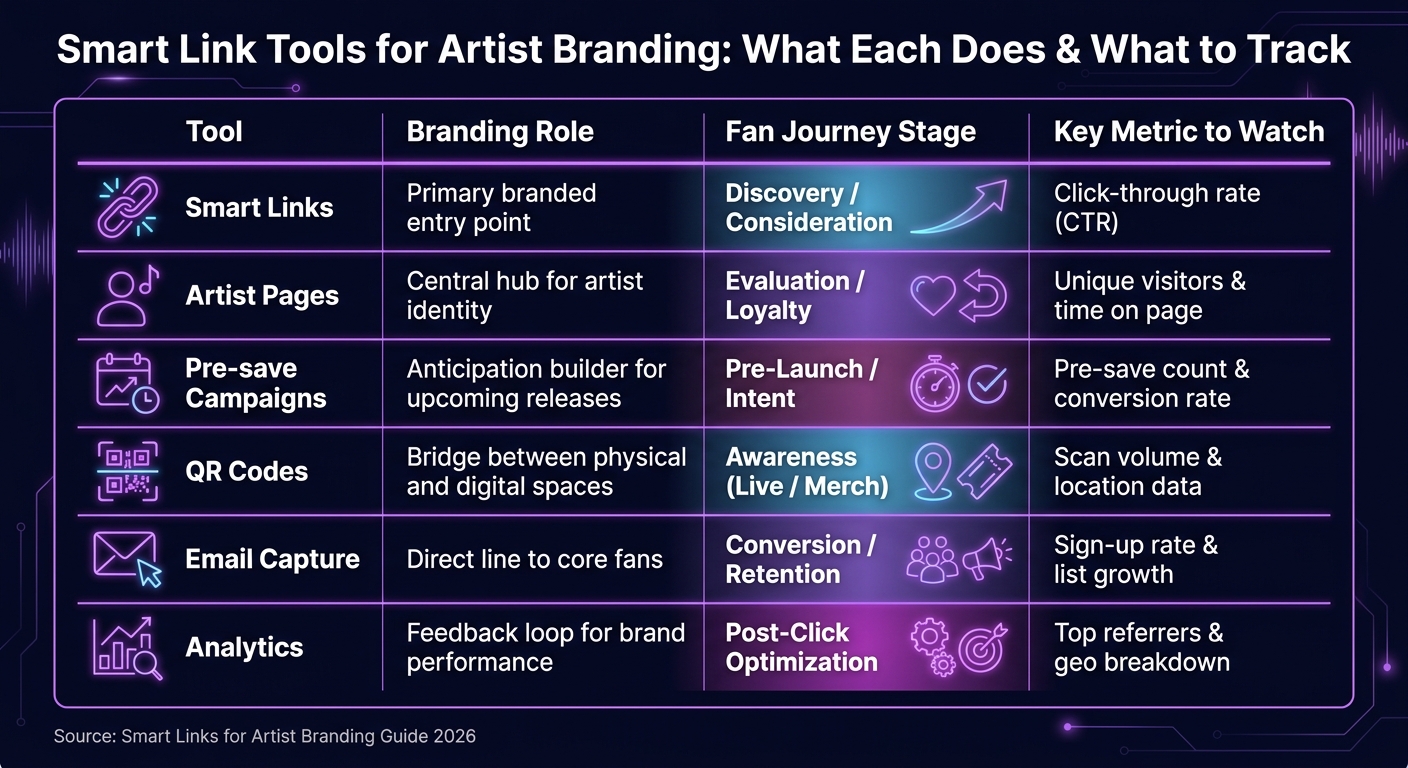
Each tool plays a different part in the same fan journey. The table below maps each one to its main branding role, the stage it supports, and the metric worth watching.
| Tool | Branding Role | Fan Journey Stage | Key Metric to Watch |
|---|---|---|---|
| Smart Links | Primary branded entry point | Discovery / Consideration | Click-through rate (CTR) |
| Artist Pages | Central hub for your artist identity | Evaluation / Loyalty | Unique visitors & time on page |
| Pre-save Campaigns | Anticipation builder for upcoming releases | Pre-Launch / Intent | Pre-save count & conversion rate |
| QR Codes | Bridge between physical spaces and digital | Awareness (Live / Merch) | Scan volume & location data |
| Email Capture | Direct line to your core fans | Conversion / Retention | Sign-up rate & list growth |
| Analytics | Feedback loop for brand performance | Post-Click Optimization | Top referrers & geo breakdown |
Use one visual system across every tool, then let the final section show how that consistency turns clicks into repeat fans.
Conclusion: Turn every click into a consistent brand signal
Once the page is built, the links are connected, and the QR codes are out in the world, one job still matters most: consistency.
Every smart link you publish is a small test of your brand. Someone might click from Instagram, scan a QR code at a show, or tap a release link from a text. Wherever they come from, the landing page should feel like you. That only happens when each link points back to the same brand system.
The formula is simple: build one branded page, keep every destination visually aligned, and give fans one clear next step at each touchpoint.
When that system is live, analytics start to show which brand signals move fans forward. You can track which platforms drive clicks, which campaigns capture emails, and which pre-saves convert. Over time, that data helps you refine templates, sharpen calls to action, and improve conversion with each release.
With the system in place, the goal stays simple: repeat the same brand signal across every release. Artists who build strong brands through smart links tend to focus on one primary action per page, keep the visuals tight, and check the numbers after each campaign. Tools like PromoLinks.me make that easier by keeping templates, analytics, QR codes, and email capture in one place, so the system stays steady between releases. For more tips on optimizing your strategy, explore our music promotion guides.
A click is small. But a page that looks right, says the right thing, and asks for one action can build recognition fast.
FAQs
How do I choose the main goal for a smart link?
Pick the destination based on what you're trying to do right now.
For a new single or album launch, a smart link with streaming options usually makes the most sense. It gives people a simple path to listen, which can help drive more streams.
If you're two to three weeks from release, put the focus on a pre-save page. That can help support algorithmic signals and boost day-one streams.
For long-term branding and catalog discovery, an artist page is often the better home base. It acts as a central hub for your music, links, and presence across platforms.
The main idea is simple: match the link destination to the stage of your campaign if you want the best conversion.
What should I include on an artist smart link page?
Keep the page clean and focused with three to five main links so fans don’t feel overloaded.
Include your release artwork, title, and artist name, plus a 30-second audio preview. Add clear buttons for your preferred streaming platforms and a short personal note about the track or project.
That way, the page feels simple, direct, and easy to use. A fan lands on it and knows exactly where to click.
How can I tell if my smart links are working?
Check your real-time analytics dashboard in PromoLinks.me to see how your smart links are doing. You’ll find the numbers that matter most right away, like page views, unique visitors, total clicks, and CTR.
Want a closer look? You can also review:
- Top Referrers
- UTM parameters
- geographic and device data
- tracking pixels for fan behavior and conversions
PromoLinks.me also filters out your own dashboard views, which helps keep your data more accurate.
Related Blog Posts
Ready to create your smart links?
Join thousands of artists using PromoLinks to promote their music smarter.
Get Started Free