
Best Free Dashboard Tools for Indie Labels
If I were running a small indie label today, I’d start with the native dashboards, add a smart-link tool for pre-saves, and only then look at a cross-platform app. That’s the short answer.
Here’s the simple breakdown:
- Spotify for Artists: best for Spotify streams, listeners, and playlist source data
- Apple Music for Artists: best for Apple Music listener data plus Shazam signals
- YouTube Studio: best for video views, watch time, and traffic sources
- PromoLinks.me: best for clicks and pre-save tracking before release day
- Chartmetric Free: best for a light cross-platform view
- Soundcharts Free: best for radio and chart watch
- Songstats Free Access: best for alerts and multi-platform snapshots
The main catch is simple: no free tool shows everything in one place. Most free plans cut back on history, artist count, or deep comparisons. One tool in this list only keeps 7 days of analytics on the free plan. Others stick to just one platform.
So if you want the best free setup, I’d use:
- Native dashboards for first-party stream and audience data
- PromoLinks.me for pre-release click and pre-save data
- Chartmetric, Soundcharts, or Songstats when I need a broader view
Chartmetric - Dashboard (Tutorial)
sbb-itb-e819543
Quick Comparison
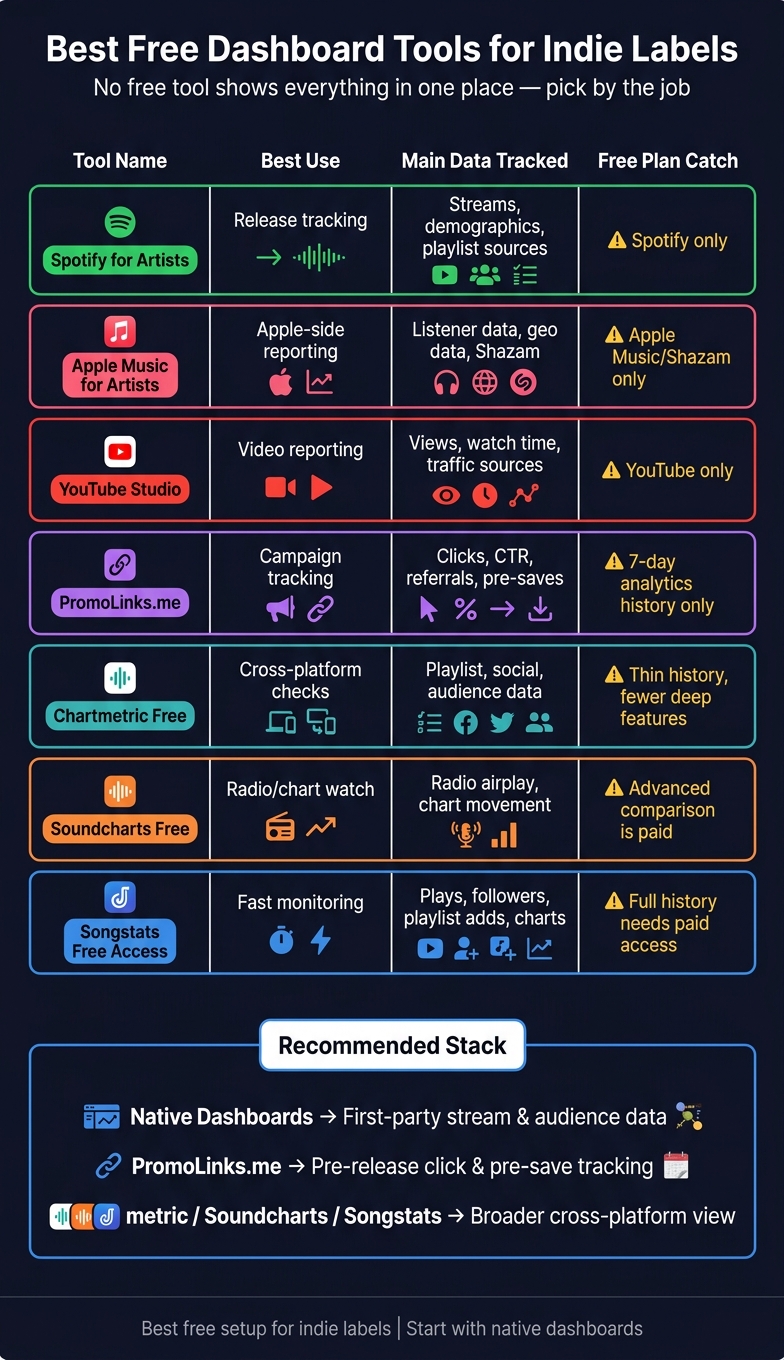
Best Free Dashboard Tools for Indie Labels: Side-by-Side Comparison
| Tool | Best Use | Main Data | Free Plan Catch |
|---|---|---|---|
| Spotify for Artists | Release tracking | Streams, demographics, playlist sources | Spotify only |
| Apple Music for Artists | Apple-side reporting | Listener data, geo data, Shazam | Apple Music/Shazam only |
| YouTube Studio | Video reporting | Views, watch time, traffic sources | YouTube only |
| PromoLinks.me | Campaign tracking | Clicks, CTR, referrals, pre-saves | 7-day analytics history on free plan |
| Chartmetric Free | Cross-platform checks | Playlist, social, audience data | Thin history and fewer deep features |
| Soundcharts Free | Radio/chart watch | Radio airplay, chart movement | More advanced comparison is paid |
| Songstats Free Access | Fast monitoring | Plays, followers, playlist adds, charts | Full history needs paid access |
My takeaway: pick the tool by the job. Use native dashboards for your catalog, smart links for campaign traffic, and an aggregator when manual checking starts taking too much time.
1. Spotify for Artists
Spotify for Artists is a solid free starting point for indie labels that want to track releases. It shows stream counts, listener demographics, follower growth, playlist placements, and discovery source breakdowns, including editorial playlists, algorithmic recommendations, user-curated playlists, and direct profile visits. You’ll still need a distributor to get music onto Spotify.
One useful part is its near-real-time release data during the first 24–48 hours after a release goes live. That gives you an early read on how a track is moving. The tradeoff is pretty simple: the platform only shows data for your own catalog, so you won’t get peer benchmarking or a cross-platform view.
The discovery sources report is especially handy. It helps you spot which playlists are sending traffic, so you can fine-tune future pitches instead of guessing.
You can also claim the artist profile for free. Spotify for Artists works best for small labels or labels with a limited roster. For another native DSP view, the next section covers Apple Music for Artists.
2. Apple Music for Artists
Apple Music for Artists is Apple’s own dashboard for Apple Music and Shazam data. It gives indie labels the main numbers they usually need at the start: listener demographics like age, gender, and location, plus geographic data, playlist placement info, and follower growth. If you already lean on Spotify data, this helps cover the Apple side without adding cost to your reporting stack.
What Data It Tracks
The big draw here is the Shazam tie-in. When you pair those discovery signals with geographic data, you can spot where a release is starting to catch on. That can be handy when you’re trying to figure out if a song is moving in one city, one state, or across a few markets at once.
What the Free Tier Restricts
The tradeoff is pretty simple: it only covers Apple Music and Shazam, so you don’t get a cross-platform view. You also won’t find peer benchmarking or alerts for new playlist placements.
Setup Time and Label Size Fit
To get started, distribute your music through a third-party distributor and then claim the free artist profile. Apple Music for Artists tends to fit emerging indie labels best, especially ones with a small roster. The Apple-only data - especially the Shazam signals - can still be useful without the extra work or cost of a paid aggregator.
Next, YouTube Studio adds video-side audience data.
3. YouTube Studio
YouTube Studio is the free built-in dashboard for any YouTube channel. For indie labels, it shows views, watch time, real-time performance, audience demographics, and traffic sources.
What Data It Tracks
The real-time dashboard helps you spot early momentum fast. You can also see which traffic sources are driving that lift, which makes it easier to tell whether a video is moving from search, browse, external links, or somewhere else.
What the Free Tier Restricts
The biggest limit is simple: scope. YouTube Studio only shows data from your own channel, so it can't help with scouting other artists, benchmarking against peers, or checking cross-platform competitor activity.
It also doesn't track smart-link clicks or pre-saves. So while it's useful for video reporting, it doesn't give you the full picture for campaign tracking.
Setup Time and Label Size Fit
Setup is light if you already run the channel. YouTube Studio is a good fit for emerging indie labels with under 10,000 monthly listeners.
For click and pre-save campaigns, the next section looks at a smart-link dashboard.
4. PromoLinks.me
For labels that want click tracking and pre-save tracking, a smart-link dashboard can fill a clear gap. PromoLinks.me gives you smart links, pre-saves, and fan capture tools built for release promotion.
What Data It Tracks
PromoLinks.me tracks clicks, location, referrals, and click-through rate. For pre-save campaigns, the dashboard shows total pledges, pending, successful, and failed saves for Spotify and Apple Music campaigns. It also collects fan emails and names through email capture, link gating, and RSVP forms.
There’s also a handy Copy Link option that adds UTM tags for Instagram or TikTok. That saves time and makes it easier to see which source is sending traffic, without doing the tagging by hand.
One catch: analytics history on the free plan only goes back 7 days. Paid plans open up full-history reporting.
What the Free Tier Restricts
The free tier includes basic smart link creation and the Album Preview Maker tool. Free pre-save support is limited to Spotify. If you want Apple Music pre-saves, you’ll need a paid plan. Email gating and animated background templates also sit behind the paid tiers.
| Feature | Free Tier | Paid Tiers |
|---|---|---|
| Basic analytics | ✓ | ✓ + Retargeting Audience Size |
| Email / Link Gating | ✗ | ✓ |
| Roster Management | Single artist | Multiple artists |
| Analytics History | 7 days | Full history (all time) |
This makes PromoLinks.me most useful for release-level tracking, rather than deeper reporting across an entire label.
Setup Time and Label Size Fit
Setup is pretty simple. Choose Artist or Label, then create your first profile. Add a release title, artwork, and one streaming URL, and the tool fills in the rest. Most labels can get a page and a first smart link live in minutes.
PromoLinks.me is a better fit for small and mid-sized labels. The Label role includes roster management, which helps if you’re handling more than one artist. Paid plans start at $7/month when billed yearly.
For teams that need more cross-platform reporting, the next section moves into a heavier analytics option.
5. Musiclytics
Musiclytics fits the cross-platform dashboard category for labels that want one view across streaming services.
But here's the issue: key details about its free tier, setup time, and best fit by label size aren't verified right now. Without that, this comparison would drift into vague category talk instead of giving you the tool-level facts you need to choose with confidence.
So for now, Musiclytics has been removed from this roundup until those details can be confirmed.
If you need real-time analytics, the next dashboard expands the view further.
6. Chartmetric Free
Chartmetric pulls reporting from Spotify, Apple Music, YouTube, TikTok, and Instagram into one place. If your label needs more than a one-platform snapshot or a single campaign report, that's where it helps.
What It Tracks
On the free tier, Chartmetric includes playlist tracking, social growth, and audience data. The main draw is cross-platform visibility. You're not stuck inside one platform's reporting silo, so it's easier to move from platform-by-platform checks to a broader view of artist momentum.
What It Restricts
Free access blocks deeper benchmarking, historical analysis, and advanced scouting. Paid plans start at about $5/month, and higher tiers add deeper analysis.
Setup Time
Setup is quick because most artist profiles are already indexed. You can search for a profile and claim or follow it without building integrations or waiting for data to load.
Best Fit by Label Size
Free access fits small indie labels and growing teams better than solo founders. It makes the most sense when you want one place to monitor cross-platform momentum, scout talent, and compare artists with their peers.
Next, look at the next free option for broader monitoring.
7. Soundcharts Free
For labels that care more about radio play and chart movement than track-by-track reporting, Soundcharts Free gives you a different view. It leans into international radio airplay and global chart data.
What It Tracks
The free version works best for basic artist monitoring and trend spotting. You can use it to keep an eye on momentum, while the deeper comparison features sit inside paid plans. It also includes an AI Heat score, which gives you a fast read on how an artist is moving.
What It Limits
If you want advanced TikTok benchmarking or stronger comparison tools, those are locked behind paid plans.
Setup Time
Setup is quick because artist profiles are already indexed.
Best Fit by Label Size
Soundcharts is a good fit for emerging indie labels that want light-touch monitoring of radio activity and global momentum. That can be handy when a label wants reach signals beyond the usual streaming dashboards.
8. Songstats Free Access
For labels that care more about fast alerts than deep reports, Songstats is the lightweight pick. It sends real-time playlist and chart alerts, which helps labels move fast when a new placement lands, whether that means promoting a single release on social or following up with curators.
What It Tracks
Songstats pulls data from Spotify, Apple Music, YouTube, Deezer, Instagram, TikTok, Shazam, SoundCloud, and Beatport. On the free tier, you can track plays, monthly listeners, followers, views, popularity, playlist adds, and chart movement across all of those sources in one dashboard.
That’s handy once streams and clicks start picking up. Instead of jumping between platforms, you can spot movement in one place and react while the buzz is still there. This is especially effective when using shareable music links to consolidate traffic from different sources.
What It Limits
The free tier covers basic tracking, but that’s where it stops. If you want full historical catalog data or deeper audience data, you’ll need Premium.
Setup Time
Setup is fast because Songstats already indexes artist profiles across the major platforms.
Best Fit by Label Size
Songstats works well for emerging indie labels with small rosters and active release schedules. If you manage a larger catalog, though, you’ll probably run into the free tier’s historical limits pretty fast.
How These Tools Compare on the Metrics That Matter
No free tool gives you streams, clicks, pre-saves, and audience data in one dashboard. That’s the tradeoff.
Some tools go deep on their own platform. Some give you a cross-platform view. Others are built for campaign tracking. The table below makes that split easy to see.
| Tool | Data Coverage | Free-Tier Limits | Setup Time | Best For |
|---|---|---|---|---|
| Spotify for Artists | Streams, demographics, Spotify playlists | Own Spotify data only; no competitive benchmarking | Fast | All sizes |
| Apple Music for Artists | Streams, Shazam signals, geo breakdowns | Own Apple Music data only; no competitive benchmarking | Fast | All sizes |
| YouTube Studio | Video views, watch time, audience metrics | Native YouTube data only | Instant | All sizes |
| PromoLinks.me | Clicks, pre-saves, CTR, referral sources | Free plan includes limited analytics; paid plans unlock full-history reporting | Quick | Campaigns |
| Chartmetric Free | Limited cross-platform and playlist tracking | No deep competitive or historical data | Quick | Boutique labels (scouting) |
| Soundcharts Free | Basic playlist and radio monitoring | TikTok charts and peer benchmarking locked | Quick | Radio/global monitoring |
| Songstats Free Access | Aggregated stream and chart snapshots | Full catalog history and real-time alerts require paid tiers | Fast | Active indie labels |
A simple way to think about it:
- Native dashboards like Spotify for Artists, Apple Music for Artists, and YouTube Studio give you the deepest view of your own data.
- PromoLinks.me helps with campaign attribution, especially before a release goes live.
- Chartmetric Free, Soundcharts Free, and Songstats Free Access give you a broader view across platforms, but free access is tighter.
That’s why PromoLinks.me fills a different role than the native dashboards. It’s built for pre-release attribution, not catalog reporting. If you want to know where pre-saves and clicks came from, it helps. If you want a full picture of long-term catalog performance, it won’t do the whole job.
Chartmetric and Soundcharts are broader, but their free tiers stop short pretty fast. Chartmetric’s free access works best for light scouting. Soundcharts leans more toward playlist and radio monitoring.
The safest starting point is the native dashboards. Then, if you need more range across platforms - or tighter campaign tracking - you can layer in one of the others. Next, it helps to look at those tradeoffs tool by tool, with the pros and cons of each. You can also explore our music promotion guides for more strategic advice on using these tools.
Pros and Cons of Each Tool
The table below lays out the main tradeoffs. Use it to pair each tool with the reporting job it handles best.
| Tool | Biggest Advantage | Biggest Limitation |
|---|---|---|
| Spotify for Artists | Best real-time data for your own releases; breaks down algorithmic vs. editorial discovery sources | Siloed to Spotify only; no cross-platform or competitive view |
| Apple Music for Artists | Shazam-integrated discovery signals and detailed geographic breakdowns | Limited to Apple Music and Shazam data |
| YouTube Studio | Native video performance, watch time, and audience demographics at no cost | No aggregation from other streaming services |
| PromoLinks.me | Tracks clicks, pre-saves, CTR, and referral sources before a release goes live | Does not show post-click stream results |
| Chartmetric Free | Best free option for competitive intelligence and peer benchmarking | Deep historical data and advanced features require paid tiers |
| Soundcharts Free | Monitors millions of playlists and includes international radio airplay tracking | TikTok charts and comparison tools are locked behind paid tiers |
| Songstats Free Access | Unified dashboard with real-time alerts for playlist adds and chart entries | Full catalog history and advanced audience demographics require a paid tier |
The final takeaway is simple: free tools work best when you pick them by job, not by platform.
Conclusion
After looking at native dashboards, smart-link tracking, and cross-platform tools, the best free setup comes down to your label’s size and what you need day to day.
Start with native dashboards for first-party data. Spotify for Artists, Apple Music for Artists, and YouTube Studio give you the core numbers at no cost: stream counts, listener demographics, and discovery sources. Learn those free platform analytics first before spending money on outside tools.
For small labels, PromoLinks.me is a smart next step for smart links and pre-save attribution. Once you’ve handled pre-save tracking, the next missing piece is broader monitoring across platforms.
If your label needs a view across services plus playlist alerts, Songstats or Chartmetric Free can cover that gap. After that, you’re pretty much at the ceiling of what free tools can do.
Upgrade when manual work starts slowing you down - not sooner.
FAQs
Which free dashboard should I start with?
Start with Spotify for Artists and Apple Music for Artists. Both give you the free data you need on streams, listener demographics, and where your plays are coming from.
Then, if you want to see what happens before someone lands on a streaming platform, add PromoLinks.me. It helps with smart links and pre-save campaigns, while also showing real-time data like clicks, traffic sources, and location insights.
How do I track pre-saves for free?
You can track pre-saves with native platform tools or with promo platforms built for music releases.
Spotify for Artists offers Countdown Pages. These pages let fans pre-save upcoming releases, preview tracklists, and get automatic library saves on release day.
If you want everything in one place, PromoLinks.me gives you a more central view. You can set up Spotify and Apple Music pre-save campaigns, then track total pledges, successful saves, and conversion rates in real time.
When should an indie label upgrade to a paid tool?
An indie label should upgrade once free dashboards stop saving time or stop answering the questions tied to growth.
That usually happens when data from five or more platforms turns into a weekly time sink. It can also happen when the team needs real-time alerts for new placements, or when free tools no longer cover things like pre-save campaigns, pixel integration for retargeting, or centralized roster management.
Related Blog Posts
Ready to create your smart links?
Join thousands of artists using PromoLinks to promote their music smarter.
Get Started Free