How to Segment Email Lists for Musicians 2026
If I send every email to every fan, I get more unsubscribes and fewer clicks. The fix is simple: I split my list by interest, location, signup source, and recent activity.
Email still beats social for direct fan reach. Many artist email campaigns see 28%–35% open rates, while organic reach on Instagram and TikTok can sit around 3%–8%. So the goal is not just to grow a list. It’s to send the right message to the right people.
Here’s the whole play in plain English:
- I follow a music marketing checklist to collect email, first name, one interest, and city/state at signup
- I use custom fields for stable info like location
- I use tags for source and actions, like pre-save, show QR scan, or merch click
- I build simple segments:
- New music
- Tour updates
- Merch
- Behind-the-scenes
- All updates
- I split fans by region or time zone for show emails
- I group fans by active, warm, and inactive
- I send:
- release emails to people who care about new music
- tour emails to fans near each city
- merch emails to past buyers and merch clickers first
The main point: I don’t need a big setup. Using the best music promotion tools, I just need clean signup data, clear tags, and a habit of using segments every time I send.
A short view of the four segment types:
| Segment | What I use it for | What I need |
|---|---|---|
| Interest | Releases, merch, fan updates | Signup choice, click tags |
| Location | Tour alerts, local send times | City, state, country, time zone |
| Source/platform | Welcome flows, platform-based follow-up | Smart link, pre-save page, QR code, social link |
| Activity | VIP offers, win-back emails, cleanup | Opens, clicks, purchases, pre-saves |
If I start with those four buckets and track opens, clicks, and unsubscribes after each send, I can keep the list cleaner and make each campaign fit the fans getting it.
Benchmarks & Segmentation: Email Marketing For Musicians
sbb-itb-e819543
Set up your list so segmentation works later
Segmentation starts the moment someone signs up. What you collect, and how you label it, decides whether you can build useful groups later or end up with one giant list of contacts that all look the same.
Collect the right signup fields from the start
Keep signup forms short and easy to use on mobile. In most cases, you only need an email address, a first name, and one extra field. For most artists, that extra field should be city/state, country, or a single interest choice like new music, live shows, merch, or behind-the-scenes.
For U.S.-based artists, city and state beat ZIP code alone because that data is easier to use for tour planning. If part of your audience is outside the U.S., add a country field so you can split U.S. fans from international fans for domestic tour announcements and USD-priced offers. You can infer time zone from state, or add a region/time zone field if you want that data upfront.
With those fields in place, you can sort people later by interest, location, and activity.
Use tags and custom fields to track source, fan type, and behavior
Use custom fields for steady data, like city, state, time zone, and top interest. Use tags for source labels and actions that can change over time.
A simple naming system makes your data much easier to work with:
| Category | Tag Examples | What It Tracks |
|---|---|---|
| Source | Source:PromoLinks-SmartLink, Source:PreSave-Campaign, Source:Show-QR, Source:Merch-Table, Source:Social-BioLink |
Where the fan first joined |
| Behavior tags | Action:Clicked-Latest-Single, Action:Clicked-Tour-Announcement, Action:Purchased-Merch |
What they did after joining |
Keep your tag list tight. Write down what each tag means, and clean out duplicates once a month. If you skip that step, things can get messy fast.
Those labels turn one list into audience groups you can actually use for release, tour, and merch campaigns.
Capture fan emails from smart links and pre-save pages
Smart links and pre-save campaigns do more than collect an email address. They also tell you how that fan joined.
PromoLinks.me supports smart links, pre-save campaigns, QR codes, and fan email capture. Use the form to collect email, first name, and city/state, then tag each signup by campaign or source. QR codes at shows or merch tables work the same way, so fans who scan a code at a specific event can be tagged to that source for local follow-up later.
That source data is what lets you send the right message to the right people in the next step.
Build your core segments by interest, location, platform, and activity
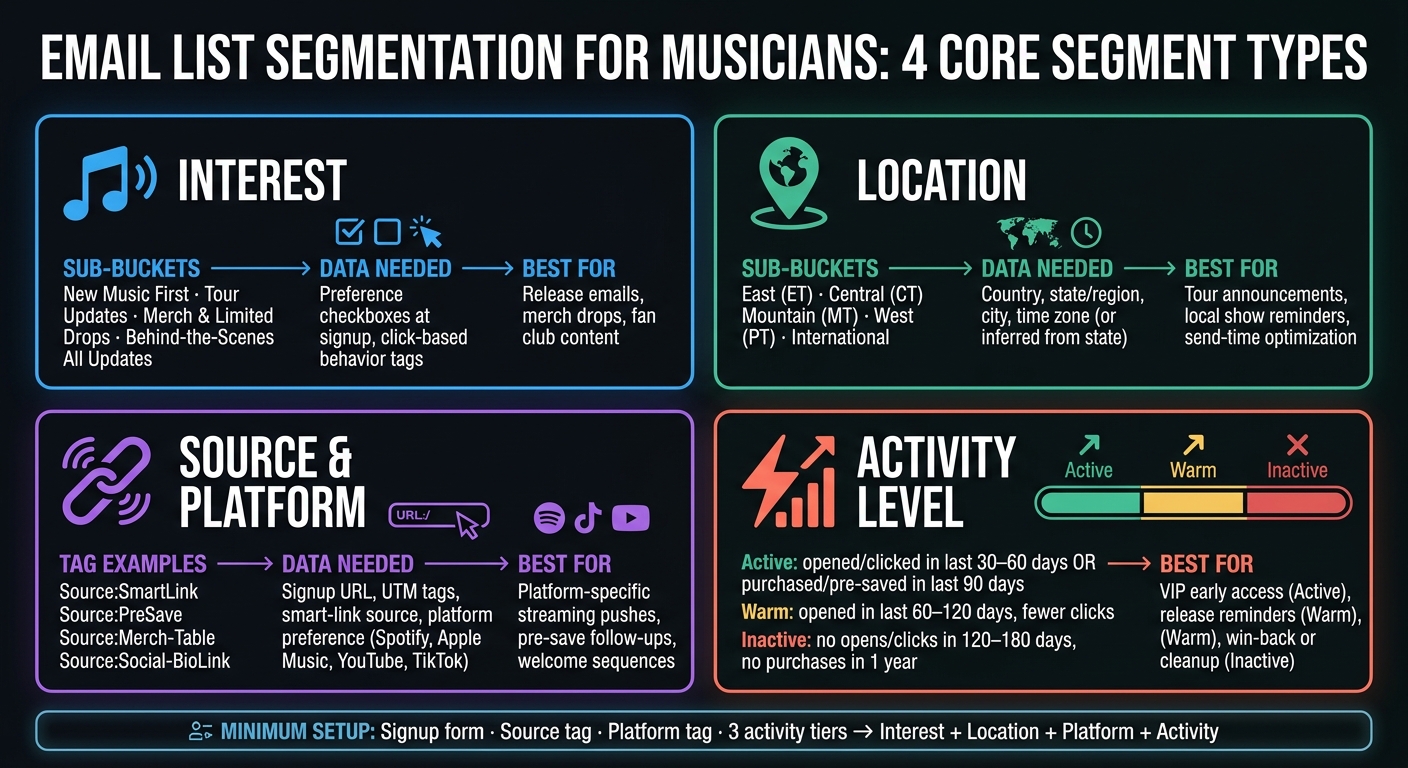
Email List Segmentation for Musicians: 4 Core Segment Types
Now it’s time to turn your fields and tags into groups you can actually send to. Start with the data you already collect and build 3–5 broad segments that are easy to manage over time.
Segment by fan interest
Interest segments come from two places: what fans say they want and what they click on. A solid starting point is five buckets:
- New Music First
- Tour Updates
- Merch & Limited Drops
- Behind-the-Scenes
- All Updates
That last group is for fans who want everything.
You can use one campaign and shift the angle for each segment. For example, send early-access framing to New Music First, date-led copy to Tour Updates, and art or product-led messaging to Merch & Limited Drops.
These interest groups help shape your release emails, tour sends, and merch pushes.
Segment by location and source/platform
Use location to reach nearby fans and send emails in their local time. Then use source and platform tags to shape welcome emails and follow-ups based on how people found you and where they listen.
For U.S. artists, broad regional grouping usually does the job without turning your setup into a mess:
- East (ET)
- Central (CT)
- West (PT)
Platform tags help you match your links and message to the places fans already use, like Spotify, Apple Music, YouTube, or TikTok.
| Segment type | Required data | Best campaign use |
|---|---|---|
| Interest | Preference checkboxes, click-based tags (music, tour, merch, BTS) | Release emails, merch drops, fan club content |
| Location | Country, state/region, city, time zone (or inferred) | Tour announcements, local show reminders, send-time optimization |
| Source and listening platform | Signup URL, UTM tags, smart-link source (e.g., PromoLinks.me), platform preference | Platform-specific streaming pushes, pre-save follow-ups, welcome sequences |
Segment by activity level
Activity segments show who’s paying attention now and who’s drifted off. For most artists, a simple three-tier setup works well:
- Active: Opened or clicked at least one email in the last 30–60 days, or made a purchase or completed a pre-save in the last 90 days.
- Warm: Opened something in the last 60–120 days but with fewer clicks or purchases.
- Inactive: No opens or clicks in the last 120–180 days, no purchases or pre-saves in the past year.
Inside the active group, you can spot superfans with a tighter rule: at least two or three purchases or pre-saves in the past year, plus steady opens and clicks. Most email tools let you filter by last-open and last-click dates, so this is pretty simple to build.
Use active fans for early access and VIP offers. Use warm fans for release reminders. Use inactive fans for re-engagement sends or list cleanup.
These tiers make it easier to decide who gets first access, who gets a reminder, and who needs a win-back email.
Send segmented campaigns for releases, tours, and merch
Once you have your segments, put them to work in your music promotion across platforms, including release, tour, and merch sends. The goal is simple: send each campaign to the people most likely to care.
Plan release emails around fan interest and engagement
Interest and recent activity should shape your release emails. Your hottest fans - people who pre-saved a past release, opened or clicked in the last 30 days, or bought something in the last 6–12 months - should get the full run: a pre-release email, a release-day email, and a post-release follow-up.
Cold subscribers are different. If someone hasn't opened or clicked in 90 days, a full sequence is usually too much. In most cases, a single release-day email is enough.
If you're using PromoLinks.me for pre-save campaigns, fans who submit their email through a pre-save page can be tagged automatically and dropped into an early-access sequence. That makes it much easier to send the right follow-up emails to your most engaged listeners.
Use the same idea for tour emails. The only real change is that location matters more than release interest.
Use location segments for tour announcements and local send timing
For tour campaigns, geography leads the way. If you're promoting U.S. dates, filter each send to fans within about 50–150 miles of each venue and schedule emails based on local time. That way, your New York fans don't get a tour email at the same moment as your Los Angeles fans.
To handle U.S. time zones cleanly, you can either:
- Run separate sends for Eastern, Central, Mountain, and Pacific audiences
- Use send-time optimization if your platform supports per-subscriber time zones
City-targeted emails should also use event pages, so each fan sees the closest show instead of digging through a long list of dates.
For merch, location matters less. Buying behavior tells you much more.
Match merch drops to fans most likely to buy
Purchase history should drive merch sends. Fans who clicked merch links before, bought in the last 6–12 months, or checked a merch-updates box at signup are your first-look group. Send them early access or a limited discount code before the public drop.
Active fans who haven't bought yet can still be good merch prospects, but the angle should be different. A single announcement email usually works best, especially if it leans on the story behind the item rather than a hard sell.
Cold subscribers - and fans who've never clicked a merch link - usually don't need to be in the send at all.
Here's a simple starting point for release, tour, and merch campaigns:
| Campaign Type | Target Segment | Ideal Timing (U.S., local time) |
|---|---|---|
| Pre-save / early access | Super fans (high opens, clicks, prior pre-saves) | 10–14 days before release; Tuesday morning |
| Release-day stream push | Super fans + active fans | Release day, at 10 a.m. |
| Post-release follow-up | Super fans + active fans | Early the following week |
| Tour announcement | Fans within ~50–150 miles of each venue | 6–8 weeks before show; about 10 a.m. |
| Presale reminder | Local fans who opened the announcement | 24–48 hours before presale ends; around 11 a.m. |
| Last-call reminder | Local fans who haven't clicked a ticket link | Morning of the final presale day; 9–10 a.m. |
| Merch drop (early access) | Past buyers + merch link clickers | Midweek at midday |
| Broad merch drop | Active fans, no prior purchase | Launch day |
Conclusion: Start simple, track results, and expand over time
Once your segments are set up, the job is pretty simple: use them every time you send. Segmentation means sending the right email to the right fans. When you do that well, you can improve opens, clicks, and revenue tracking.
The best outcomes usually come from clean data and tags you apply the same way every time. Start with a simple setup you can manage without hassle, then build on it as your list gets bigger.
Your minimum setup includes seven parts: one signup form that collects email, first name, one interest choice, and city/state; a source tag like "Source: Live show", "Source: Instagram bio," or "Source: PromoLinks smart link"; and a platform tag such as Spotify, Apple Music, or YouTube. Then set three tiers: Engaged, At-risk, and Inactive. Those four dimensions - interest, location, platform, and activity - give you what you need to route contacts on their own.
With that in place, you can send tour presales to engaged fans tagged for local shows in a given state, run merch drops for past purchasers and high engagers, and keep release emails centered on fans who want new music first. After each campaign, check opens, clicks, and unsubscribes. Start small, measure what happens, then add one layer at a time.
FAQs
How often should I update my segments?
Update your email segments on a regular basis so your messaging lines up with how fans are acting and what they’ve engaged with lately.
Because PromoLinks.me can send email data from smart links, pre-save campaigns, and event pages straight into your mailing list, it makes sense to review and tune your segments before every major campaign, like a new release, tour announcement, or merch drop.
What if I have very little fan data?
If you have very little fan data, start by growing your list. The goal is simple: turn anonymous listeners into people you can reach later through PromoLinks.me.
You can do that with Link Gates for exclusive content or bonus tracks, pre-save campaigns, and email capture on your Artist Page or event RSVP forms.
Those touchpoints help you collect fan emails now, so you can run segmented campaigns later instead of starting from scratch each time you release music.
When should I remove inactive subscribers?
The documentation does not say when inactive subscribers are removed or what rules are used to remove them.
It does stress the value of your email list and points to engagement metrics like open rates and click-through rates. But it doesn't go into list cleanup.
If you need list hygiene details or guidance on inactive contacts, check your email marketing platform’s documentation or contact its support team.
Related Blog Posts
Ready to create your smart links?
Join thousands of artists using PromoLinks to promote their music smarter.
Get Started Free